Market Intelligence
Web Monitoring Tools: What to Look for in 2026

Web Monitoring Tools: What to Look for in 2026
Most teams don’t need more alerts. They need fewer, better ones. If I were picking a web monitoring tool in 2026, I’d judge it on 4 things first: source coverage, result quality, alert control, and workflow fit.
Here’s the short version: if a platform misses news sites, social posts, RSS feeds, research pages, or custom URLs, I’m already working with gaps. If it can’t filter low-value mentions, remove repeats, and rank what matters, my team will spend too much time sorting results by hand. And if alerts, exports, and API options are weak, the tool adds work instead of cutting it.
In plain English, I’d look for:
- Broad source coverage across news, web, RSS, social, and research
- Custom page tracking for pages, sections, or fields
- Multilingual monitoring with language filters
- AI scoring plus exact-match and semantic-match options
- Deduplication and short AI summaries linked to the source
- Alert controls like cadence, ranking, keyword rules, and change-only tracking
- Source controls for blocking junk domains and spotting lookalikes
- Workflow options such as dashboards, email briefings, exports, APIs, and webhooks
A simple way to think about it: if a tool fails in even 1 of these 4 areas, you may end up with blind spots, noisy feeds, or extra manual work.
Quick comparison
| Area | What I’d check |
|---|---|
| Coverage | News, web, RSS, social, research, custom URLs, multilingual sources |
| Relevance | Exact match, semantic match, AI scoring, thresholds, include/exclude rules |
| Alerts | Hourly/daily/weekly digests, ranking, change-only tracking, low-noise controls |
| Workflow | Dashboards, email, exports, API/webhooks, domain filters, source tiers |
If I had to sum it up in one line, it would be this: the right monitoring tool helps me see more, sort faster, and act without digging through junk first.
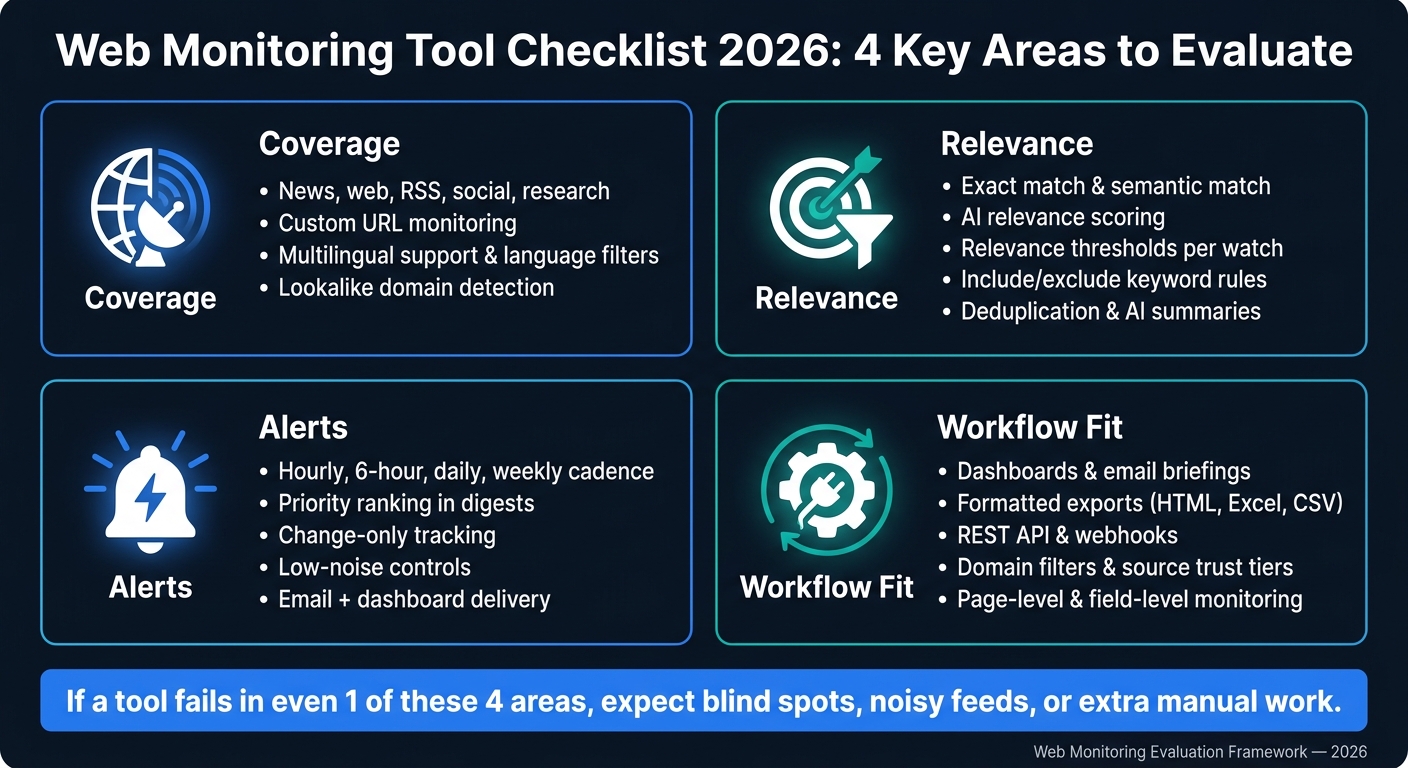
Web Monitoring Tool Checklist 2026: 4 Key Areas to Evaluate
What a strong monitoring platform must cover
Coverage comes first. If a platform can't see a source, it can't alert you to it.
Check source breadth across news, web, RSS, social, and research
A strong platform should pull from news, web, RSS, social, and research in one place.
You should also check whether it can spot lookalike domains and other impersonation sites. Those can hide mentions that matter, and if the platform misses them, you're flying half-blind.
Coverage by itself isn't enough, though. You also need a clean way to sort results by source type, language, or status and save those filters for later. That makes the feed much easier to work with, especially when things get noisy.
From there, coverage needs to go beyond what standard indexing tools pick up.
Confirm support for custom URLs, page monitoring, and multilingual sources
Standard aggregators only show what they've already indexed. That leaves gaps. If you're tracking a supplier page, a regulatory notice, or some other non-indexed site, you need custom URL monitoring.
The best platforms don't just tell you that a page changed. They let you track updates at the page, section, or field level. That level of detail cuts noise in a big way.
For teams watching non-English markets, multilingual support isn't optional. Look for platforms with language filters and the ability to track translated copies of the same content. That's a big deal for agencies and analysts following sentiment or regulatory shifts in markets where English isn't the main language.
Once coverage is in place, the next test is whether the platform can rank what deserves attention.
sbb-itb-15d6cfa
AI relevance scoring and deduplication
Coverage is only the start. A monitoring tool also needs to sort signal from noise. That's what turns a pile of mentions into something you can actually use.
Check for semantic matching, exact matching, and relevance thresholds
Once source coverage is broad enough, the next step is ranking what matters. Strong platforms let you switch between exact match for precise terms and semantic match for broader intent. That gives you room to shape each watch around the topic you're tracking instead of forcing every search into the same box.
You should also be able to apply AI relevance scoring and set relevance thresholds for each watch. That way, low-value mentions don't clog the feed, while the updates that matter still rise to the top. It also helps to have include/exclude keyword rules so you can cut out off-topic mentions without constant manual cleanup.
Use these controls to tune what shows up and keep each watch tight.
Verify duplicate removal and concise AI summaries
Breaking stories tend to spread fast across many sources, which is why deduplication matters. Look for platforms that use content-change detection to avoid sending another alert when the source material hasn't changed. That keeps digests from repeating the same item and helps page monitoring stay focused on updates that are worth your time.
AI summaries should be short, accurate, and linked to the original source. Think of summaries as triage, not a replacement for the source.
After relevance and deduplication, alert quality becomes the real test.
Alert quality and digest delivery
Once results are filtered, alerts need to help people act fast. Cutting weak matches is only the first step. After that, the real test is simple: Are the alerts fast, easy to scan, and clear enough to use right away?
Check digest cadence, prioritization, and delivery format
Set the cadence for each watch based on how fast the topic moves. Use hourly alerts for fast-moving topics. Use daily or weekly digests for broader monitoring.
Timing matters, but so does order. A good digest should group items into clear sections so the most important updates don't get buried. It also helps when email delivery is paired with a dashboard view. Email is handy for a quick read, while the dashboard gives you room to dig in.
That leads to the next check: can the tool cut noise without muting urgent updates?
Look for alert controls that reduce noise without hiding key updates
Use controls that trim noise but still let critical changes come through. The most useful options are relevance thresholds, keyword rules, priority ranking, and change-only tracking. Each one helps reduce clutter without leaving you to clean up alerts by hand after they land.
| Control Feature | What It Does | Why It Matters |
|---|---|---|
| Cadence selection | Hourly, every 6 hours, daily, weekly | Matches delivery speed to topic urgency |
| Relevance thresholds | Filters out low-scoring mentions | Keeps digests focused on what matters |
| Priority ranking | Ranks items from lower to higher priority | Surfaces critical updates first |
| Change-only tracking | Skips unchanged pages | Prevents repeated alerts on static content |
| Keyword rules | Include or exclude terms per watch | Cuts off-topic results without affecting other watches |
Next, check whether the tool fits your workflows for exports, dashboards, email briefings, and automation.
Custom scraping, source control, and workflow fit
Pick a tool that keeps data clean and works with the way your team already operates. Start with precise targeting. Then look at source controls, because a weak source can slip into alerts fast and create a mess before anyone catches it.
Confirm page-level monitoring and source reliability controls
Check for page-level and field-level monitoring on specific URLs, press pages, and fields.
You also want domain-level include and exclude rules, suspicious-source flags, and source trust tiers. Those features help keep junk URLs out of your feed. For example, a domain like fox-news[.in] can look like a known outlet at a glance. Good source filters keep that kind of lookalike from muddying your results. Once source controls look solid, move on to how the tool passes findings into reports and automation.
Check exports, dashboards, email briefings, and automation options
Next, look at how the tool sends and routes what it finds. Check for formatted exports, dashboards, email briefings, and API/webhook automation. Dashboards help with review. Email briefings make fast sharing easy. If your team has more involved workflows, webhooks and REST APIs can push monitoring data straight into internal systems without manual steps [3]. Ask for API documentation, and make sure the API is documented and stable.
Use the checklist below to compare workflow features fast.
| Required function | What it does | Check before buying |
|---|---|---|
| Page-level monitoring | Targets only the content that changed | Can the tool monitor specific sections or fields within a URL? |
| Domain filters | Blocks imposter or low-quality sources from results [2] | Does it support bulk domain uploads or wildcard exclusions? |
| Source trust tiers | Shows high-value mentions from trusted outlets | Can sources be ranked or grouped by trust level? |
| Formatted exports | Keeps formatting for sharing [1] | Are HTML, Excel, and CSV exports available? |
| API/webhooks | Sends data into internal systems without manual exports [3] | Is the API documented and stable? |
The best tools cut cleanup work at every step.
Conclusion: A 2026 checklist for choosing the right monitoring tool
No tool works for every team. The right pick comes down to a few practical things: what you need to track, how often you need updates, and how much time your team can spend reviewing results.
Use this checklist to compare tools on the four areas that matter most: coverage, relevance, alerts, and workflow fit.
| Feature | What to confirm |
|---|---|
| Source breadth | Covers news, web, RSS, and social |
| Multilingual support | Supports multilingual monitoring |
| AI relevance scoring | Ranks mentions by relevance |
| Deduplication | Deduplicates unchanged updates |
| Alert quality | Supports priority-based alerts |
| Custom scraping | Handles custom URL and subdomain monitoring |
| Source reliability controls | Lets you block, tier, or flag domains by trust level |
| Workflow outputs | Exports cleanly and supports API automation |
Score each platform against this list, then pick the one that matches your monitoring scope and your team's review capacity. Put simply: the best monitoring platform for 2026 is the one that matches your reporting cadence and doesn't need a full-time person just to keep the feed under control.
FAQs
How do I compare coverage quality?
Compare how steady the tool is at finding and tracking the sources you care about across channels. Also check whether it screens out unreliable or off-topic links.
Run the same watchlists and keywords over several days. Then compare:
- Expected sources captured
- Time to detect
- Noise rate
Use reliability controls and scoring to judge precision, not just volume.
When should I use exact vs. semantic matching?
Use exact matching when you need high precision. It works best for a quoted term, named entity, product name, or a known phrase where small wording changes can lead to false positives.
Use semantic matching when the same idea shows up in different words across sources. That includes synonyms, reworded phrases, and paraphrases. A simple way to handle this is to start with exact matching for the core terms, then layer in semantic matching to expand coverage without adding too much noise.
Which alert settings reduce noise most?
The best noise-reducing alert settings mix AI relevance scoring with tight real-time rules. Use scoring to rank items and suppress low-signal results, then set thresholds so you only get alerts when something meaningful changes. That cuts down on clutter and helps stop duplicate alerts from piling up.
It also helps to use source reliability controls. That way, alerts fire only from trusted feeds or pages instead of every source under the sun. Pair that with narrow topic or keyword scoping, and your alerts stay focused on what matters most.