Market Intelligence
How Often Should a Watch Run? Choosing Between Hourly, Daily and Weekly
How Often Should a Watch Run? Choosing Between Hourly, Daily and Weekly
Most watches should run daily. Use hourly only when a same-day miss changes the outcome, and use weekly when the page moves so slowly that daily checks just waste requests.
A simple rule works:
- Hourly if a delay of a few hours can cost leads, sales, or response time
- Daily if a next-day alert still gives enough time to act
- Weekly if the page changes rarely and the state usually sticks
The trade-off is plain. More checks catch more short-lived changes, but they also create more dead requests and more alert noise. One example from the source material makes that clear: checking 10,000 URLs hourly means 240,000 requests a day, and if only 1% change, 237,600 requests find nothing.
Cadence should follow three things: urgency, page behavior, and review capacity. If the team only reviews once a day, hourly polling often adds clutter instead of speed.
1. Hourly
Hourly works when a page can change during the workday, and waiting until tomorrow is too slow. The call usually comes down to three things: urgency, volatility, and your team’s review capacity. If all three line up around same-day action, hourly is a solid starting point.
Urgency
Use hourly when a 24-hour delay costs money, time, or a missed shot. Job boards fit this pattern. SEC filing pages do too. If the value of a new update starts to fade before the business day ends, daily checks are usually late.
Think about the actual window, not the source in the abstract. A filing that matters for a trade, a role that closes fast, or a page that posts inventory in bursts does not care that your monitor runs tomorrow morning. The page changes when it changes.
Volatility
Urgency alone is not enough. You also need to look at how the source behaves. Hourly fits pages that change at uneven times, but not every few minutes: competitor pricing pages, job listings, regulatory announcement pages, and Reddit or Hacker News threads tied to a specific event.
E-commerce is a good example. Hourly checks make sense for long-tail products where pricing mistakes can sit live long enough to matter. A mispriced product or room left uncorrected for just one hour can cost 1% to 2% of that item’s daily revenue. [9] That is not a rounding error. It is the kind of leak that adds up quietly.
What hourly does not fit well is a source that updates almost nonstop. If a page changes every few minutes, hourly gives you snapshots, not close coverage. On the other end, if a page changes once every couple of weeks, hourly is wasteful.
Review Load
This is where teams usually get into trouble. A watch only helps if someone can act on it. Hourly polling of 10,000 URLs generates 240,000 requests a day, and if only 1% of those pages change, 237,600 of those requests find nothing. [5]
That number tells you two things. First, polling at a tight cadence gets expensive fast, even before alert review enters the picture. Second, broad page-level checks create a lot of dead traffic. If a team stares at noisy alerts all day, the watch stops being a watch and turns into wallpaper.
The practical fix is simple: monitor only the part of the page that matters and ignore tiny text edits. Watch the price block, the filing table, the listing count, or the application status field instead of the whole document. That keeps hourly alerts tied to changes a person can actually use.
A basic setup might track:
- a CSS selector for the target element
- a text or attribute diff only inside that element
- filters that ignore timestamps, counters, cookie banners, and other page churn
For example, watching div.price or a filing row inside a results table is far better than diffing the full HTML. If the page adds “Updated 10:03 AM” on every refresh, full-page monitoring fires for noise. Element-level checks cut most of that out.
Missed-Update Risk
"Your sampling rate has to be shorter than the window. If the opportunity is open for five calendar days and your job runs weekly, that job is not slow. It is broken." - Mark Fulton, Founder, Reinventing.AI [12]
That quote gets to the point. The cadence has to be shorter than the opportunity window. Hourly limits your blind spot to under an hour. [4] For same-day windows, that is often good enough. For short-lived events, it may only be the floor.
Flash sales are the easy example, but the same issue shows up in filing windows, short-lived job posts, and event-driven discussion threads. If a change appears and disappears inside three hours, hourly still leaves room to miss it. In that case, hourly is the minimum viable cadence, not the safe one.
There is also a human limit here. If the team checks alerts once a day, hourly usually adds noise rather than value. [4] You collect more signals, but the response loop stays slow. More frequent polling does not fix a slow review process.
A useful rule is to match the polling cadence to the response cadence. If staff can review every hour during market hours, hourly can work well. If review happens only at 4:00 PM, the extra checks mostly stack up unread. That is where tools like KAEOA help only if the filters are tight and the handoff is clear; otherwise, faster polling just produces a cleaner version of the same problem.
Hourly sits in an awkward middle zone, which is why it gets picked so often and misused so often. It feels safe. It feels active. But it only pays off when the source changes within the day, the missed-update cost is real, and the team can respond before the signal goes stale.
There is one more trade-off worth stating plainly: hourly reduces missed updates, but it does not eliminate them. It also increases infrastructure load and review load. That trade can be worth it for a pricing page, a filing page, or a fast-moving job board. It is a poor trade for pages where the signal is rare, the page is noisy, or no one is in position to act until tomorrow anyway.
sbb-itb-15d6cfa
2. Daily
Daily is the default for most watches for a simple reason: you usually do not need to know about every change the same hour it happens. If learning about an update 24 hours later still gives you enough time to act, daily is often the better pick than hourly.[2] It sits in the middle: fast enough to catch things that matter, calm enough that review does not turn into a full-time job.
Use daily when the source changes often enough to matter, but not so often that you need constant checks. That covers a lot more ground than people expect.
Urgency
Daily makes sense when the job is tracking changes, not reacting within the hour. SEC filings fit that pattern well. So do industry news queries, grant tracking, and competitor landing pages. Those sources matter, but they usually do not demand same-hour action.
A one-day delay is fine when it does not change the result. If a filing lands at 10:15 AM and you read it the next morning, you can still make the same decision. For many monitoring setups, that is the line that matters more than raw speed.
Volatility
Daily works best for sources that change occasionally. Think pages that update from time to time, not pages that churn all day. Regulatory filings, terms pages, landing pages, and changelogs usually behave this way. They move, but not in a way that justifies checking every hour.
That starts to fail on pages with a lot of movement. A product catalog during a promo can change several times in one day. An active news feed can do the same.[1] In those cases, a 24-hour window is wide enough to hide timing that matters. If the point is to catch those swings while they are still useful, hourly is the better fit.
This is where people often over-monitor. They see that a page can change quickly and assume it always does. But if the page only matters once or twice a week, hourly checks just create noise. Frequency should follow behavior, not anxiety.
Review Load
Daily is easier to live with because it gives you one review point instead of a stream of interruptions. Rather than dealing with small alerts throughout the day, you read one daily digest and move on. For one person watching a lot of sources, that setup is usually much easier to manage.
The resource math is hard to ignore too. Monitoring 100 pages hourly produces roughly 72,000 scrapes per month. Run the same set daily and that drops to 3,000. That is a 24x reduction.[11] If you are covering a broad set of sources, that gap affects cost, queue load, and how much junk you sort through later.
A lower check rate also makes triage cleaner. If ten pages change in one day, you can review them as a batch and compare what matters. That is often more useful than getting pinged ten separate times across a workday.
One worked example helps. Say you track:
- 25 competitor pricing pages
- 20 docs or changelog pages
- 15 grant or procurement sources
- 40 news or filing pages
Hourly monitoring across all 100 pages gives you volume fast, but much of it is empty churn. Daily gives you one pass through the whole set and cuts the scrape load from 72,000 per month to 3,000.[11]
That trade-off is why daily is a common default in KAEOA setups built for breadth instead of instant reaction.
Missed-Update Risk
Daily has a plain downside: it can miss a change for almost a full day. If a page updates a few minutes after your check runs, you will not see that change until the next day.[5] For many sources, especially structured ones like SEC filings, news queries, and documentation pages, that gap is acceptable.
The bigger limit is short-lived changes. If something appears and then disappears within a few hours, daily polling can miss it entirely.[4] That matters on volatile retail pages, event pages, flash promos, or feeds that get edited back and forth during the day. It usually matters less for filings or records that stay posted once published.
This is the honest caveat with daily: it is built for durable changes, not brief spikes. If the thing you care about can vanish before tomorrow’s run, daily is too slow no matter how tidy the digest looks.
A simple way to think about it is this:
| Source type | Daily fit | Why |
|---|---|---|
| SEC filings | Good | One-day delay usually does not change the action |
| Terms pages | Good | Updates matter, but not hour by hour |
| Product catalogs during promos | Poor | Prices and stock can move several times in a day |
| Active news feeds | Poor | New items and edits can land inside the 24-hour gap |
There is also a practical limit around timing windows. If a page updates on a known cycle, daily works better when your run happens after that cycle, not before it. A daily check at 6:00 AM on a source that usually updates at 4:00 PM means you are always reading yesterday’s state. Frequency is only part of the setup; timing matters too.
For search-based watches, the same rule applies. A daily query is fine if the goal is to collect and review what changed over the last day. It is not fine if the value depends on getting to a lead, filing, or article before everyone else. In that case, the lag is not abstract. It changes the result.
Daily tends to work best when you need coverage across many sources and can tolerate delay. It breaks down when timing itself carries value. If even a one-day wait is too slow, move to hourly. If daily still feels too busy for the source, weekly may do the job with less overhead.
3. Weekly
You use a weekly schedule when a source barely moves and there’s no reason to check it every day. This is the slowest cadence, so it works best when coverage matters more than speed and when extra checks would just create noise.
Urgency
Weekly fits low-urgency pages with a long shelf life. Think policy pages, About Us pages, team pages, and legal or regulatory pages that change slowly.[2] If a page stays mostly the same month after month, a seven-day gap usually does no harm.
This cadence makes sense when nobody needs to react the same day a change appears. A privacy policy update can matter, but it rarely needs an alert at 2:00 p.m. on a Tuesday.
Volatility
Use weekly only for pages that change rarely. If the source updates once every few weeks or less, hourly or daily runs mostly waste requests and hand reviewers a pile of empty diffs.
That matters more than people expect. A slow page checked too often can look “active” in the system even when nothing useful is happening. In practice, that turns monitoring into busywork.
Review Load
Weekly checks create one review batch per week. That’s a good fit for monitoring for various use cases, such as brand monitoring on Reddit, where the goal is to keep an eye on discussion without living in the queue.[3]
A single batch also helps when a team has limited review time. Instead of scanning tiny changes every morning, you review one grouped set and move on. For low-priority sources, that’s often the sane choice.
Missed-Update Risk
This is where weekly can break down. If a page changes and then settles back within a few days, a weekly run may miss the whole event.
Use weekly when the page tends to hold its state for weeks at a time. If the source can change and reset between runs, move to daily or hourly. Put bluntly: if the page can drift in and out of a state inside a week, weekly is too slow.
| Source Type | Weekly Fit | Why |
|---|---|---|
| Terms of service / privacy policies | Good | Changes are rare; a few days of lag is acceptable |
| Long-tail product catalog pages | Good | Low volatility; reduces unnecessary scrape load |
| Corporate profile / "About Us" pages | Good | Content is largely static |
| Reddit or Hacker News threads | Depends on thread activity | Fine for non-urgent discussion tracking, not for fast-moving threads |
| Active news feeds or pricing pages | Poor | Changes can appear and vanish inside the weekly window |
There’s also a trade-off that people miss: weekly lowers review load, but it also lowers visibility into short-lived edits. That’s fine for static company pages. It’s a bad bet for pricing pages, news feeds, or any source where a short window can still matter.
When teams set cadence in KAEOA, weekly usually belongs on pages that act more like records than live signals. If the source behaves like a bulletin board, weekly works. If it behaves like a ticker, it doesn’t.
How to Pick the Right Cadence for Each Source Type
A source does not deserve one fixed schedule forever. A competitor pricing page might need checks every hour during Black Friday, then only once a week when prices sit still for months. Cadence follows the situation, not the label on the source.
Use a plain test: if a 24-hour delay changes the decision, check hourly. If a one-day delay does not change the call, check daily. If the delay barely matters at all, weekly is usually enough.
That sounds obvious, but this is where teams often create noise for themselves. They treat every source like a fire alarm, then wonder why nobody reads alerts after week two. A better move is to tie cadence to three things: urgency, how often the source changes, and how much review work the team can absorb.
| Source Type | Typical Cadence | When to Speed Up | When to Slow Down | Why |
|---|---|---|---|---|
| Competitor Pricing Pages | Daily | Hourly during promos or Black Friday | Weekly for stable or niche products | Top SKUs move fast; stable items can wait. [9][8] |
| SEC / Regulatory Filings | Daily | Hourly during major regulatory shifts | Weekly for stable policy documents | Rare, high-impact changes. [9] |
| Reddit / Hacker News Threads | Hourly | Hourly during a product launch or breaking event | Daily for general sentiment tracking | Spikes fast, fades fast. [2][9] |
| News Searches | Hourly | Hourly for front-page breaking stories | Daily for niche industry or research topics | Front pages refresh constantly; specialized content moves slower. [2][9] |
| Competitor Careers Pages | Weekly | Daily if tracking a hiring surge | Weekly for slow-moving companies | Hiring is a multi-month signal, not a same-day one. [3] |
| Product Changelogs / Blogs | Weekly | Daily during major trade shows or product cycles | Weekly for slow release cadences | Strong signal-to-noise ratio for roadmap changes. [1][3] |
| Review Sites (G2, Capterra) | Weekly | Daily after a new product launch or reputation event | Weekly for low review volume | Reviews are sticky and rarely require daily attention. [3] |
A few patterns show up fast when this gets applied in the field. Pricing, social threads, and broad news move on short clocks. Careers pages, changelogs, and review sites usually do not. If a team checks slow-moving sources every hour, it pays in attention and gets almost nothing back.
Take competitor pricing pages. For high-volume SKUs, a stale price can hurt the same day, especially during promotions, holiday campaigns, or channel conflict. In that case, hourly checks make sense. For a niche product with long sales cycles and few price moves, weekly checks are often enough, and anything more starts to feel like staring at a parked car to make sure it stays parked. [9][8]
SEC and other regulatory filings sit in a different bucket. They do not change often, but when they do, the effect can be large. Daily checks usually cover the need, while hourly checks fit short periods of policy churn, public hearings, or active enforcement shifts. Weekly can work for static policy libraries, but that slows awareness if a filing lands late Friday and matters Monday morning. [9]
Reddit and Hacker News behave almost the opposite way. They spike hard, then lose value just as hard. During a launch, outage, funding rumor, or security event, hourly checks are justified because sentiment and facts can turn inside a single workday. For broad sentiment tracking, daily is enough; anything slower and the thread has already moved on, with the useful comments buried or gone from the front page. [2][9]
News searches need the same kind of split. If the topic can hit a homepage or move a market, hourly checks are fair. If the search is about a narrow research topic, a supplier category, or a niche industry beat, daily checks often keep the signal without turning the inbox into sludge. [2][9]
Careers pages are one of the easiest places to over-monitor. Hiring is a long-window signal. One new role rarely changes a same-day decision, but a cluster of roles over weeks can tell you a lot about product direction, market entry, or sales expansion. Daily checks make sense only when you are watching for a surge; otherwise weekly is fine. [3]
Product changelogs and company blogs usually reward patience. They tend to carry more signal than random social posts, but most firms still publish on a slower rhythm. During trade shows, annual user events, or heavy release cycles, daily checks can help spot roadmap moves. Outside those windows, weekly is enough for most teams. [1][3]
Review sites such as G2 and Capterra are also slower than people expect. Reviews stick around, and volume often comes in batches after launches, pricing changes, or support issues. If a new product release lands or a reputation problem starts spreading, daily checks can help. Otherwise weekly reviews of review sites are usually the better trade-off. [3]
A practical mix often works better than one universal rule. Hourly on top competitor pricing pages, daily on news queries, and weekly on terms pages and blogs is a sane setup for a solo operator. It cuts alert fatigue without giving up the signals that actually move decisions.
That matters because review load is a real cost, not an abstract one. Every extra check creates more chances for duplicate alerts, partial page changes, and low-value diffs that still need human eyes. KAEOA can help tune this at the source level, but no tool fixes a bad cadence plan by itself.
There is also an honest trade-off here: slower cadences save time, but they can miss short-lived updates. Faster cadences catch more, but they also produce noise, repeat detections, and more triage work. If a team is small, the right answer is often slightly slower than instinct suggests, then speed up only where a missed update has a clear cost.
One cleanup rule helps more than most teams expect: prune sources that have not triggered an action in 90 days. Not every change matters, and not every source keeps earning its place. If a source keeps producing updates that never lead to a decision, it is probably consuming attention that belongs somewhere else.
Treat these defaults as starting points, not fixed law. A source can move between hourly, daily, and weekly as the market changes, the launch window closes, or the team’s review capacity shrinks. That flexibility keeps monitoring useful instead of turning it into background noise.
Pros, Cons, and a Clear Recommendation
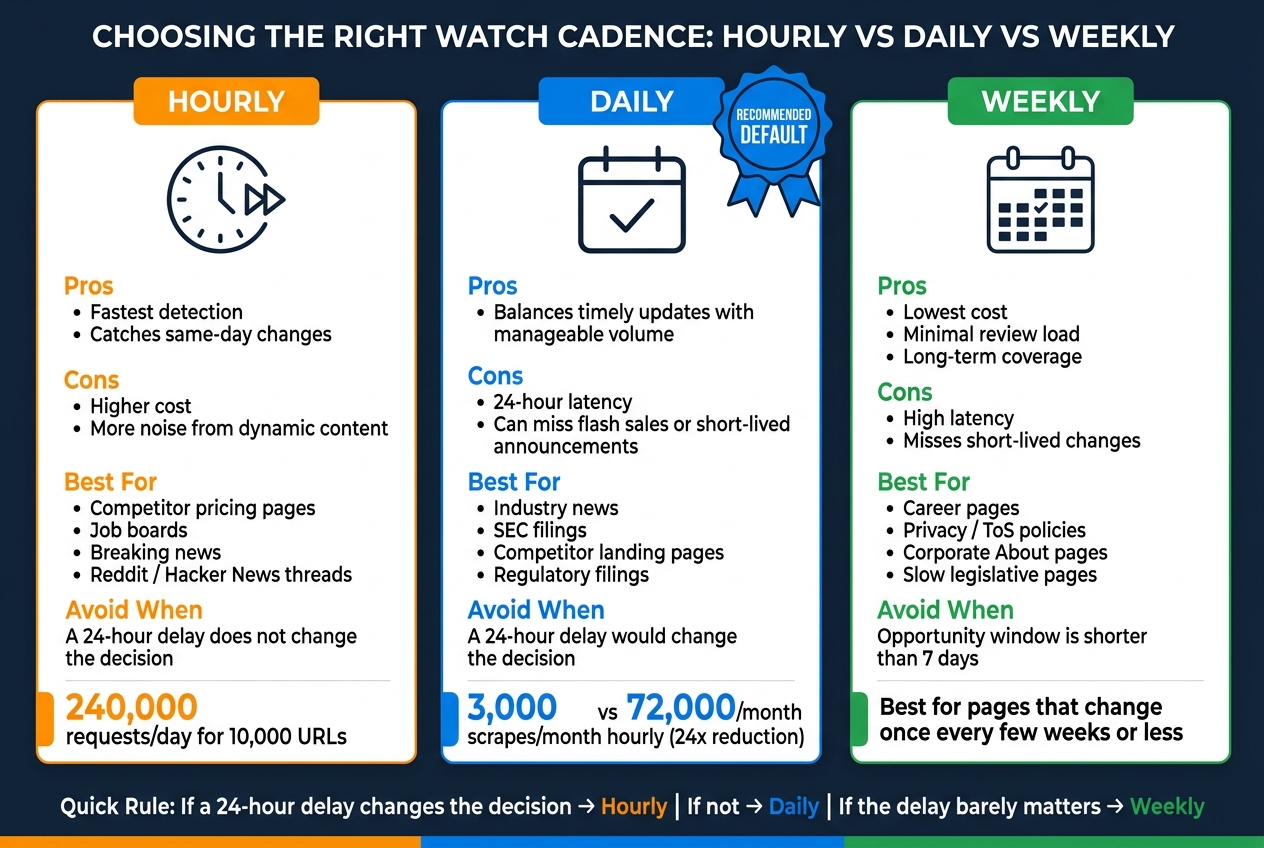
Hourly vs Daily vs Weekly Watch Cadence: Pros, Cons & Best Use Cases
You usually do not need the fastest check rate. You need the slowest one that still catches changes early enough to act.
The tradeoff is simple: faster checks find updates sooner, but they also cost more and produce more junk alerts. Slower checks cut noise and spend, but they can arrive too late to matter. That matters a lot when a page changes often because of ads, rotating modules, timestamps, stock counters, or other dynamic elements [2][1][10].
| Cadence | Pros | Cons | Best For | Avoid When |
|---|---|---|---|---|
| Hourly | Fastest detection; catches same-day changes [2][1] | Higher cost; more noise from dynamic content [2][1][10] | Competitor pricing, job boards, breaking news, Reddit/Hacker News [2][1][3] | Static pages or any source where a 24-hour delay does not matter |
| Daily | Balances timely updates with manageable volume [2][1] | 24-hour latency; can miss flash sales or short-lived announcements [2][7] | Industry news, SEC filings, competitor pages [2][6] | Cases where a 24-hour delay would change the decision |
| Weekly | Lowest cost; long-term review [2][9] | High latency; not suitable for same-day decisions [2] | Career pages, platform policies, slow-moving legislative pages, corporate profiles [2][9] | Any source where the opportunity window is shorter than 7 days |
Read the table from right to left, not left to right. Start with the cost of being late. If a missed change only creates mild inconvenience, hourly checks are overkill. If a same-day update affects price, inventory, hiring, or a public statement that shapes a decision that day, then the extra speed earns its keep.
A practical rule works well: match cadence to page volatility and to the amount of review work your team can handle. If most alerts turn out to be junk, the fix usually is not “check more often.” It is to slow the cadence, tighten the page scope, or monitor a cleaner target such as a product block, filing page, or press release archive instead of the whole page.
Daily is the default for most teams. It gives a good balance between timely updates and a review load people can actually keep up with [2][1]. For ongoing monitoring of industry news, SEC filings, and competitor pages, that 24-hour lag is often fine, and the lower alert volume makes the signal easier to spot [2][6].
Hourly makes sense when the action window is short. Competitor pricing, job boards, breaking news, and fast-moving community sites like Reddit or Hacker News can shift enough within a day that a next-day alert is not much help [2][1][3]. The downside is obvious: more checks, more spend, and more noise from pages that redraw parts of themselves all day long [2][1][10]. If the page is messy, hourly monitoring can feel like a smoke alarm that goes off every time someone makes toast.
Weekly is the cheap, low-effort option, and sometimes that is exactly right. Career pages, platform policies, slow-moving legislative pages, and corporate profile pages often do not need close watching [2][9]. But the lag is real. If the opportunity window is shorter than seven days, weekly checks are too slow by definition [2].
One honest limit: cadence does not fix a bad source. A noisy page checked hourly stays noisy. A clean page checked weekly can still miss a short-lived post, flash sale, or brief policy note that disappears before the next run [2][7]. Tools can help narrow watch targets, and KAEOA can make that setup easier, but the basic choice still comes down to business timing, not tool settings.
Default to daily, then move faster only when same-day misses change the decision. Use hourly for same-day action, daily for most ongoing monitoring, and weekly for slow-moving sources.
FAQs
How do I choose a cadence for mixed sources?
Treat every source the same, and the whole system gets noisy fast. A pricing page that flips three times a day does not belong on the same schedule as an about page that changes twice a year.
Segment sources by urgency, volatility, and business value. That gives you a schedule that matches what the source actually does, not a lazy one-size-fits-all setup.
Use simple tiers. Keep the structure tight:
- High-frequency checks for volatile, mission-critical updates
- Medium-frequency checks for important but steadier changes
- Daily or weekly checks for stable pages you track over the long haul
High-frequency monitoring fits pages where delay costs money, time, or missed action. Think stock status, pricing, product launch pages, policy pages tied to compliance, or competitor landing pages during an active campaign. If a source can change several times in a single business day, check it on a short interval and keep it on its own schedule so it does not get buried under slower sources.
Medium-frequency monitoring works for pages that matter but do not swing all day. A team page, a service page, a feature comparison page, or a partner listing often fits here. These sources still deserve attention, but hammering them every few minutes just burns requests and sends junk alerts when little of substance changes.
Daily or weekly checks make sense for stable, long-term tracking. Press archives, legal background pages, investor FAQ pages, documentation sections, and evergreen resource pages usually fall into this group. If a page changes once a month, checking it every 15 minutes is just self-inflicted noise.
The split is not only about how often a page changes. It is also about what the change is worth. A tiny copy tweak on a low-stakes page may not matter at all, while one line on a shipping policy page can matter the same day. Urgency, volatility, and value need to be judged together.
A clean way to think about it is this:
| Tier | Best fit | Typical cadence | What to watch |
|---|---|---|---|
| High-frequency | Fast-moving, mission-critical sources | Minutes to hourly | Price, stock, policy, campaign pages |
| Medium-frequency | Important but steadier sources | Every few hours or daily | Product, feature, service, team pages |
| Low-frequency | Stable long-term sources | Daily or weekly | Docs, archives, evergreen info |
Keep critical sources on separate schedules. That part gets missed all the time. If the most important pages share one giant monitoring pool with lower-stakes pages, the signal gets diluted. A mission-critical source should have its own cadence, its own alert rules, and often its own filter scope.
Filtering matters just as much as cadence. Reduce noise with content-only or element-specific monitoring instead of tracking the whole rendered page. If the only thing that matters is the price block, watch that block. If the only thing that matters is the “Out of stock” label or the release date field, monitor that element and ignore the rest.
That cuts down on false alarms from banner rotations, footer edits, cookie notice shifts, timestamp changes, or layout churn. It also gives clearer alerts because the diff points to the exact thing you care about, not a giant wall of unrelated page movement.
For example, a retailer’s product page might change in five places during a normal day: recommendation widgets, review counts, ad slots, shipping estimates, and inventory text. If your job is to track stock availability, whole-page monitoring turns that into a mess. Element-specific checks on the stock label keep the feed usable.
Increase intervals for sources that rarely change. This is basic discipline, but it saves a lot of waste. If a source has been steady for 90 days, move it from every six hours to daily. If it stays quiet for another quarter, weekly may be enough. Monitoring should react to observed behavior, not fixed assumptions.
That said, avoid setting long intervals blindly. Some pages look stable until a key event hits. A conference site may sit idle for months and then update speakers, pricing, and venue details in one week. A government procurement page may stay quiet and then post a deadline change that matters the same day. Stable does not mean harmless.
A decent operating rule is to review schedules on a fixed cadence. Every month or quarter, look at:
- alert volume
- meaningful change rate
- false positive rate
- time-to-detection needs
- source behavior over the last 30 to 90 days
If a source sends 40 alerts and only two lead to action, the schedule or filter is off. If a page matters a lot and changes are caught too late, the interval is too long. You do not need fancy theory here; the data tells on the setup pretty fast.
KAEOA works best when this tiering is built into the way monitors are grouped from the start, not patched in later after the alert stream gets ugly. Put volatile pages in their own lane, tune filters at the element level where possible, and leave low-motion sources on a slower clock.
There is a trade-off. Short intervals increase request volume and can put more load on both your budget and the target site. On some sources, aggressive polling also runs into rate limits, anti-bot controls, or temporary blocks. If the page is touchy, a slower schedule with tighter element filters may beat brute-force frequency.
Another limit: volatility changes. A “stable” source during the off-season may become highly active during a launch, sale, filing period, or crisis. Static tiering goes stale. The schedule needs periodic review, especially around known events like product drops, earnings dates, policy deadlines, or holiday promos.
One worked setup makes the point. Say you track a competitor’s product catalog, pricing page, press page, and terms page. The catalog and pricing page go on a high-frequency schedule, with price and availability elements watched directly. The press page sits on a medium schedule because updates matter, but not every minute. The terms page gets a daily check, then moves to weekly if it stays quiet, unless a legal review window is open.
That setup catches what matters without turning normal page churn into a fire alarm. It also makes alerts easier to trust, which is half the battle in any monitoring program.
KAEOA can support that kind of split cleanly, but the logic matters more than the tool. The useful pattern is simple: check critical, fast-moving sources often; check steady but important sources at a moderate pace; and slow down for pages that almost never change.
When should I switch from daily to hourly?
Switch from daily to hourly when a 24-hour delay starts costing money or pushing bad decisions into the business. That usually shows up in revenue, conversion rate, or pricing moves that depend on fresh data.
Hourly checks make sense when the source changes fast and the change matters right away. Good examples: key e-commerce prices, high-value job listings, and breaking news feeds where stale data loses value almost immediately.
There’s a limit, though. If the team can’t review the output or act on it within an hour, hourly runs mostly create extra alerts, more logs, and more cleanup work. The same goes for stable sources that barely move during the day. In those cases, hourly monitoring gives more noise, not more signal.
How can I reduce noise without missing changes?
Use a tiered, event-driven approach instead of running one schedule across everything. Check high-value sources that change often on a tighter cadence, and move stable or lower-priority items to daily or weekly checks so you don’t burn time and budget watching pages that barely move.
That split matters more than most teams expect. A pricing page, product inventory feed, or competitor promo page may need checks every 5 to 15 minutes. A policy page, investor relations archive, or static FAQ often does fine with one pass per day or even once a week. Treating both the same creates noise, extra compute cost, and a pile of alerts nobody wants to read.
False positives are where monitoring programs start to go sideways. A page can fail once because of a timeout, a CDN hiccup, a JavaScript error, or a bot check that trips for one request and disappears on the next. If every one-off failure becomes an alert, the signal gets buried fast.
Add confirmation checks before escalating. In practice, that means a first check flags a possible issue, then a second check runs after a short delay - say 1 to 3 minutes - from a fresh session, different proxy, or clean browser context. If the issue repeats, it’s probably real. If it clears, log it and move on without waking anyone up.
For scraping, use a lightweight detector first and only run the heavier extraction when something meaningful changes. That detector can be as simple as an HTTP status check, an ETag or Last-Modified comparison, a content hash on a narrow page region, or a DOM selector check on the few elements that matter. When that first pass spots a real delta, trigger the deeper scrape, parsing, screenshot, or downstream workflow.
This keeps the expensive work in check. Full browser renders, anti-bot handling, OCR, and multi-step extraction cost more than basic HEAD or GET checks, and they fail more often too. A change-triggered flow cuts waste and reduces the odds that a temporary front-end glitch turns into a chain of bad data.
Batch non-urgent alerts for business hours instead of pushing every low-risk event the second it appears. A 10:37 p.m. notice that a long-tail content page changed rarely needs an instant Slack ping. Roll those into a digest for 9:00 a.m. local time with the source, timestamp, before/after summary, and severity so the team can review it in one pass.
A simple tier model usually works well:
- Tier 1: revenue-linked or high-risk sources, checked every few minutes with confirmation
- Tier 2: active but less time-sensitive sources, checked hourly
- Tier 3: stable or reference pages, checked daily or weekly
- Tier 4: non-urgent change logs and watchlists, reviewed in batched alerts
KAEOA usually sees the best results when teams pair that setup with clear rules for what counts as a meaningful change. A new timestamp, session token, ad slot shuffle, or cookie banner variant should not trigger a full scrape. Price changes, stock status shifts, copied text edits in a target section, or schema field changes probably should.
There’s a trade-off here. If thresholds are too strict, you miss small but important edits. If they’re too loose, you end up right back in alert fatigue. The fix is not more alerts. The fix is better event logic, a second check before escalation, and tighter definitions of what actually matters.