Market Intelligence
How to Turn a Messy RSS Feed Into a Filtered Email Digest
How to Turn a Messy RSS Feed Into a Filtered Email Digest
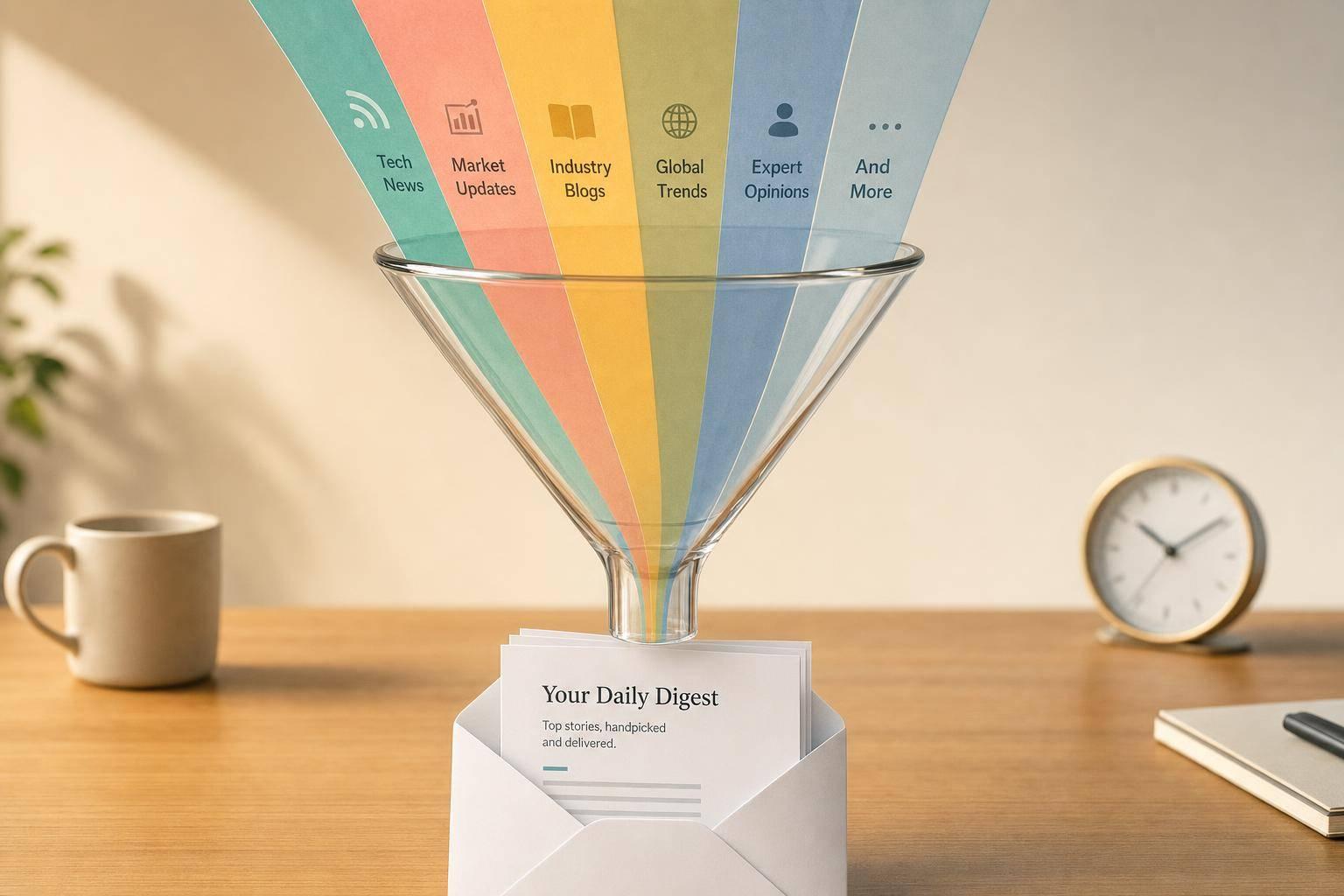
A bad RSS setup does not fail at delivery. It fails at selection. If a digest keeps sending job posts, webinars, wire rewrites, and repeat stories, the fix is to narrow the goal, merge inputs into one stream, filter hard, dedupe, and send on a schedule that fits the topic.
A setup that works usually does five things:
- Defines one job for the digest, like tracking U.S. fintech competitor launches and pricing changes
- Pulls feeds into one intake, such as Inoreader, Feedly, Zapier, or Make
- Uses include and exclude rules with exact phrases, section tags, and block terms
- Removes duplicates by URL, GUID, and near-match titles
- Sends a small email digest daily or weekly, with title, source, date, summary, and link
If the email still runs past 50 items per day, the setup is too loose. If the feed only shows headlines or short snippets, keyword matching will miss things. And if sources rewrite the same press release three ways, no simple dedupe rule will catch every case. The point is not perfect automation. The point is a digest you will scan in under a minute and trust enough to stop checking raw feeds all day.
A clean pipeline is usually simple: source feeds → filter → dedupe → digest → inbox.
Project 9: RSS Feed Digest Automation with n8n: Summarize & Send Daily Email
sbb-itb-15d6cfa
Use filters, section rules, and deduping to cut feed noise
Once sources land in one stream, the next job is cleanup. Most feeds mix useful items with junk you never want to read twice: job posts, webinars, sponsored posts, podcasts, roundups, and the same wire story copied across several outlets. Filters deal with the first mess. Deduping deals with the second.
Keep only matching keywords and sections
Start with include filters tied to the exact thing being tracked. Broad topic labels sound safe, but they usually pull in too much. If the digest follows a narrow subject, use terms like pricing, launch, or FDA instead of vague labels.
Exact phrases usually beat single words because they cut false positives. A filter for "content strategy" is narrow enough to catch the intended topic. A filter for marketing is much looser and tends to pull in a pile of side chatter. If the reader supports exact phrase matching, use it.
Tags and categories are even better when the source provides them. If a feed already labels items as Product, Research, or Policy, filter on those fields instead of leaning only on raw keywords. The publisher has already done part of the sorting, so use that work.
This matters more than it seems. A weak include filter does not fail loudly. It just fills the digest with stuff that looks close enough, and that kind of drift is what makes people stop reading.
Block recurring noise before it hits your inbox
Include filters decide what gets in. Exclusion filters decide what gets tossed out before it wastes attention. Anything outside the monitoring goal belongs on the block list. Common terms worth excluding in a work digest include jobs, webinars, sponsored, roundup, podcast, crypto, and press release.
Apply those exclusions at intake if the tool allows it. That way, matching items never enter the digest at all. It is much better to stop junk at the door than to clean it up later in email.
A simple way to build the exclusion list is to run the feed for one week with loose filters. Then review what gets skipped every single time. Those repeat offenders become the block list. After one pass, add every recurring skip to the exclusions and rerun.
That one-week review often shows patterns that are easy to miss at setup. Maybe one outlet labels every sponsored item clearly. Maybe another keeps posting podcast transcripts that match the same keyword. Once those patterns are visible, section rules and exclusions do most of the heavy lifting.
Remove duplicate stories across sources
Even after exclusions, the same story can still show up more than once. A single product launch might appear in a company blog, a trade publication, and two news aggregators. If all four land in the digest, the result is not more signal. It is the same event wearing four different headlines.
Start with exact URL or <guid> matching. That catches literal duplicates, which is the easy case. Tools like Inoreader and Feedly use duplicate detection filters to suppress identical or near-identical items across overlapping feeds.
Near-duplicates take a bit more care. Two posts may point to different URLs but still describe the same event with only minor headline changes. In those cases, compare similar titles, publication timing, and whether the body clearly refers to the same announcement or release. Keep the version with the fullest summary and drop the rest.
A small rule set usually gets most of the value:
- Match exact URLs first
- Match exact
<guid>values next - Flag titles that are very close
- Check whether the item refers to the same launch, ruling, or announcement
- Keep the copy with the best summary or source context
There is a trade-off here. Aggressive deduping can hide worthwhile angle pieces if two outlets cover the same event from very different sides. A short wire blurb and a deep analysis article may share the same headline terms but serve different needs. If the digest is meant for decision-making, not just awareness, near-duplicate rules should stay a little conservative.
One worked example makes the point. Say three feeds pick up a company launch on the same morning. The company blog publishes the original announcement, a trade site republishes a short wire rewrite, and another outlet posts a tighter summary with pricing details. Exact URL matching removes nothing because all three URLs differ. Title similarity and event matching identify them as the same launch. The digest keeps the item with the pricing details and drops the thinner copies.
This is also where section rules can help. If one feed is useful only for Research and another is noisy except for Policy, filter each source at the section level before everything merges. That cuts duplicate volume before dedupe even starts. KAEOA setups usually work better when source-specific rules come before stream-wide cleanup, because each source tends to have its own bad habits.
One honest limit: dedupe is never perfect when publishers rewrite syndication copy. If a source strips GUIDs, changes titles, and republishes with a new URL, no simple rule catches every case. You either accept a few repeats or risk dropping items that are close but not actually the same. In practice, a little overlap is less harmful than over-filtering.
Send the cleaned feed as an email digest you'll read
You already did the hard part: the feed now has less junk. The last call is simple but easy to get wrong - when the digest shows up, and whether the email is easy to scan in under a minute. If it takes more work than checking feeds by hand, the setup fails.
Pick a digest schedule that matches your timing
Send frequency should track how fast the topic moves. Use daily for fast-moving competitor or industry news, and send it at 8:00 AM ET or 5:00 PM ET. Use weekly for research-heavy topics and noisy keywords, and send it on Tuesday at 6:00 AM ET.
Feedly, Inoreader, Zapier, and IFTTT can all send the cleaned feed by email on a schedule. The tool matters less than the habit it supports. If the topic shifts every few hours, a weekly email is too slow. If the topic barely changes, a daily email turns into wallpaper.
A weekly send usually fits niche industry news or competitor updates that do not change every day. That keeps the digest from feeling like inbox tax. Then the job of the email is not to impress you. It is to help you decide, fast, what deserves a click.
Format the email for fast scanning
Layout matters as much as timing. If the headline is hidden, or the source name is missing, every item costs extra attention. That sounds minor until you hit item 17 and stop reading.
Each item should include:
- Title
- Source
- Date
- 1–2 sentence summary
- Link
That is enough to make a quick read-or-skip call. More detail slows you down. Less detail forces clicks, which defeats the point of a digest.
Keep the digest small enough to read in one pass. If the filtered email still goes over 50 items a day, split it into separate digests by topic, source group, or urgency. One stream for competitors and another for industry news usually works better than one giant pile.
Sort newest first. Use relevance sorting only if the tool supports it well, because weak relevance ranking often buries the one item you needed near the bottom. Newest first is plain, but it is predictable, and predictable beats clever when you are scanning fast.
Subject lines also do more work than people think. Use something like "RSS digest: [Topic] - [Date]" or "[Competitor] updates - [Month Day]" so each stream is easy to spot, search, and archive. If every digest lands with a vague subject, the inbox turns into a junk drawer.
There is one trade-off worth stating outright: email is great for review, not for instant response. If you track breaking news, security issues, or price changes that need same-day action, a digest alone may be too slow. In that case, keep the digest for routine reading and pair it with a separate alert for the few cases where delay costs you.
If the delivery tool gives you HTML and plain-text options, pick the one you will read. Fancy templates often waste space, especially on mobile. A plain, tight layout usually wins because your eyes go straight to the title, source, and summary without fighting banners, logos, or padding.
KAEOA usually treats this as an operations problem, not an email-design problem. The best digest is the one you actually read, clear in one minute, and trust enough to stop checking raw feeds all day.
Build a working setup step by step with real tools
RSS Digest Tools Compared: Which One Is Right for You?
Example setup: Inoreader, Zapier, and email digest
You need a setup that sends the right items, not a firehose. The clean way to do that is to filter at the feed level first, then automate only what survives.
Start in Inoreader. Create a folder called "Competitor Watch" and add the feeds you care about: company blogs, press release pages, and a few industry publications. Many sites publish an RSS feed at /feed or /rss added to the root URL, so example.com/feed or example.com/rss is often enough to find it [1][3].
Apply the keyword rules and exclusions there, inside Inoreader, before anything goes to Zapier. That matters because a noisy upstream feed turns every downstream step into cleanup work. If the folder only contains posts that match your terms and skip junk, the rest of the chain stays simple.
After that, send only the filtered folder feed into Zapier. Use RSS by Zapier as the trigger, pointed at the filtered Inoreader folder feed, not the raw source feeds. That gives Zapier one stream to watch instead of a pile of separate inputs.
Next, deal with repeats before building the digest. Use Zapier to drop duplicate URLs before the email step [6][4]. This sounds minor until the same press release shows up on the company blog, newsroom feed, and an industry site on the same day.
Then add Digest by Zapier to collect all matching items over a set period, and follow it with Send Outbound Email on a schedule [6]. The path is straightforward:
- source feeds in Inoreader
- filtering and exclusions in Inoreader
- duplicate URL check in Zapier
- Digest by Zapier
- scheduled email delivery
That gives you a clean source → filter → dedupe → digest → inbox pipeline.
A plain example helps. Say a company posts a funding announcement on its newsroom, a partner site republishes it, and a trade publication writes a short summary. If all three links hit your feed, the dedupe step cuts the repeats before the digest goes out, so the email reads like a briefing instead of clutter.
There is one catch: Zapier's free tier gets tight fast on active feeds. If several sources publish often, task limits and polling frequency become a problem, so heavier monitoring usually pushes you to a paid plan. That is not a flaw in the setup; it is just the cost of running it at any real volume.
Simpler options if you want fewer tools
Not everyone wants a chain with a feed reader, an automation layer, and scheduled email. If the goal is just “send filtered items to inbox,” a one-service tool can be easier to live with.
Chetmail is the cleanest example in this group. It handles filtering and scheduled delivery in one place. It is free for up to 3 sources, and the Pro plan supports up to 50 sources with keyword filtering and custom delivery times [3]. For a small watchlist, that removes most of the setup work.
For 1 to 5 low-volume sources, single-feed forwarders like Blogtrottr or Feedrabbit can work [2]. They send one email per article, which is fine if volume is low and you want speed over organization. The downside is obvious after a few active feeds: they do not combine items across feeds, so your inbox can turn into a stack of one-off alerts.
If email is not the point and you mainly want a place to read and sort updates, Feedly fits better [1]. It is stronger as a reader than as a digest tool. That sounds like a small distinction, but it changes the workflow: instead of receiving a curated email at set times, you open the reader and review items there.
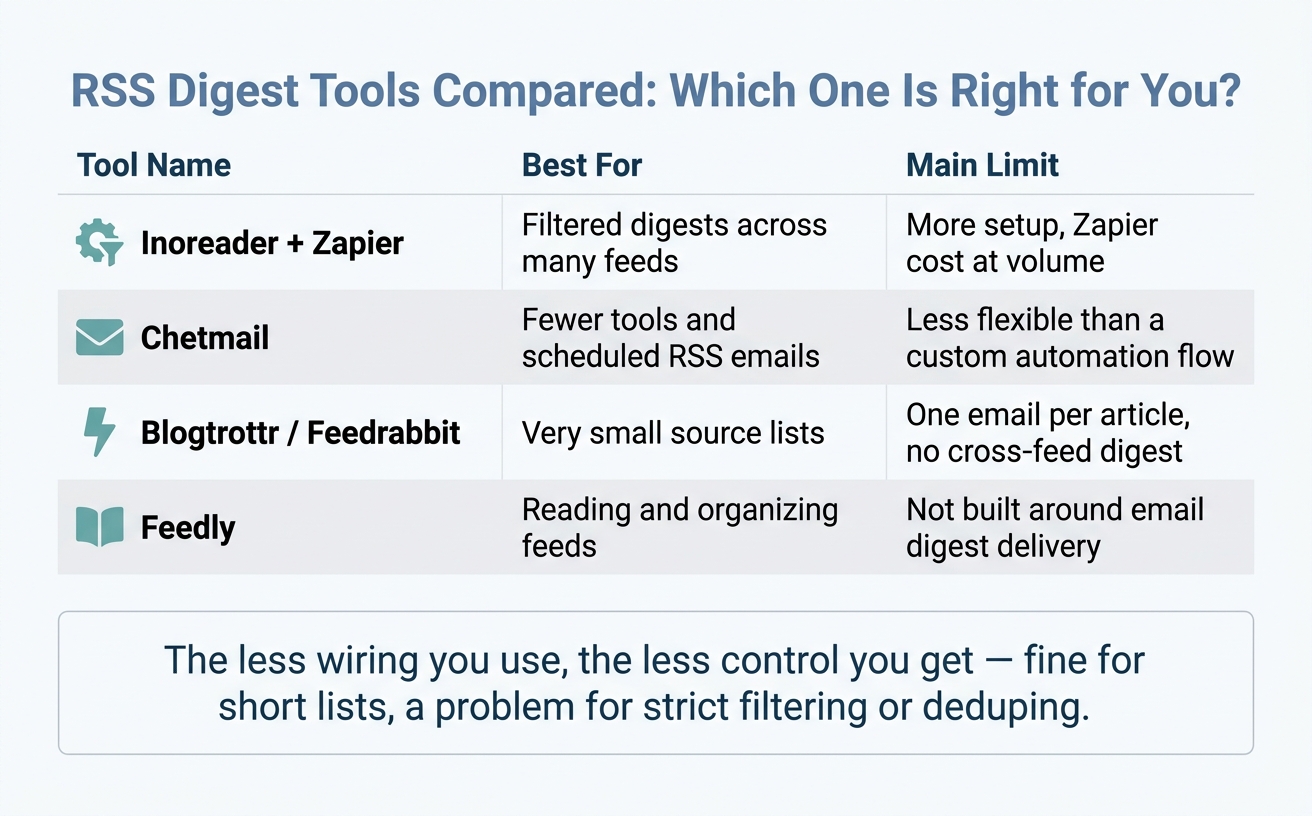
Here is the trade-off in plain terms:
| Tool | Best for | Main limit |
|---|---|---|
| Inoreader + Zapier | Filtered digests across many feeds | More setup, Zapier cost at volume |
| Chetmail | Fewer tools and scheduled RSS emails | Less flexible than a custom automation flow |
| Blogtrottr / Feedrabbit | Very small source lists | One email per article, no cross-feed digest |
| Feedly | Reading and organizing feeds | Not built around email digest delivery |
The less wiring you use, the less control you get. That is usually fine for a short source list. It becomes a problem when you need strict filters, deduping, or one clean summary instead of many separate messages.
Check the limits before you depend on the digest
Before relying on any digest, test the feed itself. A broken feed can look fine in a browser and still fail in readers or automation tools. Run a feed validator before you depend on it [5].
This step gets skipped all the time, and then people blame the automation. In practice, the issue is often the source feed: malformed XML, missing fields, bad dates, or item links that change after publishing. If the feed is shaky, the digest will be shaky too.
Truncated feeds are another common problem. Some publishers only expose headlines or short excerpts, not the full post body [1]. That gives your filters less text to inspect, which lowers match quality.
If your keyword appears only in the second or third paragraph of the article, a headline-only feed will miss it. On the flip side, short excerpts can also create false positives when a vague headline matches your term but the article itself is not relevant. Broken or truncated feeds reduce filter accuracy, so test sources before you depend on them.
A quick manual check helps here. Open a few items from each feed and compare what the feed shows against the full article page. If the feed only carries titles, your filter logic needs to be tighter and your expectations lower. If the feed includes summaries or full text, you have more room to work with.
This is also where edge cases show up. Some company blogs keep a clean /feed, while press release pages publish inconsistent entries or update old URLs after the fact. A setup can still work with those sources, but it needs monitoring, especially in the first week.
KAEOA usually sees the same pattern with competitor tracking setups: the automation part is not the hard part. The hard part is feed quality, noisy source selection, and repeat coverage from syndication. Fix those early, and the digest becomes usable instead of annoying.
If the digest misses items you know should match, check the source feed before changing the keywords. If the digest sends too much, review whether the feed contains full text or only snippets. Those two checks solve a lot more than people expect.
Conclusion: A filtered digest beats checking feeds all day
Once the pipeline is tuned, the feed turns into a short, reliable briefing instead of a noisy stream. Set the goal, tighten the filters, remove duplicates, and lock in the schedule, and the digest handles the sorting without constant babysitting.
Check the source list once a week and cut anything that never earns a click. That one habit keeps the briefing clean and useful, whether you track competitor moves, niche news, or Google Alerts alternatives for research.
FAQs
How many RSS sources should I start with?
Start small so the digest stays usable. 8 to 12 feeds is a common starting range, but 3 to 5 strong sources can work even better when they cover the updates you refuse to miss.
The mix matters more than the raw count. Pair a few high-frequency news feeds with a handful of moderate or slower long-form sources, so you catch both the daily moves and the deeper analysis. If every source publishes at the same pace, the digest gets noisy fast.
Add new feeds slowly, not all at once. Once the filters are tuned and the signal looks clean, bring in a few more sources each week and watch what changes. That pace makes it easier to spot which feed adds signal and which one just adds clutter.
What if a feed only shows headlines or snippets?
If an RSS feed only gives headlines or short snippets, the summarizer only has that text to work with. It can’t infer the rest of the article, and if it tries, the digest drifts into guesswork.
To get better output, first check whether the publisher offers a full-text feed. Many sites keep more than one feed, and the full article version is often buried in a footer, a /feed path, or a FeedBurner replacement. If no full-text feed exists, fix the prompt instead of expecting better summaries from thin input.
Use plain instructions such as: > "When the source excerpt is short, explain what the headline means instead of trying to summarize the full article."
That small change matters. It tells the model to stay grounded in the text you actually have, not the article you wish you had. In practice, that means a headline like "Apple expands repair program" turns into a short explanation of the likely news angle, rather than a fake summary stuffed with made-up details.
KAEOA works best when the prompt matches the shape of the feed. Short input needs interpretation, not article recap. Full-text input can support tighter summaries, quoted points, and cleaner takeaways.
When should I split one digest into multiple digests?
Split one digest into multiple digests when it starts doing too many jobs at once. If industry news, technical research, and competitor updates all land in the same stream, the result often feels crowded. People stop skimming with intent and start putting it off.
Separate digests fix that by giving each topic its own lane. A team that needs market moves doesn’t also need a wall of deep research notes in the same email, and a reader who wants product signals may not care about every press mention from competitors. When each digest has a clear purpose, the content feels lighter and easier to act on.
This also helps with pacing. A high-volume topic can go out daily, while a slower one can run weekly without making the whole package feel bloated. That small change matters more than most teams expect, because a digest that feels heavy often gets skipped, even when the content inside is good.
For personal reading, the same rule applies. If one digest turns into a backlog pile, split it by intent: one for broad industry movement, one for technical papers, one for companies to watch. That makes it simpler to scan what matters in the moment instead of staring at a mixed feed and saving it for “later,” which usually means never.
There’s a trade-off, of course. Too many digests can create a different kind of mess, especially if the topics overlap or arrive too often. The fix isn’t to split everything. It’s to split only when clarity drops or volume starts getting in the way.
KAEOA works best here when each digest has a tight brief, a clear audience, and its own schedule. That way, delivery matches attention span instead of fighting it.