Market Intelligence
10 Signs You Need a Content Monitoring Tool
10 Signs You Need a Content Monitoring Tool
If you keep missing mentions, getting buried in alert noise, or spending hours pulling reports, manual tracking is no longer enough. I’d switch to a content monitoring tool when I see the same 10 problems show up again and again: late mentions, noisy inboxes, delayed competitor news, too many tabs, mixed team rules, weak prioritization, source gaps, slow reporting, volume overload, and team limits.
Here’s the short version:
- You find mentions too late
- Your alerts are full of low-value results
- Competitor moves reach you after the fact
- Research is split across too many tabs
- People on your team track the same topic in different ways
- You can’t tell which mentions need attention first
- You miss coverage from places you rarely check
- Reports take too long to build
- Your process falls apart as volume grows
- You need more coverage without adding staff
A content monitoring tool fixes those problems by putting watches, filters, source tracking, and summaries into one workflow. Instead of checking sites by hand, I can use one system to track news, web pages, social posts, RSS feeds, and competitor pages on a set schedule.
The main point is simple: if manual tracking keeps causing delays, gaps, and extra work, it’s time to change the workflow.
Quick Comparison
| Area | Manual tracking | Monitoring tool |
|---|---|---|
| Mentions | Often found late | Found on a set schedule |
| Alerts | High noise | Filtered and ranked |
| Competitor tracking | Easy to miss | Watched across sources |
| Research | Split across tabs | In one feed |
| Team use | Different rules by person | Shared rules and watchlists |
| Reporting | Built by hand | Sent as digests or summaries |
| Volume | Hard to keep up | Built for more sources and mentions |
I’d use the signs below as a simple check: if several match your day-to-day work, an automated content monitoring tool is no longer a nice extra. It’s the fix for a process that has stopped scaling.
sbb-itb-15d6cfa
What a Content Monitoring Tool Does
A content monitoring tool pulls mentions from news sites, RSS feeds, web pages, social channels, research sites, and competitor domains into one automated workflow. Instead of hopping between tabs and running the same checks again and again, you get one system that handles it for you.
That matters because manual tracking tends to be scattered. One person checks Google News. Another skims social posts. Someone else looks at a competitor’s site when they remember. A monitoring tool brings all of that into one place and keeps it running on a set schedule.
At the core, keyword watches track specific terms, brand names, or topics across connected sources. Include/exclude filters help cut out irrelevant matches. So if you’re monitoring a brand like Apple, you don’t want results about fruit showing up in your feed. On top of that, relevance scoring and semantic matching help surface the mentions that fit the context you care about, not just every page that repeats a keyword.
As Priyanka Malik and Karishma Borkakoty, Content Marketers at Sprinklr, put it:
"Mention volume is the least useful signal in monitoring. Sentiment shifts and unresolved complaints reveal reputation risk earlier." [7]
Some tools also use custom web scraping to watch specific URLs for changes. That could be a competitor’s pricing page, a public procurement listing, or a research database. When something changes, the result shows up in one dashboard or in a scheduled email digest.
KAEOA is one example of a platform built around this model. It combines broad source coverage, AI relevance scoring, and automated delivery in a single monitoring workflow.
Here’s how that stacks up against manual tracking:
| Capability | Manual Tracking | Content Monitoring Tool |
|---|---|---|
| Source coverage | Limited to sites you remember to check | News, social, RSS, custom pages in one place |
| Noise filtering | Manual, inconsistent | Include/exclude filters + AI relevance scoring |
| Timeliness | You find things after the fact | Automated watches run on a set schedule |
| Delivery | Fragmented across tabs and tools | Centralized dashboard or email digest |
| Scalability | Breaks down as volume increases | Handles high volume through semantic matching |
The signs below show where manual tracking fails.
1. You Keep Finding Mentions After the Fact
You notice a brand, product, or executive mention only after it has already started to spread. At that point, you're stuck reacting instead of tracking it as it happens.
Check just once a day, and you miss everything published in between. And if that mention shows up on a source you don't watch often, there's a good chance you won't see it at all. In long buying cycles, that delay can mean the window to act is already gone.
A monitoring tool scans all the time and weeds out low-value matches, so you can focus on the mentions that matter without doing manual searches all day. Once your timing starts to slip, alert noise usually comes next.
2. Your Inbox Is Full of Noise
You set up alerts to stay informed. Then the emails start piling up, and most of them aren’t useful.
Every low-value alert steals a bit of attention from the coverage that matters. After a while, people stop opening the alerts at all.
That’s the real cost. Once alerts lose trust, people stop using them.
A good monitoring tool cuts through that mess with filtering and relevance scoring. Instead of sending every match, it checks each result against filters you set, like source type, topic, or date [2]. Then it only shows what meets the mark.
Relevance scoring helps put the highest-value items first. And when the tool groups related alerts into one notification, your inbox doesn’t get split up by the same story showing up across several emails [6].
When alerts get this noisy, speed suffers too.
3. Competitor Updates Reach You Too Late
By the time you hear about a competitor’s new product, pricing shift, or industry recognition, your window to respond is already starting to shrink. If that news reaches your team too late, you’re not reacting to the market as it stands today - you’re reacting to yesterday’s version of it.
That’s the gap monitoring tools are built to close.
The answer isn’t checking once in a while. It’s continuous monitoring. A content monitoring tool handles this with scheduled keyword watches and page-change tracking for competitor names, products, pricing, and partnerships.
That timing gap matters more than most teams think. A manual check only finds news when someone remembers to look. Scheduled watches find it when it happens.
That’s how you stop competitor moves from blindsiding your team.
4. Your Research Is Spread Across Too Many Tabs
When research is scattered across a pile of tabs, every new source adds one more switch. One more refresh. One more moment where your attention gets pulled in a different direction. That drag makes it harder to connect related signals while they still matter.
The main issue isn’t how many sources you track. It’s the time you lose comparing them. When information sits in too many places, patterns get harder to spot. A competitor update hits differently when you can see it right next to negative reviews or a spike in mentions.
A content monitoring tool pulls mentions into one feed, so you can review them without reopening every source. You can filter by keyword, source type, or date to sort what matters faster. And once the tabs start piling up, it gets much harder to keep teams aligned on what they found.
5. Different People Track the Same Topic Differently
Once research lives in one place, the next issue is team consistency.
As teams get bigger, people often start tracking the same topic in different ways. One person uses one keyword set. Someone else checks a different source list. A third person applies different filters. On paper, it looks like the topic is covered. In practice, the team is not working from the same data.
That creates a mess fast. Reports don’t match, leadership has to sort through conflicting findings, and decisions take longer than they should. The problem gets worse when deadlines are tight and no one has time to figure out why the numbers or takeaways don’t line up.
This is where shared watchlists and one rule set help in a very direct way. A content monitoring tool gives the whole team the same saved watchlist, sources, and filters. If one person updates the rule, everyone gets that same update automatically. No duplicate setup. No competing versions of the same topic.
Shared rules keep reporting aligned and stop teams from ending up with different answers about the same subject.
6. You Cannot Tell What Matters From What Does Not
Once your watchlists are set up, the next problem shows up fast: separating signal from noise.
Volume isn't the issue. Relevance is. And that's exactly where manual review starts to break down.
When your monitoring feed spits back a flood of results, the hard part isn't seeing more mentions. It's figuring out which ones need your attention right now. Somewhere in that stack, there's usually a critical mention or update that calls for a fast response. The rest? Routine mentions and off-topic matches that add noise, not value.
Missed signals slow decisions and weaken response times. As volume grows, relevance scoring matters more, not less.
A content monitoring tool doesn't just pull in more mentions. It helps decide which ones deserve attention. AI relevance scoring ranks each result, filters out low-value matches, and brings forward only the items above your threshold. Your digest puts the highest-priority results first and screens out low-signal noise.
That move from raw volume to ranked signal is what makes monitoring usable at scale.
And when relevance is still hard to judge, the next blind spot is coverage from sources you rarely check.
7. Key Coverage Is Hiding in Sources You Never Check
If relevance isn't the problem anymore, coverage might be.
Most teams watch the obvious places: major news outlets, brand social feeds, and a handful of keyword searches. That sounds fine on paper. In practice, it leaves holes. A lot of the coverage that matters shows up first in places no one on the team is checking.
Researchers have documented disinformation networks that use impersonation domains to mimic legitimate news sites and mislead readers.[4] That kind of blind spot shows up in all kinds of teams. A product team that tracks only tech blogs can miss a Hacker News thread where users point out a bug. A PR team that scans only general news can miss a wire release that shifts the entire story.
This is where broad source coverage matters. KAEOA pulls from news wires, Reddit, Hacker News, research sites, RSS feeds, and custom URL watches. Manual search has limits. It won't hit every source, and it won't keep watch around the clock. You pick the sources; the tool keeps watching them the whole time.
Once coverage reaches this range, the next bottleneck isn't finding mentions. It's turning all of that into a report people can actually use.
8. Reporting Takes Too Long to Pull Together
Once coverage gets broad, the next choke point is turning all those results into something people can scan fast. Most teams feel it when a weekly or monthly summary is due and someone has to piece it together by hand from several sources. That kind of reporting also slows the handoff from analysis to action. It’s repetitive, and it gets slower as volume climbs.
Delayed reports delay decisions. The more time it takes to pull a brief together, the less time your team has to respond.
That’s where automated summaries come in. AI summaries fix this bottleneck. They turn high-volume results into concise, categorized briefs. KAEOA can sort monitored content by relevance and send concise scheduled digests, giving stakeholders a cleaner view without the wait. And when reporting still depends on manual work, the next problem is volume.
9. Your Process Breaks Down as Volume Grows
Manual tracking can work when you only monitor a small set of sources. But once volume starts climbing, that approach starts to crack.
At that point, manual review just can't keep up. Important signals get buried, and teams burn hours digging through content that doesn't matter. This is usually where manual workflows fail first.
Automated filters and rules help you surface only the highest-priority content, so your workflow can keep up as volume grows. [1] KAEOA also helps by watching for changes instead of having your team recheck the same material again and again as coverage expands. [2]
As volume keeps climbing, the next issue becomes pretty simple: can you expand coverage without adding headcount?
10. You Need More Coverage Without Hiring More People
As volume climbs, headcount becomes the next bottleneck. And when coverage grows faster than your team, manual monitoring runs into a hard limit.
That’s where automation helps. It expands source coverage without piling more work onto the same people. Automated watches can track keywords, RSS feeds, and page changes, which lets your team follow more sources without adding staff. AI tools help the same team handle more work without hiring. [5]
A small team can use automated tracking to monitor thousands of posts and domains that manual review would miss. [4] KAEOA automates watches across news, web, and social sources, so teams can expand coverage without added headcount.
That’s the point where manual tracking stops scaling.
Manual Tracking vs. a Monitoring Workflow
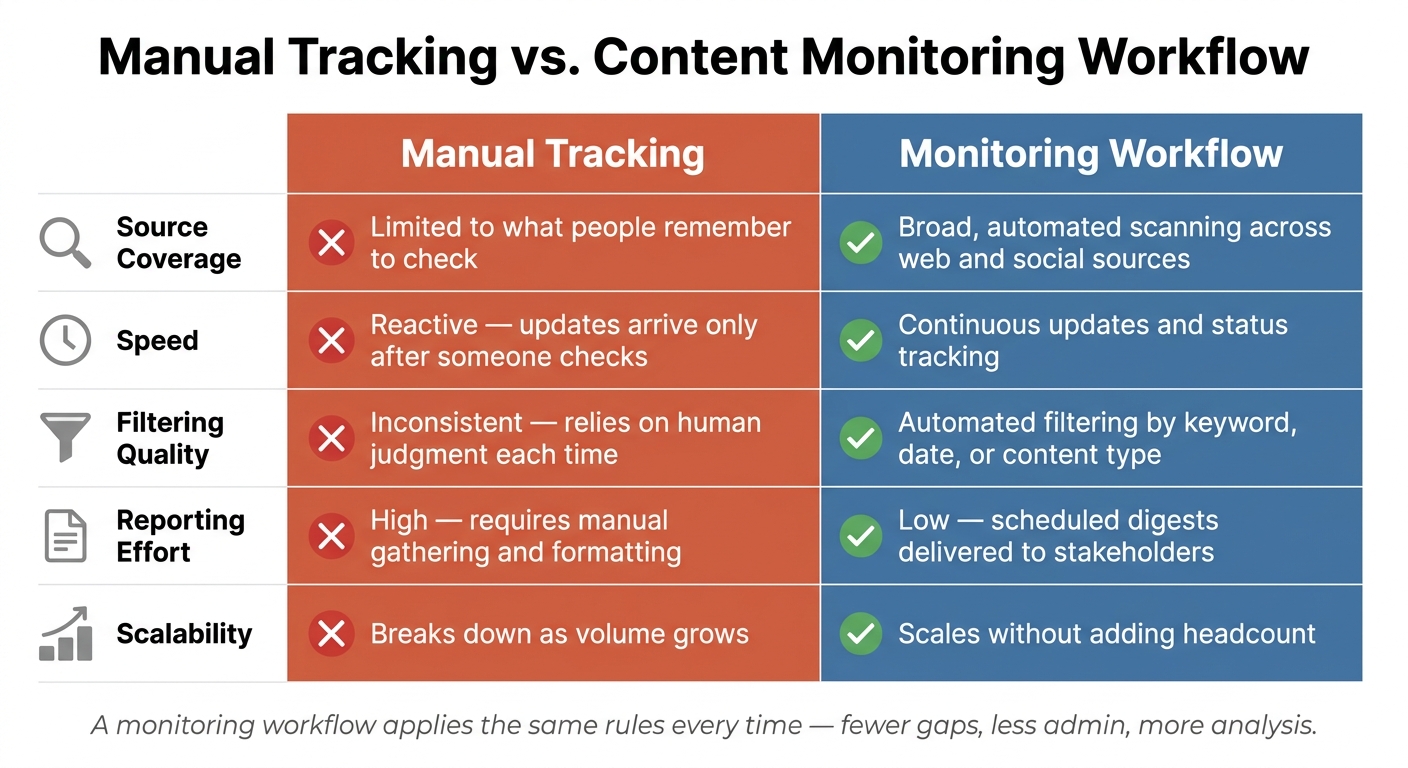
Manual Tracking vs. Content Monitoring Tool: Key Differences
This is where the gap shows up in day-to-day work. The table below sums up what those earlier problems lead to: missed mentions, noisy alerts, slow reporting, and uneven filtering.
| Dimension | Manual Tracking | Monitoring Workflow |
|---|---|---|
| Source Coverage | Limited to what people remember to check | Broad, automated scanning across web and social sources [4] |
| Speed | Reactive; updates arrive only after someone checks | Continuous updates and status tracking [2] [3] |
| Filtering Quality | Inconsistent; relies on human judgment each time | Automated filtering by keyword, date, or content type [1] [2] |
| Reporting Effort | High; requires manual gathering and formatting | Low; scheduled digests delivered to stakeholders [2] |
| Scalability | Breaks down as volume grows | Scales without adding headcount [2] [5] |
The main issue is simple: if your team spends more time putting reports together than learning from them, manual tracking has stopped doing the job.
Manual review can still work when volume is low. But once volume picks up, things get messy fast. One person checks one set of sources, another uses a different filter, and now the team is working from slightly different inputs.
A monitoring workflow fixes that by applying the same rules each time. That means fewer gaps, less back-and-forth, and more time spent on analysis instead of admin work.
If these bottlenecks sound familiar, the next step is figuring out whether your team has hit the point where a switch makes sense.
How to Know It Is Time to Switch
If the same problems keep coming back, this is no longer just workflow friction. It is time to switch.
The biggest sign is repetition. If you keep dealing with missed mentions, late competitor updates, slow reports, and uneven tracking week after week, manual monitoring is not doing the job anymore. At that point, the issue is the method, not the team.
Once you can see the pattern, tie the tool to the problem. For example:
- Keyword watches help catch missed mentions
- Country and language filters cut irrelevant noise
- Scheduled digests replace alert overload
- AI summaries bring priority items to the top
- Custom source monitoring helps you catch niche publications and forums before they slip through
If your team tracks news, RSS feeds, web pages, and open communities, a monitoring workflow can keep results filtered and easy to review.
When those features line up with the pain points you already have, the reason to switch is pretty clear. Switch when the same gaps keep showing up and manual tracking has no dependable way to fix them.
Conclusion
If several of these signs sound familiar, manual monitoring has hit its limit. A content monitoring workflow gives you a repeatable way to cut through the noise, spot what matters, and move faster.
FAQs
How often should a monitoring tool check for new mentions?
A monitoring tool should check for new mentions on a steady schedule - ideally all the time, or at least every few hours - so you don’t miss time-sensitive updates. If you’re tracking high-velocity keywords, check even more often.
Manual checks fall apart fast as volume grows. That’s why it makes sense to use automated schedules for keyword watches and news or web monitoring. You keep alerts up to date without drowning in noise.
What sources should I monitor first?
Start with the sources that give you the most up-to-date insight: industry news you can pull in automatically, keyword-based web mentions, RSS feeds from the sites that matter in your space, and direct social channels where people are already talking.
That mix helps you see what’s happening now, not three days later when everyone else has caught up.
From there, branch out to competitor pages worth tracking, custom web pages you scrape on a set schedule, and email digests that roll alerts into one place. It’s a simple way to cut the noise and keep your monitoring process under control.
How do I know when manual tracking no longer scales?
Manual tracking stops working at a certain point. You miss mentions, fall behind on competitor activity, and end up buried in too many alerts.
When your sources are scattered, research gets slow and uneven. Your team spends more time pulling information together than actually analyzing it. That’s when a consolidated content monitoring solution starts to make sense.