Market Intelligence
What to Do When the Same Story Shows Up From Twelve Sources

What to Do When the Same Story Shows Up From Twelve Sources
You have 12 alerts about one announcement. Turn them into one digest entry, but keep every source record and any reporting that changes the story. Match the event, check where each report gets its facts, and keep corrections visible.
Start with the event rather than the headline. Two articles about the same company may cover different facilities, separate decisions, or different stages of a project. Check the company, action, location, and event date before you put the links together.
Publication dates need a separate check. A report posted on October 9 may describe an October 8 announcement, while another October 9 report covers a response issued that morning. Those links belong in the same story record, but they do not necessarily describe the same development.
Give each link a source ID and record its URL, publisher, headline, publication time, underlying source, and added information. Keep the original URL alongside a comparison URL with tracking parameters removed. Preserve the original headline even if you write a shorter title for your digest.
URL cleanup helps you find repeated pages, but it has limits. Removing utm_source, utm_medium, and utm_campaign usually removes campaign tracking; removing every query parameter can break a link or point you to different content. A matching URL is a reason to check the page, not permission to discard it.
Read the lede, attribution, quotes, and numbers before counting sources. Four outlets publishing the same Reuters report give you four publication records, not four independent confirmations. Different headlines and shorter text do not change that relationship.
Use four labels: Duplicate, Supporting copy, New angle, and Follow-up. A repeated page is a duplicate; wire copy or a rewrite without added reporting is supporting copy. An interview or separate confirmation adds an angle, while a changed schedule, response, or correction belongs under follow-up.
The label should explain the reporting, while the action controls what readers see. You can keep an interview in the source record without giving it a separate digest entry. You can also merge repeated copy out of view without deleting the links that show how the story spread.
Choose your lead link after that check. Favor the account that supports its claims and fits the reader’s task, whether that is an AP report, a local reporter’s interview, a state filing, or a specialist explanation. A large publisher does not automatically deserve the lead, and the earliest alert does not establish who first reported the story.
Keep the difference between a claim and its confirmation visible. A company press release supports “the company says it plans to hire 400 people.” It does not, by itself, support “400 people now work at the facility.”
When the lead article lacks a fact you use, attach the source that supplies it. Do not place a quote from a local interview under a wire link and leave readers to assume the wire contains it. If the strongest account requires a subscription, mark that and include an accessible source when one supports the same claim.
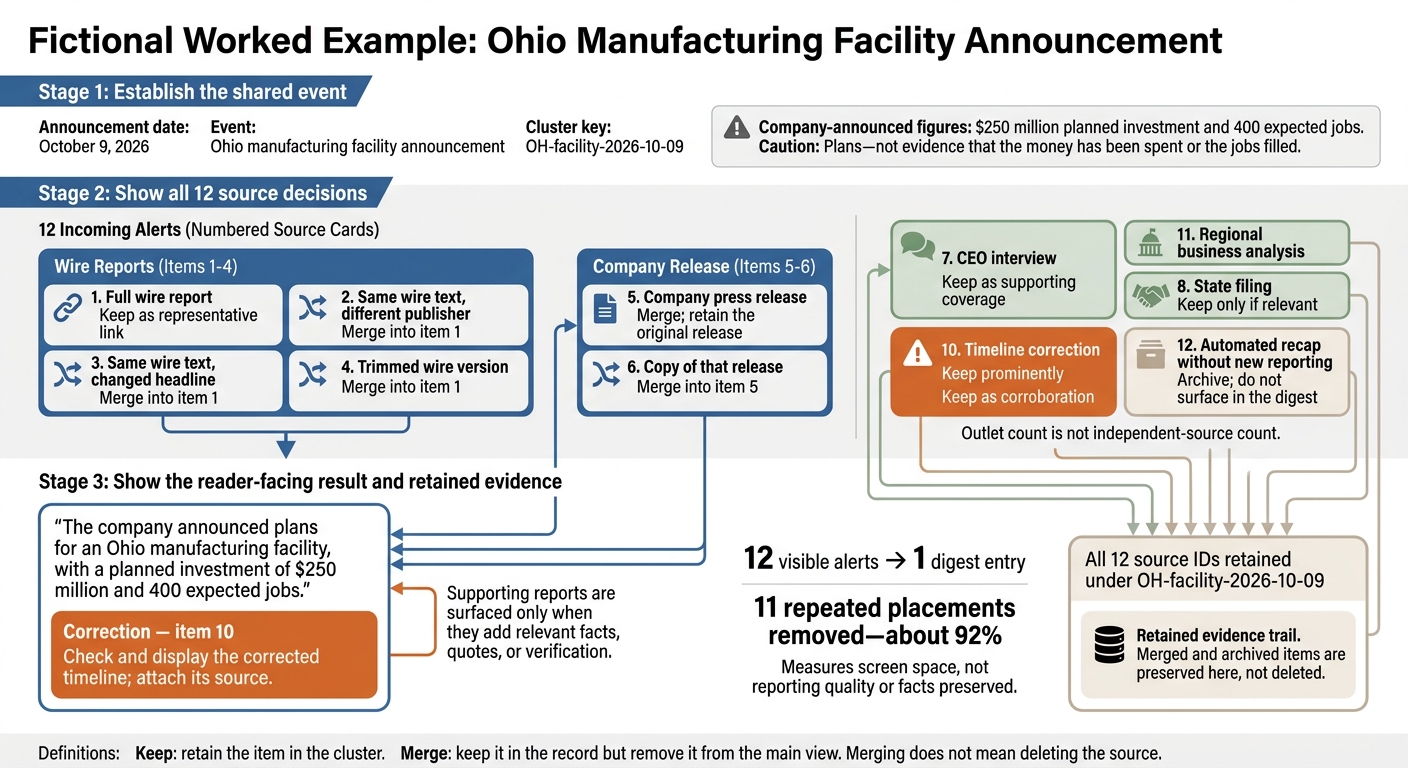
Consider the article’s fictional Ohio facility announcement on October 9, 2026. The company announces a $250 million planned investment and 400 expected jobs, and your inbox receives 12 alerts. Your job is to preserve the announcement, check its support, and make any correction easy to find.
Assign every alert the record key OH-facility-2026-10-09. Keep the 12 source IDs attached to that record, then decide what each contributes. The reader sees one entry; your working record still contains the evidence behind it.
The four wire versions can sit behind one representative link. The company release and its copy remain available as the source of the announced figures. The interview, state filing, separate confirmation, and timeline correction need a closer read because each may change what you write.
Treat the regional analysis as optional, based on your audience. An Ohio business brief may need its discussion of local suppliers or hiring conditions, while an announcement-only digest may not. Archive the automated recap if it adds nothing, but retain its source record.
Reducing 12 visible alerts to one entry removes 11 repeated placements - about 92%. That measures screen space, not the quality of the reporting or the number of facts preserved. A shorter digest fails if it hides the corrected opening date.
Write the entry with claim-level attribution: “The company announced plans for an Ohio manufacturing facility, with a planned investment of $250 million and 400 expected jobs.” Add the corrected schedule only after checking what the correction actually says. The example does not supply that date, so you should not invent one.
Place a Correction note beside the entry when the earlier schedule changes. Name the source and explain whether it corrects an error or reports a later decision. <u>Do not leave an old date in the main text while hiding the replacement among supporting links.</u>
For every remaining alert, finish the sentence “Adds ___.” Name the document, quote, fact, or changed status. If you cannot fill that blank without referring to a new headline or timestamp, the alert probably does not need another visible entry.
Automation can reduce the reading queue, but it cannot settle source relationships. If your tool supports Boolean searches, a query such as "company name" AND (Ohio OR "facility name") can collect likely matches. Check the tool’s syntax first, and avoid excluding update or correction, which may remove the reports you need most.
Keep a manual review lane for sources whose updates matter to your readers. Unchanged URLs can contain revised text, and matching phrases can appear in reports about separate events. Source tracking costs time and storage, but deleting records makes later corrections harder to check.
Before sending, open the lead link, check each stated number against its source, and read the correction again. Confirm that planned spending remains planned spending and expected jobs remain expected jobs. Send one entry only when it preserves the facts readers need - not merely because it takes less space.
Group related links before removing repeats
After you match the event, put all twelve related alerts into one working cluster under a single event label. Give each link its own row or note, and keep it there until you assign a label. Mark the shared facts, details that appear in only one report, and any conflicts.
Record sources with consistent labels
For each link, record the URL, publisher, original headline, time, underlying source, and what it adds. Assign source IDs such as S1 and S2 so you can trace each digest claim to a specific report. Preserve the original headline and time; store any cleaned title in a separate field.
Keep both the original URL and a cleaned comparison URL without tracking parameters. In the underlying source field, record AP, Reuters, or other attribution - not just the outlet that displays the article. Use the same four labels throughout: Duplicate, Supporting copy, New angle, and Follow-up.
Decide what to merge or keep
Merge repeats in the digest, but keep them in the audit trail. Retain publisher names, links, and attribution behind the primary link so you can check where each report comes from later. Assign each item a label and action based on its reporting.
| What the item contains | Label | Action |
|---|---|---|
| Same page via another alert or tracking URL | Duplicate | Collapse into one record; remove the repeated item from the main view. |
| Syndicated report or rewrite with no added reporting | Supporting copy | Merge into the audit trail with its link and underlying-source credit. |
| Independent confirmation | New angle | Group with the story; note the claim it confirms. |
| New interview, document, technical detail, or local context | New angle | Keep accessible; record the specific addition. |
| New development, response, or changed facts | Follow-up | Keep visible as an update within the cluster. |
Base these decisions on the reporting, not the number of publishers. Track outlet count separately from underlying sources: broad distribution can signal attention, but syndicated copies do not count as independent evidence.
Compare first reports with other first reports, and check later updates for changed facts. Once you label the cluster, choose the strongest report as the primary link.
sbb-itb-15d6cfa
Choose a primary link based on the reporting
You have several alerts about the same story, but the first one you receive may not deserve the lead link. After you cluster the alerts, choose the article with the strongest reporting - not the biggest publisher or the earliest alert. Look for exclusive interviews, new documents, original data, or firsthand reporting. [1][6]
Check how the article supports its claims. Specific attribution gives you more to work with than vague references to unnamed sources. Corrections and update notes also provide strong signals that the publication tracks and revises its reporting. [1][6]
Treat articles that repeat AP or Reuters wire copy as derivative unless they add original reporting. Look for new details, technical explanation, or regional context rather than a rewritten headline. A reporter who regularly covers the topic can help, but judge the evidence, not the byline alone. [3][6][8]
Your primary link also needs to fit the digest item’s purpose. Choose a filing or official notice when readers need the factual baseline or the exact change. Use a specialist article when it explains technical limits, business context, or details the primary document leaves out. A secondary account can lead when it gives readers the clearest, most complete account for that purpose. [1][3][8]
Keep supporting sources behind the primary link
Keep the original document and any independent corroboration in the source trail behind your primary link. When a claim includes a fact or quote found only in a supporting report, attach that report’s source ID to the claim. Don’t imply that the lead article contains evidence you found elsewhere. [8]
An official announcement states a claim; it does not independently confirm it. Keep that distinction visible when you connect supporting sources to the entry. [8]
If the strongest reporting sits behind a paywall, label it clearly and retain an accessible evidence link when one exists. If you cannot establish which outlet originated the reporting, call your chosen link the representative article, not the original. [8]
Keep follow-ups that add new information
You’ve chosen the primary link, but the remaining alerts still need a decision. Sort each one into merge, keep, or flag for review based on what it adds to the story.
For each follow-up, write one note:
Adds ___.
Use that note to name a new fact, quote, document, correction, or context that changes your understanding. If you can only point to a different headline or background already in the cluster, merge the alert rather than keep another entry.
Merge repeats and flag conflicting reports
Compare the follow-up with all the facts in your cluster, not just the lead article. Merge when the event and facts stay the same. Keep useful additions in the existing entry, and reserve a separate update for a new stage of the story, such as a regulatory response.
When a follow-up changes the facts, pause merging until you can explain the difference. If figures or timelines disagree, mark the cluster needs review and record each claim alongside its outlet. Label the difference as a correction, a later development, or unclear attribution; repetition alone does not verify a claim.
Avoid matching rules that hide separate events
Match the event stage, not keywords alone. A familiar headline or unchanged URL can contain a new update, so check the update notes and article text before dismissing the link. Its timestamp may not reflect the latest changes. [4]
Use filters to surface likely updates, then check each one by hand. Automation can narrow the queue, but it should not make the final call: keyword matching can miss a change in the story. Keep a small manual review lane for critical sources, don’t exclude words such as update or new, and count wire copies as one source. [6][7]
Turn 12 alerts into one digest entry
How to Turn 12 News Alerts Into One Digest Entry
You have 12 alerts about one Ohio facility announcement, but your digest needs one entry - not 12 versions of the same story. Group the alerts while keeping the source records, supporting evidence, and corrections available.
Fictional worked example: On October 9, 2026, a company announces an Ohio manufacturing facility with a $250 million planned investment and 400 expected jobs. Twelve alerts cover the announcement. These are plans - not evidence that the money has been spent or the jobs filled.
Decide what to do with each of the 12 sources
Use the item numbers as source IDs, and assign OH-facility-2026-10-09 as the cluster key on every note. This gives you one shared record without erasing the differences between the sources.
Keep means retain the item in the cluster. Merge means keep it in the record but remove it from the main view; merging does not mean deleting the source.
| Item | Distinctive signal | Decision | Reason |
|---|---|---|---|
| 1 | Full wire report | Keep as representative link | Gives readers one readable account of the core announcement. |
| 2 | Same wire text, different publisher | Merge into item 1 | Republishing wire copy does not add independent evidence. |
| 3 | Same wire text, changed headline | Merge into item 1 | A different headline does not create new reporting. |
| 4 | Trimmed wire version | Merge into item 1 | A shorter version still reports the same story. |
| 5 | Company press release | Merge; retain the original release | Keeps the source of the announced figures on record. |
| 6 | Copy of that release | Merge into item 5 | The record already contains the corporate text. |
| 7 | CEO interview | Keep as supporting coverage | Adds original quotes and context. |
| 8 | State filing | Keep as supporting evidence | Provides an official record to check against the announcement. |
| 9 | Independent confirmation | Keep as corroboration | Separate sourcing adds corroboration. |
| 10 | Timeline correction | Keep prominently | Changes the schedule readers should rely on. |
| 11 | Regional business analysis | Keep only if relevant | Supports an Ohio business brief; remains optional for an announcement-only digest. |
| 12 | Automated recap without new reporting | Archive; do not surface in the digest | Adds no new information, but its source must remain traceable. |
The number of alerts does not tell you how many sources independently support the announcement. Items 1–4 repeat one wire report, and items 5–6 share the company’s release. Keep those relationships in the record so readers do not mistake repetition for confirmation.
Set review filters and build the final entry
Review duplicates and supporting copies first, then check new angles and follow-ups. Use item 1 as the base story, and add only relevant quotes, verification, corroboration, or corrections from items 7–10.
Include item 11 when its regional analysis serves the digest’s purpose. An Ohio business brief may need that context; an announcement-only digest may not. Keeping a source in the cluster does not require showing it beside the main entry.
Attribute the $250 million planned investment and 400 expected jobs to the company announcement. Do not describe either figure as a completed outcome: the announcement alone does not establish that the company has spent the money or filled the jobs.
Put item 10’s corrected timeline in a visible Correction note and attach its source. Do not leave the correction buried among supporting links while the main entry repeats the earlier schedule.
Check the digest before sending
Confirm that every link concerns the same facility and announcement, rather than another Ohio project. Check that the wire and release copies have their underlying sources recorded, that the representative link works, and that readers can still access the verification trail.
Preserve useful quotes, documents, new facts, corrections, and later developments even when you remove duplicate coverage from view. If sources conflict and you cannot resolve the difference, flag it rather than rewriting the accounts into agreement.
Show supporting reports beside the main entry only when they add facts, quotes, or verification. Keep repeated copy and the automated recap out of the digest, while leaving their source records available for review.
Reduce repetition without losing facts
After you merge the alerts, cut wording that repeats facts. Use one sentence for the event, one for context, and one for impact only when needed. Keep extra sentences only if they add new facts, and remove names, dates, and descriptions already stated in the lead. [2]
After automated filtering, keep a small held-out feed of critical sources for manual checks. Compare those reports with the consolidated entry to catch important information hidden by false merges. Similar wording flags a report for review; it does not prove duplication. [4][3]
Test the cleaned entry by checking how many distinct events readers can understand. Confirm that deduping removes repeats - not separate events or supporting evidence. [5][8]
FAQs
How can I spot rewrites that hide their original source?
Check what each article cites: documents, filings, press conferences, specific statements, or another publication’s first report. Follow those references back to the primary source. A chain of outlets citing one another does not establish who first reported the story.
Look for work the outlet contributes itself: exclusive interviews, its own data analysis, on-the-ground observations, or details that later reports credit to it. Use a source grid to compare the core event, details each outlet adds, and publication times. That comparison helps you distinguish an outlet that repeats the news from one that first moves the story forward.
When should a follow-up become a separate digest entry?
Create a separate digest entry for a follow-up only when it changes your understanding of the story. That can mean a major factual update, a newly released primary document, original reporting, or a shift toward accountability, impact, or historical context.
Keep the follow-up in the existing story group when it only repeats or rephrases earlier information. Different wording alone doesn’t warrant a separate entry.
How should I handle conflicting reports I can’t verify?
When reports conflict, don’t force a conclusion or treat one source as correct by default. Identify which outlet reports each fact, and mark claims as unconfirmed or disputed so readers can tell what remains unsettled.
Track how reports change over time, and flag high-stakes details for follow-up instead of presenting them as settled facts. Check primary materials, such as official filings, transcripts, or statements, when available. If several outlets repeat the same unverified claim, treat that as one unconfirmed source, not independent corroboration.