Market Intelligence
How to Monitor Hacker News and Reddit for Mentions of Your Product
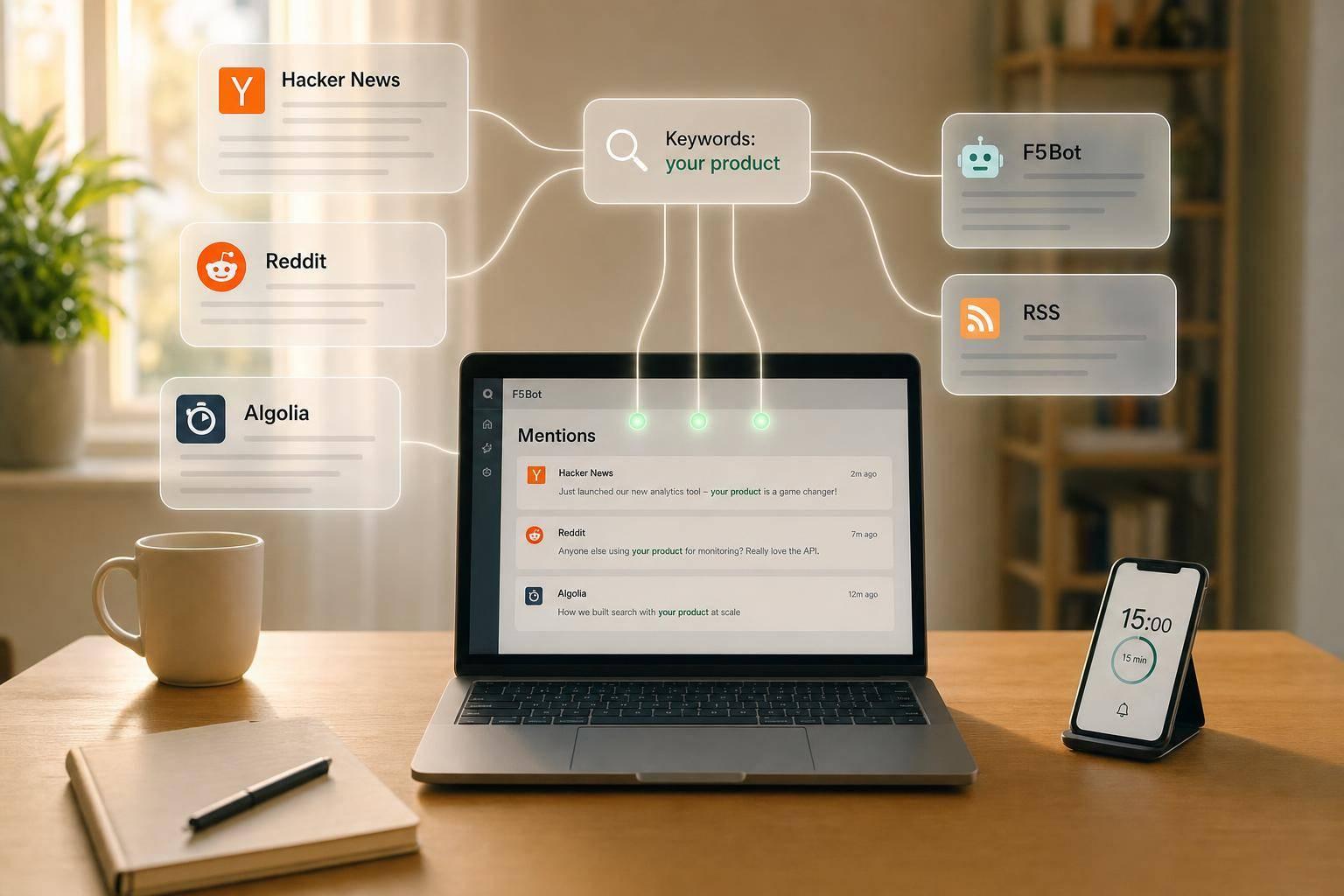
How to Monitor Hacker News and Reddit for Mentions of Your Product
If you wait for users to email you, you miss half the signal. Product talk often shows up first in Reddit comments and Hacker News threads, then sits in Google for months or years. A free setup works if the keyword list stays tight and the review habit stays small.
- Track brand terms, misspellings, competitor names, buyer-intent phrases, and feature terms
- Use Reddit native search with quotes,
AND,OR,NOT, andsubreddit:filters - Use HN Algolia for separate story and comment searches
- Add F5Bot for email alerts and Google Alerts/Talkwalker Alerts for backup coverage
- Keep one weekly review sheet and spend 15 minutes on it
- Expect gaps: free tools miss some comments, and broad keywords create junk
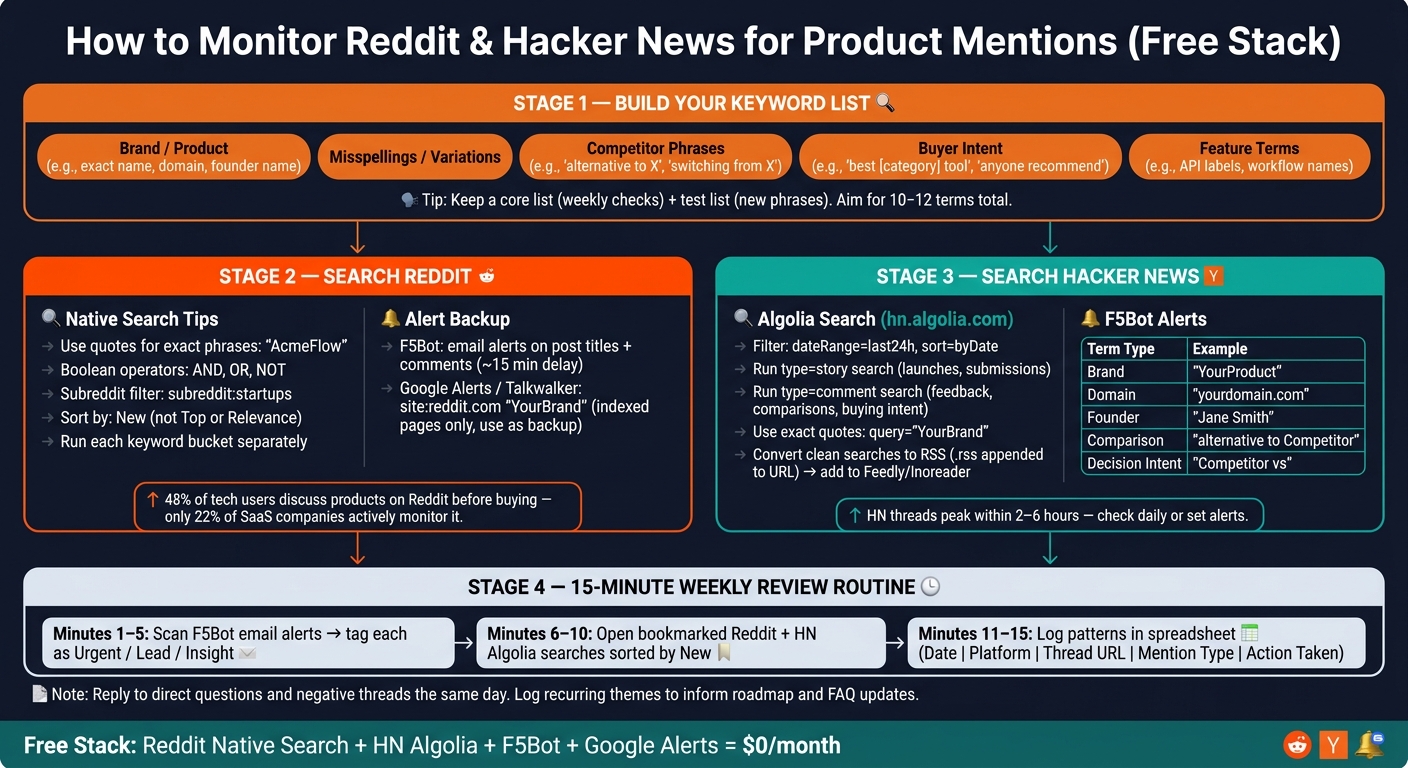
A few numbers explain why this matters. 48% of tech users discuss products on Reddit before buying, while only 22% of SaaS companies actively monitor Reddit. Hacker News threads can peak within 2 to 6 hours, so a slow check often means showing up after the useful part is over.
This is not a tool problem first. It is a keyword and routine problem.
How to Monitor Reddit & Hacker News for Product Mentions (Free Stack)
Build a tight keyword list before you set up any tools
Before opening Reddit or Hacker News, write down the terms people use when they talk about your product, your market, and the problems you solve. If this list is sloppy, every search after it gets sloppy too. If it’s tight, you can run the same checks week after week and spot changes instead of guessing.
The goal is not to dump every possible phrase into one giant pile. You want a short working list that stays useful. These are the exact terms you’ll reuse in search queries, saved searches, and manual checks.
Group keywords by brand, competitor, and buyer intent
Use five buckets: brand terms, misspellings, competitor phrases, buyer intent phrases, and feature terms. Keeping them separate makes scanning easier because each bucket answers a different question. Brand terms show direct mention. Competitor and intent terms surface people who are shopping, comparing, or fed up.
| Keyword Bucket | Examples |
|---|---|
| Brand / Product | Exact name, domain (e.g., brand.io), founder or CEO name |
| Misspellings / Variations | Run-together versions, dropped letters, odd capitalization |
| Competitor | Rival names, "alternative to [Competitor]", "switching from [Competitor]" |
| Buyer Intent / Category | "anyone recommend", "looking for [category]", "best [category] tool" |
| Feature Terms | Distinctive feature names, specific API labels |
Start with the brand bucket on Reddit. That gives you the cleanest signal first: direct mention, support pain, praise, complaints, and random side comments. After that, expand into competitor and buyer-intent searches, where people often describe the problem before they ever mention a product.
Brand terms need more than the exact company name. Add the domain, short forms, spaced versions, run-together versions, and common misspellings. If people can type it wrong, they will type it wrong.
A simple example makes the point. If the product name is TaskFlow, don’t stop at TaskFlow. Add task flow, taskflow app, taskflow.io, and the common typo where one letter drops out. That catches the posts that matter instead of only the neat, polished ones.
Competitive intelligence monitoring works best when the list stays small. Track your top three to five rivals, not every company in the category [1][3]. Once the list gets too broad, search review turns into janitorial work.
Use competitor phrases that match how people talk when they’re ready to move. Good examples include "alternative to [Competitor]", "switching from [Competitor]", and "frustrated with [Competitor]". Those searches pull in comparison threads, churn signals, and posts from people who are actively asking for another option.
Buyer-intent phrases are less direct, but often more useful. A person posting "best CRM for small team" or "looking for invoicing tool" may be much closer to a decision than someone casually naming products in a broad thread. These searches also help when brand awareness is still weak and very few people mention your name outright.
Feature terms round out the list. Use the names of product features that stand out, plus specific API labels, workflow names, or technical terms tied to your product. If users ask for a feature without naming a vendor, these searches can still surface threads worth joining.
This is where search discipline matters. Don’t mash all buckets together in one query and hope for magic. Run them separately so you know whether the result came from direct demand, competitor dissatisfaction, or category-level interest.
For common brand names, Boolean logic cuts down noise fast. A query like (BrandName OR BrandApp) AND (software OR tool) NOT (photography) filters out unrelated chatter. Without that extra control, a brand that overlaps with a hobby, a city, or a person’s name can flood your results with junk.
Negative terms help more than most teams expect. Add -hiring, -job, and -course when recruiting posts, job boards, and training content start taking over the feed. On Reddit especially, one noisy pattern can bury the threads you actually need.
If a search still pulls garbage, narrow it with category or problem terms instead of piling on more vague keywords. "Best CRM" and "looking for invoicing tool" are tighter than broad words like "sales" or "billing." The more the query sounds like a real buyer sentence, the better the results usually get.
There’s a trade-off here. A narrow search gives cleaner results but misses edge cases. A broad search catches more discussion but creates more cleanup work. That’s normal, and there isn’t a magic setting that removes the trade-off.
One practical way to handle it is to keep two versions of your list. Use a core list for repeat checks every week, then keep a test list for new phrases that may or may not be useful. If a test phrase keeps surfacing good threads, move it into the core list. If it stays noisy, cut it.
This matters even more when a brand name is generic. If the name overlaps with a common word, a movie title, or a non-software topic, plain brand search often breaks down. In those cases, category terms and exclusion filters do most of the heavy lifting.
KAEOA usually sees the same pattern: teams overbuild the list at the start, then stop using half of it within a month. A shorter list that gets checked often beats a giant spreadsheet nobody trusts. Search terms are only useful if they stay close to how people talk in the wild.
One more limit is worth stating plainly. Search coverage on Reddit and Hacker News is never perfect. Some threads use slang, abbreviations, or problem descriptions you won’t predict on day one, so the list needs light tuning over time.
Use these five buckets as the base for your Reddit and Hacker News searches next. They give you a repeatable structure, cleaner signal, and a much better shot at finding threads before they disappear into the feed.
sbb-itb-15d6cfa
Use Reddit's native search to find product mentions for free
You already have keyword buckets. Now the job is simple: run them through Reddit search with tight syntax and keep the noise low. Put exact phrases in quotes, use Boolean operators like AND, OR, and NOT, and narrow results with filters such as subreddit:, title:, and self-post filters. A query like "AcmeFlow" AND "alternative" NOT "giveaway" pulls up comparison threads and cuts out junk at the same time.[4][8][9][10][11][12]
Sort by New. That sounds basic, but it matters. Reddit discussions go stale fast, and if you check only Top or Relevance, you often see old threads that no longer help with outreach, research, or support.
Save the searches that keep producing good results. Reddit does not make this glamorous, but saved core queries save time week after week. Run brand terms, competitor names, and buyer-intent phrases one bucket at a time so you can see which group pulls signal and which one just sprays noise.[4][8][9][10][11][12]
A clean search set usually looks something like this:
- Brand:
"AcmeFlow","Acme Flow",title:"AcmeFlow" - Competitor:
"CompetitorName" AND "AcmeFlow" - Intent:
"AcmeFlow alternative","best workflow tool","workflow automation" AND "small business" - Exclusions:
NOT "giveaway" NOT "promo" NOT "job posting"
That approach works because Reddit search is blunt. If the query is messy, the results are messy. If the query is tight, you get threads you can actually act on.
Search specific subreddits before running Reddit-wide scans
Start narrow. Search the 2–3 subreddits most likely to mention the product before scanning all of Reddit. The subreddit: operator gives you a cleaner first pass, so use queries like subreddit:startups "AcmeFlow" or subreddit:entrepreneur "workflow tool".[8][11][14]
This matters for a practical reason: context changes everything. A mention in r/startups means something different from a mention in a giant general-interest subreddit. Inside a focused community, you can see how people talk, what language they use, and whether the post is a buying question, a complaint, or a side comment.
After that first pass, remove the subreddit filter and run the same terms across Reddit. That broader scan catches recommendation and comparison threads that happen outside your home turf, which is often where buying intent shows up.[8][11][14]
Use a steady rhythm instead of checking at random. Check priority subreddits daily, then run wider searches 2–3 times a week for competitor comparisons and category terms like "AcmeFlow alternative".[9][10][11] Daily checks help with speed. The broader scans help with pattern spotting.
There is a trade-off here. Reddit native search is free, but it is not perfect. Results can be uneven, comment discovery is weaker than many teams expect, and the same query may surface slightly different items over time. That is one reason manual review still matters.
Use alerts only after you know which searches pull useful threads. If you set alerts too early, you end up with an inbox full of low-grade mentions and stop trusting the system.
Use Google Alerts or Talkwalker Alerts as a backup, not your main Reddit monitor
Google Alerts and Talkwalker Alerts can help, but only as a backup. A query like site:reddit.com "YourBrand" can catch indexed Reddit pages and push them to your inbox without extra effort.[5][6][7][13]
That sounds handy, and it is, up to a point. The catch is timing and coverage. These alerts lag behind fresh Reddit posts, and they miss comments that are not indexed yet.[5][6][7][13] If the team needs fast visibility into product mentions, support issues, or side-by-side comparisons, relying on Google Alerts alone is like checking yesterday’s weather to pick today’s jacket.
Use them for passive coverage, not active monitoring. They are decent at surfacing a mention you might have missed, especially on older or high-visibility threads. They are not good enough for day-to-day watch duty when speed matters.
For many teams, the best setup is plain: Reddit native search does the main work, and Google Alerts or Talkwalker Alerts fill in the gaps. KAEOA can fit into a workflow like that later, but the manual foundation still matters because it teaches which keywords deserve attention and which ones waste time.
Add a free Reddit alert tool if you want email notifications without manual checks
If manual checks start eating too much time, add a keyword alert tool. F5Bot watches Reddit post titles, linked URLs, and comment text for your chosen terms, then sends an email within minutes when it finds a match.[16][17][19]
That comment coverage is the useful part. Plenty of product talk happens in comments, not post titles, so a tool that watches comment text can catch mentions Reddit search or web alerts may miss. F5Bot also monitors Hacker News and Lobsters with the same keyword list, which helps if your audience lives in more than one technical community.[15][16][18]
Use it as a helper, not a substitute for direct search. If the keyword list is sloppy, F5Bot will faithfully email every sloppy result. That means you still need to clean your terms first, especially around broad category phrases that attract off-topic chatter.
A sensible setup looks like this:
- Manual Reddit searches for brand, competitor, and intent buckets
- F5Bot for email notices on tight keyword sets
- Google Alerts or Talkwalker Alerts for extra indexed coverage
That stack keeps costs at $0 while giving you both pull-based research and push-based alerts. It also keeps control in your hands. You decide which searches matter, which subreddits deserve daily checks, and which terms are too broad to trust.
The honest limit is scale. This method works well when the keyword list is focused and the number of priority communities stays small. Once the brand footprint grows, or once multiple competitors and category terms start throwing off dozens of daily mentions, manual review gets heavy fast. At that point, the free stack still helps, but it stops being enough on its own.
Monitor Hacker News with Algolia search, RSS feeds, and simple alerts
You already have a tight keyword list from Reddit. Use the same list on Hacker News. That saves time, and it works because HN tends to reward the same kind of precise search setup: brand names, misspellings, competitor terms, and a few high-intent phrases.
Hacker News matters most for developer-focused products. Its threads also move fast. A post can peak within 2 to 6 hours after submission, so waiting a day often means showing up after the useful part of the discussion is over. Algolia search at hn.algolia.com gives you the basic controls you need: filter by date, sort by newest, and split stories from comments. A simple brand-monitoring URL looks like this: https://hn.algolia.com/?dateRange=last24h&query=YourBrandName&sort=byDate&type=story. Replace the query with your product name, bookmark it, and check it every day.
Search stories and comments separately to catch all mentions
Start with type=story when you want to catch main submissions. That view is useful for launches, show-and-tell posts, and links where someone shares your site or product page. If someone submits your homepage or release post directly, this is where it shows up first.
But that is only half the picture. A lot of the useful feedback on Hacker News lives in comment threads, not in the submission title. If you only watch stories, you miss comparison talk, bug complaints, offhand praise, and the “we switched from X to Y” comments that tell you how people talk about your product in the wild. Run a second search with type=comment, or remove the type filter if you want one broader pass.
Use exact phrase matching with double quotes when your brand name is specific enough to support it: query="YourBrand". That cuts down on junk from partial matches. If your product name is a common word, plain search gets messy fast, so add context with Boolean logic: (BrandName OR BrandApp) AND (tool OR software) NOT (gaming) [2]. That kind of filter is not fancy for the sake of it. It keeps you from wasting time on mentions that have nothing to do with your company.
A simple split works well:
- Stories for launches, links, and public submissions
- Comments for feedback, comparisons, and buying intent
That trade-off matters. Story search is cleaner, but comment search usually tells you more.
Turn Hacker News searches into RSS feeds for faster daily review
Once a search URL gives you clean results, turn it into an RSS feed. On Algolia, you can append .rss to the end of the search URL and drop that feed into Feedly or Inoreader. Then new matches land in one place with the rest of your monitoring.
This is where Hacker News stops feeling like another tab you have to remember to open. Instead of checking from scratch, you scan a feed during your daily pass. For a small team, that difference is bigger than it sounds. A bookmarked search is easy to forget; a feed in the same reader you already use tends to get seen.
Use RSS mainly for brand terms. That keeps the feed clean enough to review quickly. Broad category terms are different. A feed for something vague like “AI assistant” or “developer tool” usually turns into noise, and once the feed gets noisy, people stop reading it. Review those broader terms by hand so you can adjust the query when results drift.
There is a limit here: RSS is good for collection, not urgency. If a thread takes off in the afternoon, a feed helps you spot it during review, but it does not act like a pager.
Use F5Bot to get email alerts for new Hacker News mentions
For faster notice, use F5Bot. Keep the setup lean and reuse the same brand, misspelling, competitor, and intent keywords from your Reddit list. The free account supports up to 15 keywords, which is enough if you stay disciplined and avoid stuffing it with every possible variation.
F5Bot updates roughly every 15 minutes, so it is fast enough for a same-day response. That matters on Hacker News, where the useful window is short and early replies tend to shape the tone of the thread. Put in your exact product name, your domain, your founder’s name if they are active on HN, and a few phrases tied to buying intent or comparison behavior, such as "alternative to [Competitor]" or "[Competitor] vs" [2].
A tight alert set might look like this:
| Term type | Example |
|---|---|
| Brand | "YourProduct" |
| Domain | "yourdomain.com" |
| Founder | "Jane Smith" |
| Comparison | "alternative to Competitor" |
| Decision intent | "Competitor vs" |
This works best when each keyword earns its spot. Broad terms create noise almost immediately. If your inbox starts filling with weak matches, the alert system stops being useful and turns into background hum.
Use RSS for the daily manual pass and F5Bot for immediate flags. That split is practical. RSS handles routine review; alerts catch the mentions that need attention now. KAEOA usually recommends treating HN the same way operators treat incident channels: route the urgent stuff fast, and batch the rest so it does not eat the week.
There is one honest caveat. Hacker News search is good, but it is not perfect. Comment discovery can still miss nuance when people refer to you indirectly, use shorthand, or talk about your product without naming it. F5Bot also depends on the terms you choose, so if the keyword list is sloppy, the alert quality drops with it. Tight inputs matter more than extra tools.
A simple setup is enough for most teams. Bookmark the Algolia story search, run a second pass on comments, convert the clean searches to RSS, and reserve alerts for the few terms that signal urgency. That gives you a fast HN check without turning one site into another full-time monitoring job.
Turn Reddit and Hacker News monitoring into a 15-minute weekly routine
Once searches are saved, this stops being a “check all day” problem. It turns into a short review block you can run once a week without losing the signal.
Stick to one tight list of 10–12 terms pulled from the earlier keyword buckets, then reuse that same list everywhere. That matters more than people think. If each tool uses a different set of terms, the process gets messy fast and patterns get harder to spot.
Example setup: 12 keywords, 3 Reddit searches, 2 Hacker News queries, 1 weekly review sheet
Use three Reddit searches, two Hacker News queries, and one spreadsheet to keep the whole thing in bounds. The point is not to build a fancy system. The point is to make sure the same small set of checks happens every week.
For storage, a plain spreadsheet works fine. Keep five columns:
- Date
- Platform
- Thread URL
- Mention type
- Action taken
That’s enough to spot repeats without turning the sheet into admin work. A lot of teams overbuild this part and then stop using it. A thin log is better than a big system nobody updates.
During the weekly 15-minute pass, break the routine into three short blocks:
- Minutes 1–5: Scan F5Bot email alerts from the past week. Tag each mention as Urgent, Lead, or Insight.
- Minutes 6–10: Open bookmarked Reddit and HN Algolia searches sorted by New so missed items still show up.
- Minutes 11–15: Log patterns in the spreadsheet, such as recurring feature requests, competitor complaints, or questions that should feed FAQ updates or roadmap notes.
That last step is where the value shows up. One complaint by itself may be random noise. The same complaint showing up three times in a month is a pattern. The spreadsheet gives you a way to tell the difference.
Reply to direct questions and negative threads the same day. Waiting a week on those usually backfires. If somebody is actively asking for help, or if a thread is turning against your product, speed matters more than perfect wording.
Know the limits of a free monitoring stack
This workflow works well until the volume goes up or the noise starts drowning out the useful stuff. Free tools miss some mentions, and comments are often the first thing to slip through. Generic queries also tend to bring back junk, so manual review still matters even when alerts are set up well.
Generic product names are the roughest case. If your name is close to a common word or job title, results can get polluted fast. Use negative terms to cut out obvious noise, such as excluding “hiring,” “job,” or “resume” when those terms don’t belong.
There’s a trade-off here. Add too many keywords, and the list gets noisy. Add too many exclusions, and you start missing useful posts. When results drift, prune the keyword list instead of piling on more terms. A smaller list with cleaner intent usually beats a big list that nobody trusts.
A simple example helps. Say a search for your product keeps pulling in hiring threads and candidate posts. Don’t answer that by adding five new related keywords. Start by removing weak terms and adding a couple of exclusions. That keeps the review pass short enough to survive week after week.
Manual checking also catches context that alerts often miss. A Reddit title may look harmless until the comments turn into a feature debate or a comparison thread. Hacker News can do the same thing. The original post may not mention your product directly, but the comments can still reveal where buyers are annoyed, confused, or ready to switch.
Optional: centralize your workflow in KAEOA or another aggregator when manual checks stop scaling
At some point, the weekly pass starts creeping past 15 minutes. Usually that happens for one of two reasons: the number of mentions goes up, or the keyword list gets broad because different people keep stuffing more terms into it.
When that happens, centralize the same inputs in one digest. Move the same keyword set into an aggregator such as KAEOA or another daily digest tool, then review one feed instead of bouncing across tabs and inboxes. The logic stays the same. Only the collection layer changes.
That said, don’t switch too early. The free stack is still the right starting point because it forces discipline. You see exactly which terms work, which searches are noisy, and which sources are worth checking. If you skip that learning phase, you can end up paying for a bigger inbox full of low-grade mentions.
There’s also a limit to what an aggregator fixes. It can cut tab fatigue and save time, but it won’t magically clean up a bad keyword strategy. If your search terms are vague, the digest will still be vague. If your product name is generic, you’ll still need exclusions and some human judgment.
Use the free stack first. Switch only when manual review no longer scales, not when the idea of automation just sounds nice.
Conclusion: a consistent monitoring habit beats missed mentions
Once the searches are saved, the work gets simpler. The same keyword set, the same searches, and the same weekly review turn scattered mentions into signals you can act on again and again.
That rhythm works because it pairs fast alerts with a set review window. F5Bot, bookmarked searches, and a Google Alerts alternative form a free stack that covers most solo monitoring needs without much setup. You catch new mentions as they happen, then use the weekly pass to spot patterns, pull out leads, and ignore noise.
The weak point isn’t the tools. It’s the habit. Skip a week, and small but useful mentions slip by. Keep the keyword list short, check the saved searches every week, and resist the urge to add every vague term that sounds related. In practice, the best mentions often show up first in comments, where people ask for alternatives, share pain points, or name the tool they switched to.
That’s the part many teams miss. They watch headlines and big posts, but the buying signal often sits three replies deep in a Reddit thread or under a niche blog post. A plain, repeatable routine beats a fancy setup that never gets checked.
FAQs
How do I choose the right keywords?
Balance signal and noise from day one. Start with 3 to 5 high-intent search phrases tied to the problem the product solves, not just the brand name.
Use a tight set of terms that show intent, such as:
- the product name and common misspellings
- competitor names paired with terms like "alternative" or "disappointed"
- buying-signal phrases like "looking for [category]" or "recommend [category]"
This works better than chasing broad mentions. A search for a plain brand name often pulls in junk, off-topic comments, old threads, or people talking about something else with the same acronym. Problem-led phrases cut through that mess.
Test every term in Reddit search and sort by new. That view shows what the feed looks like right now, not what got upvoted six months ago. If more than half the results are off-topic, tighten the query. Add negative keywords like -hiring or -job to strip out posts from people recruiting, job hunting, or talking about careers instead of buying.
A simple pass is enough at first. Search the term, scan the first batch of results, and judge relevance fast. If the pattern is noisy, narrow it. If the results show people asking for options, comparing tools, or venting about a rival, keep it.
Check terms daily for the first week. That first week gives a clean read on whether the phrase pulls buyer intent or just chatter. After that, switch to a monthly audit so the list stays tight as language shifts, new competitors show up, or a phrase starts drifting off-topic.
How often should I check Reddit and Hacker News?
Aim to catch mentions within the first 2 to 6 hours. That’s when threads usually have the most activity, and your reply still has a fair shot at helping the discussion instead of arriving after everyone has moved on.
For a solo founder, daily checks are the bare minimum. Once more than 24 hours pass, you’re often too late to add much that people will notice or care about. On high-priority platforms like Hacker News, hourly checks or real-time alerts work better, because the pace is much faster and useful threads can peak and fade in a single afternoon.
When should I switch from free tools to an aggregator?
Switch when free tools stop giving you a workflow you can trust. A common tipping point is volume: once you’re dealing with more than 30 mentions a week or around 5 alerts a day, the noise starts to pile up fast. At that point, the job isn’t finding mentions anymore. The job is sifting through junk, checking what matters, and trying not to miss the one thing that actually needs attention.
Another clear sign is time loss. If someone on the team spends too much of the week manually sorting irrelevant results, free tools are no longer cheap. They’re just shifting the cost from software to labor. That trade-off gets worse when alerts are inconsistent, duplicate mentions keep showing up, or sources come in without enough context to act on them.
You’ll likely need an aggregator once team coordination starts to matter. A single inbox or one person forwarding screenshots might work for a while, but it breaks down when multiple people need to review mentions, assign follow-up, or keep a shared record of what happened. Reporting creates the same pressure. If leadership wants recurring updates, trend lines, tagged issues, or proof that responses happened on time, manual tracking turns into a mess pretty quickly.
The same goes for workflow bottlenecks. When manual replies, sentiment analysis, semantic search, or integrations become the slowest part of the process, free monitoring tools usually run out of room. They may catch the mention, but they don’t help much with routing, classifying, or acting on it. That’s usually the moment teams start looking at platforms like KAEOA - not because the alerts vanish, but because the work around the alerts starts eating the day.