Market Intelligence
Include and Exclude Keywords: How to Write a Filter That Does Not Leak

Include and Exclude Keywords: How to Write a Filter That Does Not Leak
Most broken keyword filters fail for one of two reasons: they match too much, or they miss the thing that matters. The fix is plain: split the query into three parts, test it on past results, and keep tuning it as language shifts.
- Put the must-have entity in one group
- Put the topic or intent terms in another
- Block repeat junk with NOT
- Limit the fields when the source allows it
- Check both false positives and misses
- Change one layer at a time
A filter is not “done” when the syntax looks clean. It is done when the feed holds up against actual news, Reddit threads, RSS items, and social posts.
Build your first filter: include groups, exclude groups, and field limits
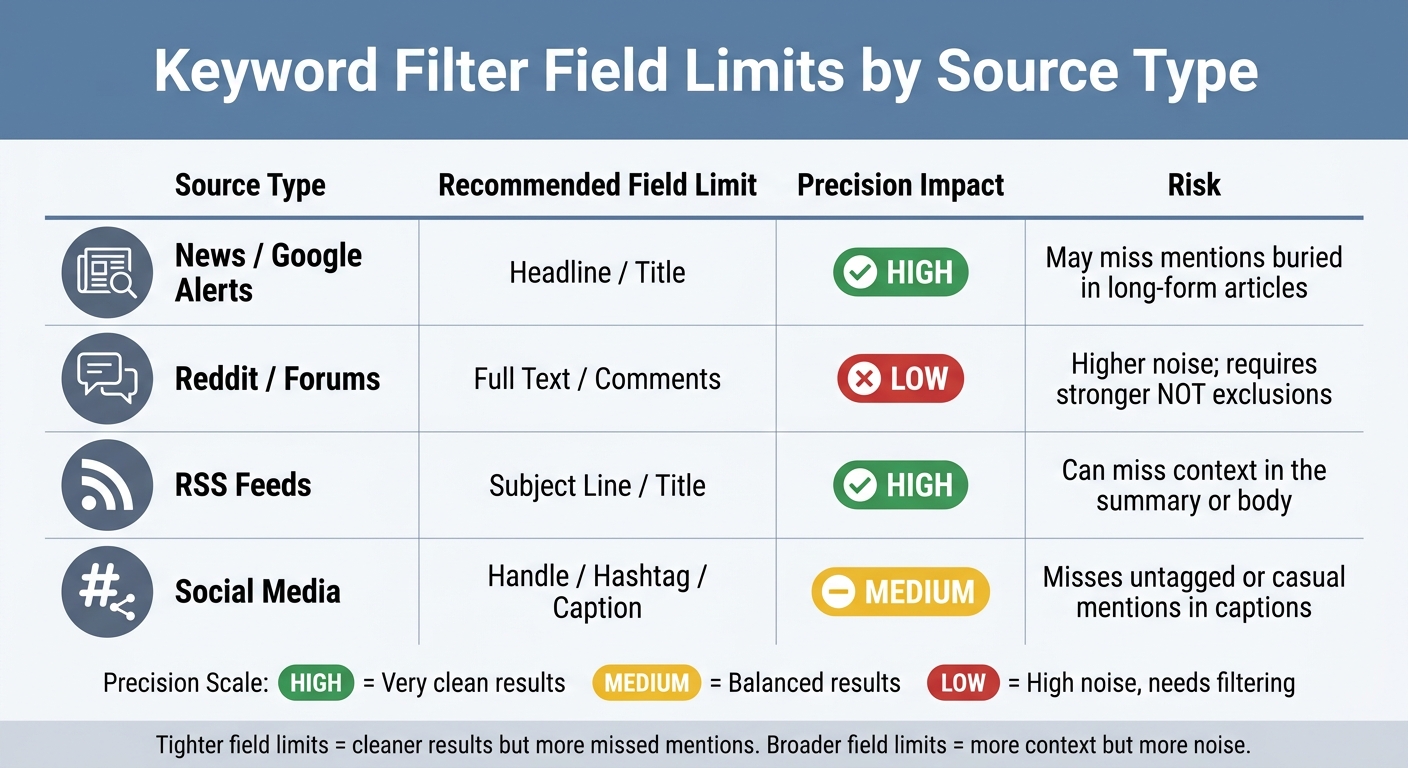
Keyword Filter Field Limits by Source Type: Precision vs. Noise Trade-offs
Start with a filter that does three jobs: include the right mentions, cut known noise, and limit where the tool looks. Keep it simple on the first pass, then run it against live results and tighten it based on what shows up.
Build include groups for brands, people, topics, and comparison terms
Use include groups to tell the system what must be present. For a brand like Nike, a clean starting group looks like this: (Nike OR "just do it" OR @Nike). The quoted phrase matters because it keeps multi-word names together, which cuts stray matches when the same words show up apart in some unrelated post.
This same pattern works for people, product names, campaign lines, and topic clusters. If a name has a common spelling or a slogan gets reused in other contexts, quotes help keep the signal tighter. It’s a small step, but it saves cleanup later.
For competitor tracking, keep comparison intent in its own group instead of stuffing everything into one long OR string. Terms like vs, alternative to, switching from, and better than usually point to people who are actively weighing options, not just tossing out a mention. A plain setup looks like this: (Brand A OR Brand B) AND ("vs" OR "alternative to" OR "switching from" OR "better than").
That second group changes the quality of results. Without it, the filter pulls general brand chatter. With it, the filter starts surfacing buying intent, migration talk, and side-by-side evaluations. That’s often where the useful stuff lives.
(Brand A OR Brand B) AND ("vs" OR "alternative to" OR "switching from" OR "better than")
One caveat: comparison language is messy. People also write “worth it,” “replace,” “moved over from,” or “thinking about leaving.” If volume is low, the first fix usually isn’t a bigger brand list. It’s adding the phrasing real people use in the source you’re watching.
Build exclude groups from recurring noise patterns
Exclude groups exist to kill repeat junk before it spreads through the feed. Job posts are a classic example. If a brand name keeps pulling recruiting posts, add terms like hiring, careers, and jobs right away instead of waiting for the mess to pile up.
This matters even more when the tracked term is generic or has other meanings. Apple is the obvious case. If the goal is the company, not food, a starting filter like (Apple NOT fruit NOT pie) cuts a lot of junk fast. You can tune the rest after that, but known noise should go out on day one.
(Apple NOT fruit NOT pie)
This kind of cleanup is rarely elegant, and that’s fine. Filters are not essays. They’re working rules. If a term leaks bad matches over and over, block the pattern and move on.
There’s a trade-off, though. Every NOT term can hide a real mention if the post contains both the wanted and unwanted word. A news story about Apple at a food-tech event might get excluded by accident. That’s why blunt exclusions work best when the noise is heavy and obvious, not when the topic already sits on a thin edge of low volume.
A practical way to handle this is to review the misses, not just the hits. If relevant mentions keep disappearing after a new NOT rule, back it off or move the filter to a narrower field instead of piling on more exclusions.
Apply the same logic across alerts, RSS, Reddit, news, and social tools
The include/exclude logic stays the same across tools, but the field limit changes how much noise you invite in. In alerts and RSS, title-only filters usually work well because headlines carry most of the editorial intent. If the title says the brand name, odds are decent the piece is actually about the brand.
Reddit, forums, and most social sources behave differently. Good discussion often shows up in the body, comments, captions, or reply threads rather than in the title. If you limit too hard there, you miss the posts that matter. If you open the full text, you catch more useful material, but you also pick up more junk.
That’s the trade. Tighter field limits give cleaner results but can miss buried mentions. Broader field limits pull more context but need stronger NOT logic to stay usable.
| Source Type | Recommended Field Limit | Precision Impact | Risk |
|---|---|---|---|
| News / Google Alerts | Headline / Title | High | May miss mentions buried in long-form articles |
| Reddit / Forums | Full Text / Comments | Low | Higher noise; requires stronger NOT exclusions |
| RSS Feeds | Subject Line / Title | High | Can miss context in the summary or body |
| Social Media | Handle / hashtag / caption | Medium | Misses untagged or casual mentions in captions |
The table looks simple, but the choice affects workflow more than people expect. A title-only news filter is easy to review and usually clean. A full-text Reddit filter can dump a lot of half-relevant chatter into the queue unless the excludes are doing real work.
In practice, a good first pass looks like this:
- Use title/headline limits for news alerts and RSS.
- Use full text or comments for Reddit and forums.
- Use handle, hashtag, or caption fields for social when the tool supports them.
If a source starts noisy, don’t change five things at once. Keep the include group steady and adjust one layer at a time: first field limit, then NOT terms, then extra intent phrases. That makes it easier to see which change helped and which one just moved the mess around.
Some tools also handle syntax a little differently. One platform may accept NOT, another may prefer a minus sign like -jobs, and another may treat quoted phrases in a stricter way. Before blaming the logic, check the parser rules in the product itself. KAEOA users run into this less when templates are set up cleanly, but the rule still stands across tools.
Run the draft query against actual mentions, then look at two piles: what should have matched but didn’t, and what matched but shouldn’t have. That review tells you more than theory ever will. One missed thread on Reddit or one flood of hiring posts usually reveals the weak spot right away.
sbb-itb-15d6cfa
Test your filter against real examples before you trust it
A filter can look clean on paper and still fail the minute it hits live data. The only check that matters is this: run it against 1–2 weeks of past mentions, then read 50 results by hand. That first pass should show where it breaks - false positives, false negatives, and patterns the raw volume count hides.
Example 1: tighten a company filter across news, Reddit, and RSS
Start with a layered query like this:
(Brand OR @Handle OR "Brand Name") AND (review OR outage OR pricing OR lawsuit OR launch) NOT (jobs OR careers OR ticker OR coupon)
That structure gives each part a job. The OR group covers the ways people name the company. The AND group limits results to the topics that matter. The NOT group cuts obvious junk before it floods the feed.
Once results come back, the weak spot usually shows up fast. If the feed is packed with junk, the NOT group is too thin and needs terms pulled from the noise you’re actually seeing, not guessed in advance. If the query returns less than expected and you already know relevant mentions exist, the OR group is too narrow [1].
Reddit usually needs its own pass. People use sarcasm, shorthand, in-jokes, and community slang there, so the wording often looks nothing like a news headline or an RSS item [1]. If the tool supports subreddit scoping, use it early to narrow the first pass, then open it up after you know what clean matches look like [4].
That same testing pattern works for people, products, and topics. The logic stays the same. What changes is the anchor.
Example 2: disambiguate an executive name that shares a name with public figures
A search for "Jordan Lee" with no added context can pull athletes, actors, musicians, and a pile of unrelated mentions [2][3]. A plain name search is often too loose, especially for common names. The fix is to start with name variants, then pin the query to role or company context.
("Jordan Lee" OR "J. Lee") AND (CEO OR founder OR Acme) NOT (basketball OR actor OR music)
Each layer does a different kind of cleanup. The OR group catches variants of the name. The AND group ties the person to a role or company. The NOT group removes the most obvious collisions.
If the tool supports proximity operators, use them. "Jordan Lee" NEAR/5 Acme is tighter than a plain AND because it forces the company name to appear close to the person’s name, which cuts a lot of stray matches [1][2]. That matters when a page mentions both terms but in different parts of the document for unrelated reasons.
There’s a trade-off, though. A stricter proximity rule can drop good hits if the article uses the full company name in one paragraph and the person’s short name much later. Precision goes up, recall can drop, and that’s why the sample review matters.
Use a simple pass-fail log to track useful hits and misses
Don’t tweak a filter from memory. Keep a plain log after each run and record three things: what matched, what missed, and what should have matched but didn’t. Tag each sampled result as useful or noise, then note any expected mention that never appeared.
A small table is enough:
| Result | Tag | Note |
|---|---|---|
| News article on outage | useful | Correct brand + topic match |
| Job board post | noise | Add jobs and hiring to NOT |
| Known Reddit thread missing | missed | Add slang term to OR group |
This keeps the work honest. Without a log, it’s easy to “fix” one problem and create another without noticing. With a log, each edit has a reason behind it.
If more than 40% of the sample is noise, the NOT group needs work [2]. If volume is lower than expected and known mentions are missing, the OR group is too narrow [1]. Change one layer at a time - NOT first when the feed is messy, OR first when it’s too quiet - so you can see which edit changed the results [1].
That one-change rule sounds slow, but it saves time. When three parts change at once, there’s no clean read on what fixed the issue and what made it worse. Filters drift fast when edits pile up without a trace.
A weekly review cadence is usually enough for most teams. That catches shifts in coverage, new spam patterns, and new language before the filter goes stale. KAEOA teams often see this with earnings cycles, product launches, or a sudden burst of Reddit chatter around one subreddit while the rest of the web stays quiet.
One more limit is worth stating plainly: a clean filter does not mean full coverage. Some sources block crawling, some tools parse operators a bit differently, and some mentions just won’t use the words you expect. A filter helps you cut noise and find signal faster. It does not turn open-web monitoring into a perfect record of everything said everywhere.
Maintain your filter over time, not just at setup
A clean filter on day one can get messy a few months later. Language shifts, reporters pick up new shorthand, product teams rename things, and a query that used to pull the right feed starts missing good hits while letting junk slide through.
The pass-fail log from testing gives the best signal for what to change. Use it to decide what to add, what to cut, and where a term needs to be widened. If a term keeps failing for the same reason, fix that pattern instead of tweaking the query at random.
Review the query every quarter. That cadence is slow enough to avoid busywork and fast enough to catch drift before the feed goes stale. If the topic moves fast, use shorter review cycles for the parts most likely to change.
Add new variants and drop obsolete terms on a schedule
Repeated coverage questions are a solid trigger for updates. If the same “why didn’t this show up?” issue keeps coming back, the query is out of date. Match the review schedule to the pace of the topic rather than treating every filter the same.
| Frequency | Focus | What to do |
|---|---|---|
| Weekly | Noise control | Add recurring junk to the NOT list |
| Monthly | Missing variants | Check for new product names, nicknames, or phrasing journalists are using |
| High-change periods | Precision during launches or rebrands | Update immediately after a launch, rebrand, crisis, or executive change [5] |
| Quarterly | Full query review | Review the entire Boolean string for obsolete terms, logic gaps, or outdated competitor names [1] |
That schedule works because each check has a narrow job. Weekly review keeps spam and off-topic clutter from piling up. Monthly review catches the new names people start using in the wild, especially in headlines and social posts where phrasing changes fast.
High-change periods need a different mindset. During a launch, rebrand, crisis, or executive move, waiting for the next monthly or quarterly pass is too slow [5]. Update the query as soon as the language changes, or you’ll spend days reading the wrong feed.
Quarterly review is where you step back and inspect the whole Boolean string [1]. Look for old competitor names, stale exclusions, and logic that made sense six months ago but now cuts out good coverage. This is also the right time to check whether one part of the query has grown into a patchwork of fixes that should be rewritten cleanly.
A simple operating habit helps here: save examples every time the filter misses or misfires. One folder for false positives, one for false negatives. After a few weeks, the pattern usually jumps out. Maybe reporters switched from the full product name to an acronym. Maybe a NOT term now blocks valid stories because the market moved.
KAEOA sees this a lot in launch-heavy categories. Teams spend time building the first query, then leave it alone while the language around the topic keeps moving. The result is predictable: less trust in the feed, more manual cleanup, and a lot of “why didn’t we catch this?”
Know when keyword filters fail and when manual review or source-specific monitoring helps
Sometimes the query is not the problem. If updates stop improving the feed, the weak point is often the source itself, not the Boolean logic.
Generic brand names are the classic failure case. If a company name is also a common English word, no amount of extra tuning will cleanly separate every brand mention from everyday usage. You can reduce noise, but you usually can’t remove all of it without dropping real coverage too.
Image-only mentions create another hard limit. Screenshots, memes, and image posts can carry the brand reference with little or no text. A keyword filter cannot read what is never written in the first place. If that channel matters, the answer is manual review, image analysis from a platform that supports it, or tighter source selection.
Reddit and other community-heavy spaces break filters in a different way. People use inside jokes, clipped names, sarcasm, and thread-specific language that never appears in press coverage. A clean Boolean string built on newsroom phrasing often misses that layer entirely. In those cases, source-specific monitoring works better than stuffing more edge cases into one giant query.
When updates stop fixing the feed, the problem is usually the source, not the query.
That line matters because teams often respond to bad results by piling on more NOT terms. Sometimes that helps. Sometimes it just makes the query brittle. A bloated exclusion list can block good coverage, hide new variants, and make the filter hard to debug later.
Use a practical test. If a bad result set comes from one source type over and over, isolate that source before rewriting the full query. News, blogs, forums, and social posts do not behave the same way, so they usually should not share the exact same filter logic.
There’s also a trade-off between precision and labor. Manual review takes time, but for messy sources it can beat hours spent trying to force keyword logic to do a job it can’t do well. Source-specific monitoring adds setup work, yet it often gives cleaner signal than a single catch-all filter.
KAEOA’s rule of thumb is simple: if a source keeps producing misses after a few clear query updates, stop treating it like a keyword problem. Change the monitoring layer, narrow the source set, or accept that part of the workflow needs human review.
None of this is glamorous, but it’s how good monitoring stays useful. Filters drift. Names change. Language mutates around the topic. The teams that keep signal quality high are usually the ones running small, steady updates instead of waiting for the feed to break.
Conclusion: a clean filter comes from structure, testing, and upkeep
A filter that keeps working is a process, not a one-time search. Start with the entity that must appear, add every name variant people actually use, tie it to the right context with AND, and remove repeat junk with NOT. Parentheses matter. Without them, the platform can read the logic in the wrong order and send back bad results.
Good structure on paper means nothing if the live results are messy. Test the query against recent data, open real matches by hand, and change only one layer at a time so the cause of each shift stays clear. If volume drops after one edit, you know where the problem came from. If quality improves, you know what to keep.
That discipline also keeps you from chasing ghosts. When teams rewrite three parts of a filter at once, they usually can’t tell whether the fix came from a new keyword, a tighter exclusion, or a better grouping rule. Slow, boring testing wins here.
Then comes the part people skip: upkeep. Language changes, product names change, publishers change their phrasing, and new false positives show up out of nowhere. A query that worked six months ago can drift without anyone noticing, especially if no one checks samples from current results.
KAEOA works best when it supports that habit instead of replacing it. The query still needs clean logic, hand checks, and regular edits. No tool saves a weak filter that never gets reviewed.
Keep the structure tight, test it against what people are saying now, and trim the junk as it appears.
FAQs
How broad should my first filter be?
Start with a broad OR group that covers every way people might mention your brand. Include the clean brand name, common misspellings, your social handle, and any hashtag people use in the wild. People rarely type names the way a style guide wants, especially on social, so this step catches the loose, honest mentions that would otherwise slip past your search.
A simple pattern looks like this:
("YourBrand" OR "YorBrand" OR "@yourhandle" OR "#YourBrand")
After that, tighten the query with AND so results stay tied to the topics you care about. If the goal is product feedback, pair the brand group with terms tied to support, pricing, bugs, reviews, or a product line. If the goal is campaign tracking, use the campaign name, slogan, or offer language people are likely to repeat.
Then use NOT to cut out junk you already know will pollute the feed. Recruiting posts are a common one, so terms like jobs, hiring, careers, and recruiter often belong in the exclusion set. You should also remove unrelated meanings if your brand name overlaps with a common word, a place, or another company.
A working query might look like this:
("YourBrand" OR "YorBrand" OR "@yourhandle" OR "#YourBrand") AND ("pricing" OR "review" OR "bug" OR "support") NOT ("jobs" OR "hiring" OR "careers")
Don’t trust the first version just because it looks clean on paper. Run it against at least one week of historical data and inspect the results by hand. That small test shows you where the query is too loose, where it misses obvious mentions, and which exclusions are too aggressive.
When should I use NOT terms versus tighter field limits?
Use NOT terms only for junk that shows up again and again in the results. Good candidates are job posts, off-topic meanings, or spam phrases that keep polluting the feed. Add those exclusions after checking the results, because broad filters can cut out posts you actually want.
When a keyword is messy or has multiple meanings, tighten the query instead of swinging a big hammer with NOT. Use exact-match phrases, proximity operators, or plain AND logic to pin down the context. If the same term appears in both useful posts and noisy ones, narrower phrasing usually does a better job than a broad exclusion.
How often should I update a keyword filter?
Review keyword filters at least quarterly. Language shifts, slang comes and goes, competitors rename products, and people misspell the same brand in new ways. If filters sit untouched for six months, results start drifting and you spend more time cleaning up searches by hand.
Update filters any time a new campaign goes live or the public face of the company changes, such as adding a new spokesperson. Those moments change how people talk about the brand, and the old setup usually misses part of the conversation.
A simple rule helps keep tracking tight: if the same topic needs a manual search twice in one month, add it to the filter set. On the flip side, cut keywords that keep pulling junk results and burying the mentions that matter. More terms do not always mean better monitoring; sometimes they just make the feed louder.