Productivity
How Researchers Use RSS Feeds to Stay Informed Daily
How Researchers Use RSS Feeds to Stay Informed Daily
Keep up with new papers without letting your unread queue set your schedule. Start with a few research feeds, spend 10–20 minutes a day checking titles and abstracts, and save full-text reading for a weekly session.
For language research, add https://rss.arxiv.org/rss/cs.CL to your reader; for a specific biomedical topic, create an RSS feed from a PubMed search. Group subscriptions by topic, check priority journals first, and use keyword filters to reduce noise. For retrieval-augmented generation, try “retrieval-augmented generation,” “retrieval augmented generation,” and “RAG,” using OR logic if your reader supports it.
Treat each match as a reason to check the abstract - not proof that a paper belongs in your reading list. Save papers with a short note explaining why they matter, then aim to read 1–2 during your weekly review. Scan a few unfiltered titles each week to catch wording your filters miss, and remove feeds that keep producing irrelevant results.
<u>RSS supports monitoring, not an exhaustive literature search.</u> Feed coverage, publisher updates, and reader polling can delay or omit papers. Use database searches and citation tracking when you need coverage beyond your subscriptions, and treat zero unread items as optional - not a daily target.
Staying up to date in science - setting up alerts & using RSS feeds
sbb-itb-15d6cfa
Start with a few research feeds
Your daily reading window is fixed, so choose feeds that fit within it. Start with one or two subject feeds, a few priority journals, and one or two specialty sources or saved searches; add more only when you can still review the queue within that window.[5][7]
Choose feeds for your research topic
For arXiv, use
https://rss.arxiv.org/rss/cs.CLfor computation and language, orhttps://rss.arxiv.org/rss/cs.AI+cs.LGfor AI and machine learning.[5]
Choose categories that match your current work instead of subscribing to all of computer science.[5] A focused selection keeps your daily scan centered on papers you have a reason to read.
Add journal issue or latest-article feeds alongside your subject feeds. Check each journal’s Current Issue page or search its name plus “RSS feed”; some journals provide both issue feeds and online-first feeds.[5]
For more targeted coverage, search PubMed by topic or author, then select Create RSS. This brings relevant papers from journals outside your usual subscriptions into your reader.[4][5]
Subscribe and organize feeds by topic and priority
Paste each URL into your reader’s Add feed or Subscribe option. Check that entries load and article links open, then rename any subscription whose title doesn’t clearly identify the source.[5]
Group feeds into topic folders, and keep priority sources separate from broad discovery feeds.[5] This lets you check your must-read sources without sorting through the full queue.
Example folders: Natural Language Processing, Methods, and Key Journals.
Your reader collects only the updates that publishers or databases provide through their feeds.[5] After grouping your subscriptions, use keywords to narrow the items you review.
Filter feeds for relevant papers
Your feeds are grouped by topic, but the daily queue still contains papers outside your focus. Add keyword filters to keep your 10–20 minute scan focused, while treating each match as a prompt to read - not a substitute for reading.
Filter an arXiv feed by keyword
For retrieval-augmented generation research, start with arXiv’s
cs.CLfeed. Filter titles for “retrieval-augmented generation,” “retrieval augmented generation,” or “RAG.” Use OR logic when supported; otherwise scan titles manually.[5][6]
Create a filtered view with your reader’s filter rules rather than deleting papers that don’t match. Include abstracts only if your reader can search that field; a title-only filter cannot catch wording that appears only in the abstract.[1][6][9]
Check the results for unrelated uses of “RAG,” such as recombination-activating gene. If those papers appear, combine “RAG” with “LLM” or “language model” to narrow the results.[6][7]
Review filter gaps
Your query can miss relevant papers when authors use different wording. Broaden it based on the terms you find in the literature.
Add related phrases used in the literature, such as “retrieval-based LLMs,” “knowledge-augmented,” and key datasets, authors, or application areas.[6][7]
Search only fields your reader supports.[6] Each week, scan a few unfiltered titles for missed papers and unfamiliar terms. Keep a separate filtered view when possible, so you can check the original feed and update your query from papers it misses.[6][7]
Keep broad feeds for discovery and keyword filters for reducing noise; unfiltered scans help catch papers the query leaves out.[5][6][7] Save papers that pass your filter for your deeper-reading session.
Separate daily scanning from deeper reading
Research RSS Workflow: Scan, Inspect, Save, Review
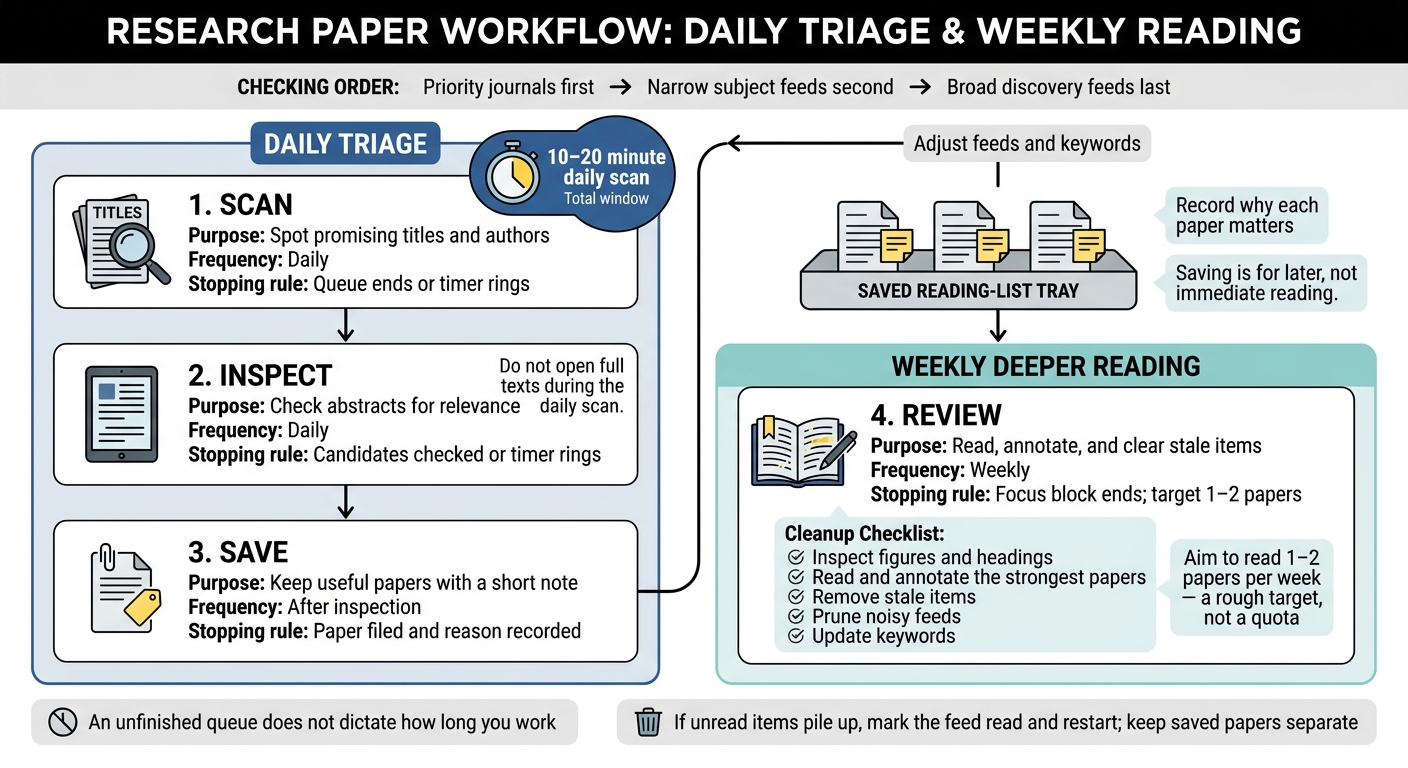
Your filtered feeds still need a stopping rule, or a quick check turns into a reading session. Check priority journals first, narrow subject feeds second, and broad discovery feeds last. Use that order to sort incoming papers rather than keep searching for more.[7][8]
Scan, inspect, and save within your time limit
Scan unread titles, then open abstracts for papers that look relevant. Decide whether to skip or save each paper before your timer ends, and stop when it rings. Do not open full texts during the daily scan: saving a paper marks it for later, not for immediate reading.[7]
Save useful papers in your reader, reading list, or Zotero. Add a short tag or note explaining why each paper matters so you can judge it later without repeating the same abstract check.[4][7]
Review saved papers and adjust feeds weekly
Use this week’s saved papers as next week’s reading list. Aim to read 1–2 papers per week, but treat that number as a rough target, not a quota.[7] Inspect figures and headings before reading and annotating the strongest papers; remove stale items from the active queue while keeping useful references in Zotero.[1][4]
Keep the same four-step loop across your daily scans and weekly reading blocks. Each step has a clear stopping point, so an unfinished queue does not dictate how long you work.
| Step | Purpose | Frequency | Stopping rule |
|---|---|---|---|
| Scan | Spot promising titles and authors | Daily | Queue ends or timer rings |
| Inspect | Check abstracts for relevance | Daily | Candidates checked or timer rings |
| Save | Keep useful papers with a short note | After inspection | Paper filed and reason recorded |
| Review | Read, annotate, and clear stale items | Weekly | Focus block ends; target 1–2 papers |
During the weekly review, prune noisy feeds and update keywords as your project changes. Filters need these adjustments to keep results relevant and protect your time. If unread items pile up, mark the feed read and restart, but keep saved papers separate from that reset.[7]
Know the limits of RSS
Your daily scan can miss a new paper even when your feed list is well tuned. RSS is not live: arXiv subject feeds update once a day at midnight U.S. Eastern time and skip weekends. Journal feeds may update when papers appear online or wait until a full issue is released, and your reader polls each feed on its own schedule. Expect delays rather than immediate updates.[1][5]
You only see what publishers include in their feeds. When a paper matters to your work, check its references for related research your feeds did not surface.[2][7]
Use RSS for daily monitoring, not exhaustive review. For exhaustive literature searches, use PubMed or Web of Science; for citation tracking, use citation alerts or citation-search tools.[1][3][9]
Conclusion: keep feeds focused and decisions clear
Your unread count doesn’t need to reach zero. Subscribe to a few arXiv subject feeds and journal feeds, then group them by topic and priority so you know where to start. Keep priority feeds separate from broader reading.
Limit your daily scan to 10–15 minutes.[7] Scan titles, save promising papers, and skip updates that don’t fit your interests.
Reserve one weekly session for deeper reading and feed cleanup.[7] Use your saved items to adjust what you follow, and scan one broad feed for terms your filters miss before updating those filters.
FAQs
How can I avoid saving duplicate papers?
Use a reference manager like Zotero, which includes built-in RSS support, to track and organize papers in one searchable library instead of a separate folder. You can then find what you’ve saved without digging through files.
Many RSS readers separate read posts from new ones, so you don’t review the same content twice. If you lose track of your progress, use “mark all read” to reset the feed’s read status - but note that this also marks unread posts as read.
What if a journal has no RSS feed?
If a journal has no official RSS feed, check whether your RSS reader can build a custom feed from its new-article page. You can also use a website monitoring tool such as deltafeed to track changes on pages without feeds.
For search-based updates, use Google Scholar alerts or PubMed’s RSS generation feature. PubMed creates feeds from search queries, so you can follow matching articles rather than rely on a single journal’s feed.
How can I tell if my filters are too narrow?
If you’re missing relevant research or your feed stays empty for long stretches, your filters may be too narrow. Aim for a volume you can review, such as fewer than 20 new papers per week for a specific search [1]. If results fall well below that level or you feel out of touch with important developments, broaden your search terms or remove specific keyword constraints [1].