Market Intelligence
Google Alerts Keeps Missing Things: What Is Actually Broken and How to Work Around It
Google Alerts Keeps Missing Things: What Is Actually Broken and How to Work Around It
Google Alerts misses things because it follows Google’s index, not the live web. If a page is indexed late, filtered, grouped with duplicates, or never indexed at all, no alert shows up. One sample cited in the source found Google News RSS items had a median age of 6.6 days, and only 7.6% were under 6 hours old. That explains most “why did this arrive so late?” complaints.
What fixes the problem depends on the failure:
- Late alerts usually mean indexing lag.
- Missing alerts for known pages usually mean weak query setup or source coverage gaps.
- Spotty delivery often means filtering, duplicate grouping, or “Only the best results.”
The workarounds are plain:
- tighten the query with quotes, exclusions, and variants
- switch alerts to All results
- verify with manual Google Search and Google News checks
- use RSS, Reddit/Hacker News monitors, and page-change tools for sources where a miss hurts
Google Alerts still has a job. It just should not be the only layer.
A lot of teams treat every miss like the same bug. That wastes time. The fix starts with reading the symptom correctly, then using the right backup for the type of gap.
Google Alerts is fine when the job is broad scanning of indexed web pages. It is weak when the job is fast detection, direct source tracking, or watching changes on one URL. Those are different jobs, and the tool breaks down when it gets asked to do all three.
The first place to look is the query. A loose brand query like Acme Health can create two problems at once: junk hits and silent misses. Google may match pages too loosely, then filter results hard enough that the mentions you care about never reach the inbox. Putting the brand in quotes, adding context words, and removing obvious junk terms usually helps more than people expect.
"Acme Health" is better than Acme Health.
"Acme Health" -jobs -careers -linkedin is often better than both.
If people use name variants, split them cleanly: "Acme Health" OR "Acme Care".
That does not fix coverage gaps. If Google never indexes the page, no syntax change will force an alert. The fastest check is manual search using the same query in Google Search and Google News. If the page appears there but no alert came through, the issue is likely delivery, filtering, or timing. If it does not appear there either, the issue is upstream: Google has nothing to send.
That distinction matters because it changes the next move. When search finds the page, alert settings deserve inspection. When search does not find it, waiting longer is often pointless. A direct source path works better.
For must-not-miss sources, RSS still does the job. A competitor press room, a trade blog, an investor relations page, or an agency updates page should not depend on Google deciding to index fast enough. Feedly and Inoreader keep those feeds in one place. Feedly Pro+ starts around $12/month billed annually, which is low compared with the cost of missing a key post.
Google Alerts also struggles with discussion-heavy places. Reddit, Hacker News, forums, and comment threads often move long before Google catches up, and some of those pages never appear cleanly in Alerts. For that job, direct community monitors fit better.
F5Bot is a good starting point. It is free for up to 200 keywords and tracks Reddit, Hacker News, and Lobsters with near-real-time exact keyword matching. That works well for brand names, product names, founder names, and odd error strings. If the term is messy or has many meanings, BillyBuzz adds AI filtering from about $19/month, but broader matching can still drift into noise.
Specific pages need a different tool again. If the concern is a pricing page edit, a docs update, a change to terms, or a new partner listing on the same URL, Google Alerts is the wrong tool. It watches for indexed pages that match a query, not edits to one page. Visualping and Distill.io are built for page changes instead.
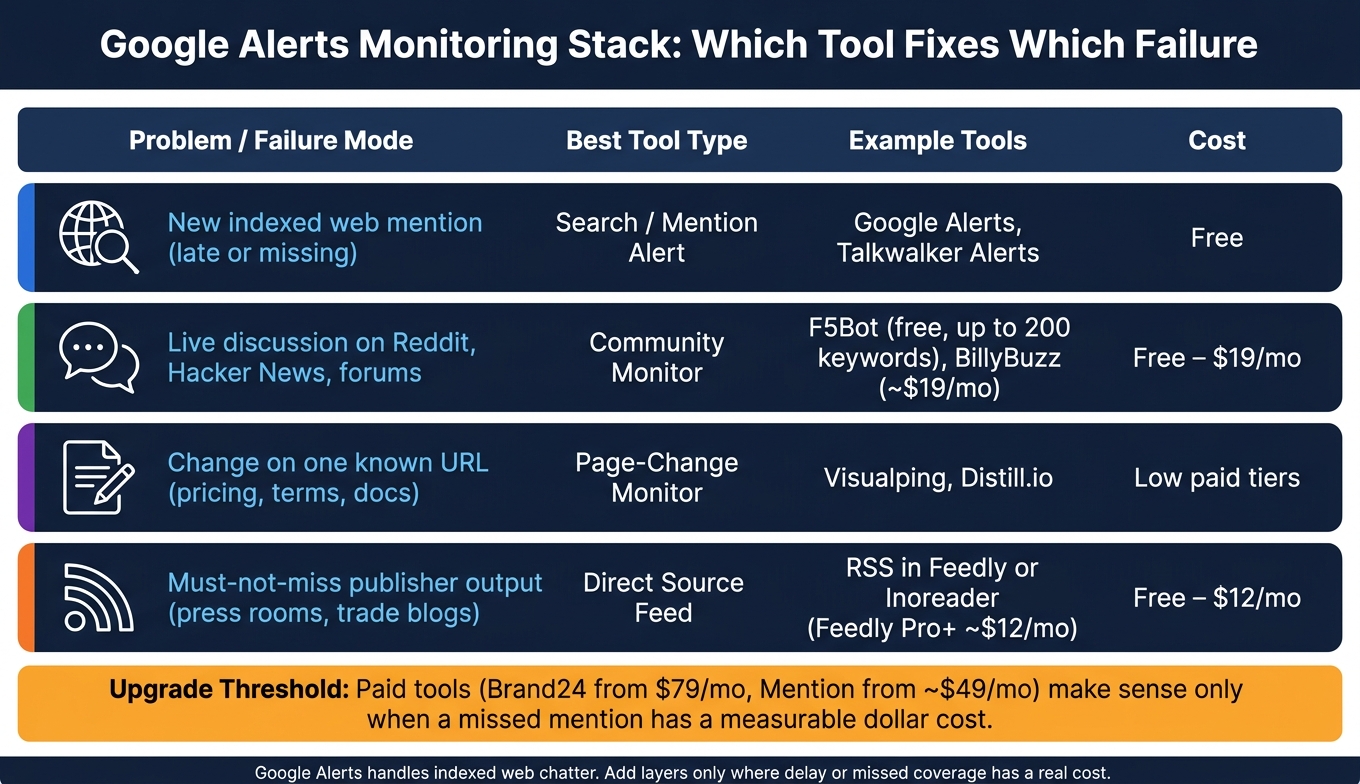
One small comparison helps keep the stack straight:
| Problem | Best tool type | Example |
|---|---|---|
| New indexed web mention | Search alert | Google Alerts, Talkwalker Alerts |
| New discussion on Reddit/HN | Community monitor | F5Bot, BillyBuzz |
| Change on one known URL | Page monitor | Visualping, Distill.io |
| Must-not-miss publisher output | Direct feed | RSS in Feedly or Inoreader |
There is a trade-off in all of this. Tighter queries cut noise but miss looser references and misspellings. Broader queries catch more edge cases but bring junk. “All results” gives more coverage but also more cleanup. Direct feeds and page monitors are better for high-risk sources, but they add maintenance. Feeds break. URLs change. Some pages render badly in monitoring tools.
That is why the best setup is usually small, not sprawling. One broad Google Alert, one external-only version, one or two high-intent query variants, then direct monitors for the sources where delay is not acceptable. For example:
"Acme Analytics""Acme Analytics" -site:acmeanalytics.com"Acme Analytics" review- F5Bot alerts for
Acme AnalyticsandAcme DB - RSS feed for competitor press room
- Visualping on the competitor pricing page
That stack is easy to test. Run the same search manually. Check whether the alert used All results. Watch which sources arrive late and which never arrive. Delete the alerts that only produce junk.
Talkwalker Alerts is also worth keeping as a free backup for web and news. It will not solve forum monitoring or page edits, but a second alert source helps when one misses a result and the other catches it.
KAEOA fits best after this point, when the problem is not “find one more source” but “stop scattering signals across five places.” A single digest for alerts, feeds, community hits, and watched pages is easier to review than separate emails all day. That said, no digest should hide the raw stream entirely if the topic is PR, legal, or crisis work. Ranked results help, but edge cases still matter.
Paid tools make sense only when a miss has a plain cost. If a delayed review, pricing change, or bad thread can cost more than $49 to $79/month, then tools like Mention or Brand24 start to look less optional. They still do not fix bad queries or closed platforms, so paying does not remove the need for testing.
The useful way to think about Google Alerts is narrow and unsentimental: it is a free layer for indexed discovery, not a live monitoring system. Once that is clear, the misses stop feeling random. They map to timing, matching, or coverage, and each of those has a different fix.
If the alert is late, suspect indexing lag.
If a known mention never appears, inspect the query and check whether Google indexed the page.
If a source cannot be missed, bypass Google and monitor it directly.
That is the whole job: use Google Alerts for what it can do, then cover the blind spots with the right tool instead of hoping one inbox will catch everything.
Google Alerts Monitoring Stack: Which Tool Fixes Which Failure
Google Alerts Alternative: Track Any News Topic with RSS
sbb-itb-15d6cfa
Fix your query first - weak matching is the easiest problem to solve
If Alerts misses pages you already know exist, don’t blame the tool stack yet. Start with the query. A loose query causes more missed mentions than most teams expect, and this part is usually the fastest to fix.
Use exact-match phrases, context words, and exclusions to cut silent misses
Treat each query element like a part you can swap in or out. Don’t jam every idea into one bloated search and hope Google sorts it out.
| Query Element | Example | What It Does |
|---|---|---|
| Exact match | "Acme Analytics" |
Fires only on that specific phrase |
| Site exclusion | -site:acmeanalytics.com |
Removes your own domain from results |
| Word exclusion | -jobs |
Filters out recruitment-related pages |
| Context term | "Acme Analytics" review |
Narrows to a specific mention type |
| OR variant | "Acme Analytics" OR "Acme DB" |
Catches alternate names in one alert |
The first move is simple: put the brand name in double quotes. Use "Acme Analytics", not Acme Analytics. Without quotes, Google can split the words, match them in different parts of a page, or decide that something “close enough” counts. That sounds fine until it starts skipping the pages you care about.
Then cut obvious junk. Add exclusions such as -jobs, -salary, and -site:acmeanalytics.com if you don’t want your own pages. That trims noise and makes the alert more likely to surface pages that matter instead of burning space on career posts, salary scrapers, or your own blog.
Context terms help when one alert is trying to serve too many jobs. "Acme Analytics" review is different from "Acme Analytics" pricing or "Acme Analytics" outage. If you need a certain kind of mention, say so in the query. Google is not a mind reader.
OR is useful when the market uses more than one name. If people say "Acme Analytics" in some places and "Acme DB" in others, "Acme Analytics" OR "Acme DB" gives one alert a bit more range. Still, don’t push this too far. A huge OR chain becomes hard to debug, and once it breaks, you won’t know which variant is doing the damage.
Turn off the filters that hide valid results
Google Alerts defaults to "Only the best results". That setting sounds harmless. It isn’t. It can drop pages that are valid mentions simply because Google decides they aren’t good enough.
Switch every alert to "All results". Yes, it gets noisier. That trade-off is worth it when the problem is missed coverage. Quiet alerts feel nice right up until they skip the mention your team needed to catch on the same day.
Keep language and region open unless there’s a hard reason to limit them. If a brand gets mentions from Canada, the UK, India, or on non-U.S. pages that still rank in Google, narrow filters can hide those pages for no good reason. Tight filters make sense only when you know the search space must stay small.
Build a working alert set step by step
One giant “do everything” query usually fails in boring ways. It misses edge cases, buries signal in junk, and turns troubleshooting into a mess. A small set of narrow alerts is easier to test and easier to trust.
For a brand called Acme Analytics, this is a good starting point:
- Broad exact-match alert:
"Acme Analytics"- catches every indexed mention of the phrase. - External mentions only:
"Acme Analytics" -site:acmeanalytics.com- filters out your own content so you only see third-party coverage. - Review monitoring:
"Acme Analytics" review- surfaces opinion pieces and user feedback specifically.
Set each one to As-it-happens and All results. Then test them by hand. Run the exact same queries in Google Search and Google News. Use the same punctuation, the same quotes, the same exclusions. If a page shows up in manual search but no alert arrives, that’s a useful clue.
Usually the problem comes down to one of two things. The alert is still stuck on "Only the best results", or the query syntax is doing something different from what you meant. A missing quote, an overused exclusion, or a clumsy OR can break matching fast.
This manual check matters because it separates query problems from coverage problems. If Google Search can find the page and Alerts still doesn’t send it, the alert setup is suspect. If Google Search doesn’t show the page either, Alerts may not be the main issue at all.
There’s also a limit here worth stating plainly: better syntax won’t fix gaps in Google’s source coverage. If a forum page, niche site, or fresh news post never enters the index in a useful way, no amount of quote marks will save the alert. Query tuning fixes weak matching. It does not fix missing data.
KAEOA usually sees teams waste hours switching tools before they do this basic cleanup. That’s backwards. Clean query structure, open result filters, and side-by-side testing in Search and News get you much closer to the truth. If known mentions still don’t show after that, the problem is no longer “bad search wording.” It’s coverage.
When indexing and coverage are the problem, add direct searches and source feeds
You tighten the query, trim the noise, and Google Alerts still misses pages you know exist. At that point, the issue usually is not the query. It’s coverage. Google may index the page late, skip it for a while, or never add it at all. No amount of query tuning fixes a page that never makes it into the index.
That matters because it changes the job in front of you. If Alerts fails because delivery is spotty, you adjust settings and verify timing. If Alerts fails because Google never indexed the page, you need a different path to the source.
Run manual Google and Google News checks as a verification layer
Run the exact same alert query in Google Search and Google News. Don’t rewrite it. Don’t simplify it. Use the same operators and phrasing so the check tells you something useful.
If manual search finds the page but Alerts does not, the gap points to indexing lag or delivery problems [1][5]. In plain terms, Google knows about the page, but Alerts did not pass it along. That pushes you toward checking alert frequency, result type, and whether the item appeared outside the delivery window.
If manual search does not find the page either, that tells a different story. Google has not indexed it yet, or it skipped it. In that case, sitting around and waiting on Alerts is like waiting for mail from a house that was never put on the map.
Use this check as a simple fork in the road:
- Manual search finds it: the page exists in Google, so inspect alert delivery and timing.
- Manual search does not find it: the page is outside Google’s current reach, so switch to direct source tracking.
Google News is worth checking separately because it can surface publisher content on a different path than the main web index. A page might show in News before it becomes easy to find in standard search, or the reverse. That small extra step can save a lot of guessing [1][5].
One limit is worth stating plainly. Manual checks do not scale well across dozens of narrow topics and hundreds of source pages. They work best as a spot-check layer, not as the whole system. Use them to diagnose blind spots, not to replace monitoring.
Subscribe to RSS from sources you cannot afford to miss
For sources you absolutely cannot miss, go straight to the source feed. A competitor’s press room, a niche trade blog, a federal agency update page, or a filing page should not depend on whether Google decides to index the page soon enough.
RSS still does this job well because it cuts Google out of the middle. When the publisher posts, the feed updates. That does not mean every feed is perfect - some are messy, delayed, or incomplete - but for many sites it is far more dependable than waiting for Alerts to notice a new page.
Use an aggregator so those feeds do not turn into a second inbox problem. Feedly and Inoreader are the common picks because they keep many feeds in one place and let you sort, tag, or filter them without too much fuss. Feedly’s Pro+ plan starts at about $12/month when billed annually and includes AI-based filtering to cut noise in high-volume feeds [3].
That filtering helps when a source publishes a lot of marginal items. Say a company press room posts product blurbs, hiring notes, event recaps, and the occasional item you actually care about. In a feed reader, you can narrow what you review instead of scanning every single post by hand.
A simple setup usually works:
- Add direct RSS feeds for each must-not-miss source.
- Group them by topic, company, or risk level.
- Review high-risk feeds daily and lower-priority feeds weekly.
That last part matters. Not every source needs the same cadence. A regulatory filing page or investor relations page may deserve daily checks. A slower niche blog can wait for a weekly batch review.
Here’s a practical split:
| Source type | Best method | Why |
|---|---|---|
| Competitor press room | RSS feed in Feedly or Inoreader | Direct publisher output, less dependence on Google indexing |
| Key trade blog | RSS feed plus weekly review | Fast to scan, easy to catch posts Google may miss |
| Google-indexed news topic | Google Alerts plus manual checks | Good breadth, but verify gaps |
| Forum or community site | Separate monitoring tool | Alerts and RSS often miss discussion-heavy pages |
The trade-off is maintenance. Feeds break. URLs change. Some publishers remove RSS or hide it behind odd endpoints. A setup that looks clean on day one can drift if nobody checks it. That’s why a direct-feed system works best when someone owns it and audits it every so often.
For teams running a lean monitoring stack, KAEOA's media monitoring often fits here as the layer that keeps source tracking from turning into a messy patchwork. Still, direct RSS is the better move for pages where a miss costs more than a bit of setup time.
Use direct feeds for must-not-miss sources, and don’t force RSS to cover places it was never built to handle. Forums, comment threads, and community sites often need separate tools because their content structure changes too often, and Google Alerts is even less dependable there.
Forums, Reddit, Hacker News, and specific pages need backup tools outside Google Alerts
You can set up Google Alerts perfectly and still miss the places where people talk first. Forums, Reddit, Hacker News, and product threads often light up hours before Google picks anything up, and sometimes those pages never surface cleanly in Alerts at all.
That gap comes from the source, not from bad keywords. Google Alerts works best when a page gets indexed and then judged worth showing. Community sites don’t wait for that cycle. If the job is to catch live discussion, you need tools that watch those communities directly instead of waiting for Google to notice them.
Monitor Reddit and Hacker News directly instead of waiting for Google to index them
For Reddit and Hacker News, Google Alerts is the wrong layer. It looks at search results after indexing. You need something closer to the stream.
F5Bot is the simple starting point. It’s free for up to 200 keywords and monitors Reddit, Hacker News, and Lobsters in near real time with exact keyword matching [2]. That makes it a good fit for brand names, product names, executive names, error strings, or any term where exact phrasing matters.
A practical setup looks like this:
- Track exact brand terms such as
Acme Cloud,AcmeCloud, and common misspellings. - Add product names and launch terms separately rather than stuffing them into one broad query.
- Use one keyword per alert when possible, so false positives are easier to spot and tune.
That last point matters more than it seems. If you dump ten terms into one monitor and traffic gets noisy, you won’t know which term caused the mess. Separate alerts keep cleanup sane.
If exact matching feels too narrow, BillyBuzz is the step up. It starts at about $19/month and adds AI-based context filtering for broader searches [3]. That helps when a term has many meanings or when people refer to a company in loose ways that exact matching misses. A plain brand like “Mercury,” for example, can pull in posts about cars, planets, or news outlets. Context filtering cuts some of that waste.
There’s a trade-off, though. Exact matching is clean but can miss side-door mentions. Context filtering catches more, but it can also guess wrong. For high-stakes monitoring, exact terms usually make a better first layer, with broader AI-filtered tracking added only after you know the noise level.
Google Alerts still has a place here, just not the lead role. Use it as a backup for indexed posts, press coverage, and blog mentions that spin out of the same discussion. Don’t depend on it to catch the first wave.
Use page-change monitors for high-stakes sources that Alerts skips
Specific pages are a different job entirely. You’re not asking, “Did someone publish a new page about this?” You’re asking, “Did this page change?” Google Alerts does not solve that well because it tracks new pages, not edits to an existing URL.
That matters for pages like pricing, legal terms, feature comparison pages, status pages, partner directories, documentation, and job listings. A company can rewrite half a pricing table and keep the same URL. Google Alerts may never say a word.
For that use case, switch from mention monitoring to page-change monitoring. Visualping and Distill.io both watch a specific URL and notify you when the content changes [2]. They look at the page itself, not at search index behavior.
A simple way to think about it:
| Job | Tool type | Good example |
|---|---|---|
| Find new web pages that mention a term | Search/mention alert | Google Alerts, Talkwalker Alerts |
| Watch live discussion in communities | Community monitor | F5Bot, BillyBuzz |
| Detect edits on one known URL | Page-change monitor | Visualping, Distill.io |
This is where a lot of teams trip up. They use a mention tool to solve a page-watching problem, then assume monitoring “doesn’t work” when they miss a change to a pricing page or policy page. The tool wasn’t broken. The setup was aimed at the wrong target.
Page-change monitors also need care. Many pages include moving parts like timestamps, counters, rotating testimonials, cookie banners, or stock widgets. If you monitor the whole page, you may get spammed with useless alerts. The fix is to watch a narrow section when the tool allows it, such as the main pricing block or a product spec table, instead of the entire document.
There’s another limit worth stating plainly: some sites are hard to monitor because content loads through scripts, login walls, or region-based variants. A monitor may see a stripped-down version of the page or fail to detect a shift that a normal visitor sees. For pages that matter to revenue or legal risk, test the monitor with a known change before trusting it.
Consolidate backup tools when you need one digest instead of five separate workflows
Once you add Reddit monitoring, Hacker News tracking, page-change checks, and backup web alerts, the setup can turn into inbox chaos. Five tools sending five separate emails sounds fine at first. After a week, it’s a mess.
Talkwalker Alerts works as a free backup layer for web and news coverage [3]. It won’t solve community monitoring by itself, but it can widen coverage beyond Google Alerts and give you another pass at indexed mentions. That’s useful when one alert source misses a page and the other catches it.
If the problem becomes consolidation rather than coverage, put a digest layer on top. KAEOA can pull in community mentions, news, RSS, and monitored URLs into one email digest, then sort with keyword filters and AI relevance scoring before delivery. That setup helps when a team cares less about raw volume and more about seeing the few items that deserve action first.
This kind of rollup is most useful when multiple people touch the same inputs: comms, support, product marketing, founder office, or analyst relations. One person doesn’t want Reddit alerts in one app, pricing-page edits in another, and RSS hits buried in a third inbox. A single digest cuts that friction.
There’s a cost to consolidation, of course. The more filters and scoring you add, the more you risk hiding edge-case items that look minor at first. For brand protection or crisis work, it often makes sense to keep a raw feed available somewhere, even if the main team reads a ranked digest. That way you get speed without going blind to outliers.
Used well, the stack is pretty simple. Google Alerts handles indexed web chatter. F5Bot or BillyBuzz covers fast-moving community threads. Visualping or Distill.io watches pages where edits matter more than new URLs. Talkwalker Alerts adds backup web/news coverage. Then, if separate streams become a time sink, KAEOA can sit over the top and turn the noise into one sorted briefing.
Build a simple monitoring stack that matches how Google Alerts fails for you
Google Alerts usually doesn’t fail in one neat way. It fails on matching, timing, or coverage, and each problem needs a different fix. Don’t swap out Google Alerts for everything at once. Match each failure mode to a layer, so the weak spots stop eating important mentions.
Use a three-layer setup for reliable coverage
A simple stack works best when each tool has one job. Google Alerts is fine for broad scanning, but it’s shaky when you need fast checks or direct watch on pages and communities that matter.
| Layer | Job | Tools |
|---|---|---|
| 1. Broad discovery | Catch general web and news mentions | Google Alerts, Talkwalker Alerts |
| 2. Verification | Check what Alerts may miss during indexing lag | Manual Google and Google News checks |
| 3. Priority sources | Watch communities and specific pages directly | F5Bot, BillyBuzz, RSS, Visualping or Distill.io |
Use Alerts for reach. Use manual search to confirm what hasn’t shown up yet. Use direct monitors for places you can’t afford to miss, like a review page, a subreddit, a forum thread, or a competitor’s pricing page.
This setup works because it accepts a plain fact: one tool won’t cover every source the same way. A Google Alert for "Your Brand" might catch a blog post two days late, miss a subreddit mention, and never flag a product page edit. That’s not one problem. That’s three different jobs pretending to be one.
Manual checks matter more than people like to admit. If Alerts tends to lag, run the same query in Google Search and Google News during the hours when timing matters. For example, search "Your Brand" OR "Your Product" in Google News, then compare it with what landed in your alert inbox. If the search sees it and the alert doesn’t, timing is the issue, not query logic.
Priority sources need direct watching because indexing is never guaranteed. RSS is still one of the cleanest ways to track sites that publish on a feed. Visualping and Distill.io help when there’s no feed and the page itself is the signal, like pricing, policy pages, release notes, or a public changelog. F5Bot and BillyBuzz help with community and web mention monitoring where Google Alerts gets patchy.
Put everything into one place if you can. An email digest, an RSS reader, or a single folder in your inbox beats checking five tools at random. If the stack makes you open tabs all day, it turns into shelfware fast.
Audit the setup every 30 days. Delete alerts that spit out junk. Tighten the search operators on the ones that almost work. If an alert for Apple brings a flood of fruit recipes instead of company news, fix the query with operators like "Apple" AND iPhone or "Apple Inc" OR AAPL rather than hoping volume sorts itself out.
A short audit can be as simple as this:
- Check which alerts produced noise
- Review which mentions arrived late
- Compare missed items against manual searches
- Drop tools that duplicate each other without adding new coverage
That monthly cleanup matters because alert systems drift. News cycles shift, sites change structure, and your own watch list changes. What worked 60 days ago may now be dead weight.
Add paid tools only when a missed mention costs more than the subscription
Free tools carry a lot of the load. Google Alerts, Talkwalker Alerts, and F5Bot can cover broad web mentions, brand terms, and some community chatter well enough for many teams. The upgrade point isn’t “when free tools feel annoying.” It’s when a miss has a dollar cost.
That cost usually shows up in plain business terms. A PR issue spreads before anyone sees it. A competitor changes pricing and you catch it a week late. A review shapes buying decisions while the alert still hasn’t arrived. Once that starts happening, a paid line item stops looking like overkill and starts looking like basic risk control.
Brand24 starts at $79/month and Mention starts at ~$49/month [4][3]. Those prices aren’t hard to justify if one missed signal leads to lost pipeline, extra support load, or a messy response scramble. If a single bad review on a high-traffic site costs more than $79 in lost conversions, the math gets simple.
That said, paid tools don’t fix every blind spot. They can widen source coverage, speed up detection, and improve filtering, but they still depend on source access, crawl patterns, and query quality. A bad search setup in a paid platform is still a bad search setup. Money buys more visibility, not magic.
Use paid tools where the miss hurts most. That might mean watching review sites, competitor pages, executive mentions, or top-tier media with stricter timing. It does not mean throwing a paid monitor at every brand term and hoping volume equals safety. Narrow use usually beats blanket use.
KAEOA fits best as the place where this stack gets organized, filtered, and reviewed, not as a stand-in for every source or every kind of monitoring. If the alerts are messy, late, or split across inboxes and feeds, the stack breaks down even when each tool is technically working.
One honest trade-off: the three-layer setup asks for a bit more discipline. You have to maintain queries, check manual searches when timing matters, and review source monitors that stop being useful. If you want a zero-maintenance system, this isn’t it. But if the cost of missing a mention is real, a little upkeep beats flying blind.
Another limit is source fragmentation. Some communities are easy to watch directly. Others are closed, rate-limited, or shaped by platform rules that make outside monitoring weak. In those cases, even the best stack leaves gaps, and the answer may be manual review or native platform notifications instead of another alert tool.
The goal isn’t to build a giant monitoring machine. It’s to stop losing track of the mentions that matter. Broad discovery finds the signal. Verification checks whether indexing lag hid it. Priority-source monitors cover the pages and communities where delay is not acceptable.
If the free stack keeps missing low-stakes chatter, that may be fine. If it keeps missing the few mentions that change revenue, reputation, or response time, move those sources into a tighter setup and pay only where the miss is expensive. KAEOA can help keep that setup usable without turning monitoring into a part-time job.
FAQs
Why are my Google Alerts so late?
Google Alerts often shows up late for one simple reason: it runs on Google’s indexing cycle, not live monitoring. In plain terms, Google usually has to crawl a page, process it, and add it to the index before that mention appears in an alert. That lag can stretch to days, especially for smaller sites, low-traffic pages, or pages that Google doesn’t revisit often.
The delivery layer adds more delay. Google Alerts sends updates on its own schedule, and it isn’t built for minute-by-minute notice. If a brand mention, news hit, or review needs a same-day response, that gap matters. By the time the alert lands, the post may already be spreading, getting quoted, or driving a search result snapshot you would have preferred to catch earlier.
This is where people get tripped up. They assume “Google” means instant, but Google Alerts is closer to a light notification service sitting on top of search indexing. It is useful for broad monitoring, low-pressure tracking, and catching mentions that don’t need an immediate reply. It is not a live listening tool.
There’s also a coverage limit. If content sits behind login walls, appears in some forums, gets deleted fast, or lives on pages Google never indexes, Google Alerts may miss it entirely. So the issue isn’t only speed. Sometimes the mention never arrives at all.
For time-sensitive monitoring, that trade-off is hard to ignore. If a team needs fast notice for press coverage, product complaints, executive mentions, or legal-risk keywords, Google Alerts works better as a backup than as the main system. Tools built around direct source monitoring, RSS polling, API access, or page-change checks tend to surface items earlier because they aren’t waiting for Google Search to catch up.
KAEOA usually frames Google Alerts as a decent free baseline, not an immediate-warning channel. That’s the right way to think about it: fine for passive tracking, weak for anything that depends on speed.
How can I tell if the problem is my query or Google’s indexing?
First, check whether the page is indexed. Search Google for the exact URL, or check the URL in Google Search Console.
If Google has indexed the page but it still doesn't show up in Alerts, the problem usually sits in one of two places: the query itself or Google Alerts coverage. Run the same query in a normal Google search and compare the results.
If the page does not show up in manual search either, indexing is the likely issue. If it does show up in search but not in Alerts, Google Alerts is probably lagging, skipping the result, or handling the query more narrowly than expected. That happens more often than people think.
When should I stop relying on Google Alerts alone?
Stop relying on Google Alerts alone when missing a mention has a real cost. A PR flare-up, a competitor launch, or a time-sensitive sales lead can move in hours, not days, and a late alert is often the same as no alert.
Look for other options when you need real-time response, broader coverage, steadier delivery, or programmatic control. Google Alerts works fine for low-stakes research and casual tracking. It falls short when monitoring turns into an operational job with money, timing, or reputation on the line.
The gap matters more than most teams admit. If a reporter names your company in a fast-moving story, you need to know while the story is still forming. If a competitor drops a new pricing page at 9:12 a.m., a digest that lands later doesn’t help much. And if inbound demand depends on spotting buying signals early, delays cut straight into pipeline.
Google Alerts also gives you limited control over how alerts arrive and how they fit into the rest of your stack. You can set frequency, sources, language, region, and a few other basics, but that’s about it. You’re not getting the kind of routing, filtering, enrichment, deduping, or API-driven workflow that a comms, sales, or market-intel team often needs once the volume goes up.
Coverage is another weak spot. Google Alerts leans on what Google indexes and decides to surface, which can leave blind spots across smaller sites, forums, fast-changing pages, or sources that just don’t make it into the alert stream in time. For casual monitoring, that may be fine. For a crisis desk or a team tracking direct rivals, those gaps hurt.
Delivery reliability deserves some plain talk too. Alerts can be late, noisy, thin, or simply absent for terms you’d expect to trigger. That doesn’t mean the tool is useless. It means the tool was built for light monitoring, not for jobs where a miss carries a clear cost.
A better setup depends on what you’re trying to catch. PR teams usually need news monitoring with near-live alerts, source filtering, and shared workflows. Competitive intel teams care more about specific domains, product pages, changelogs, job posts, and SERP movement. Lead-gen teams often want buying-intent signals piped into Slack, email, a webhook, or a CRM the moment they appear. Those are different use cases, and one free alert feed won’t cover all of them well.
When the work gets serious, programmatic control starts to matter. You may need alerts routed by keyword group, market, or account owner. You may need a webhook payload, not just an email. You may need to suppress junk terms, watch exact-match brand mentions, or trigger downstream actions in Zapier, Make, or a custom script. Google Alerts doesn’t give you much room there, which is where teams start looking at other monitoring tools or a mixed setup that includes RSS, news APIs, social listening, page-change trackers, and custom search operators.
That trade-off is worth stating clearly: broader, faster monitoring usually costs money and takes setup time. You trade a free tool for better speed, cleaner workflows, and fewer blind spots, but you also take on vendor cost, tuning work, and some level of alert fatigue if the queries are sloppy. Even so, for use cases where timing matters, that’s usually the right trade.
KAEOA treats Google Alerts as a starting point, not the whole system. Use it for background noise and non-urgent mentions. For anything tied to revenue, reputation, or a fast market move, put it behind tools built to catch signals when they happen, not after the window has started to close.