Productivity
How to Follow arXiv Preprints on a Topic Without Reading Everything
How to Follow arXiv Preprints on a Topic Without Reading Everything
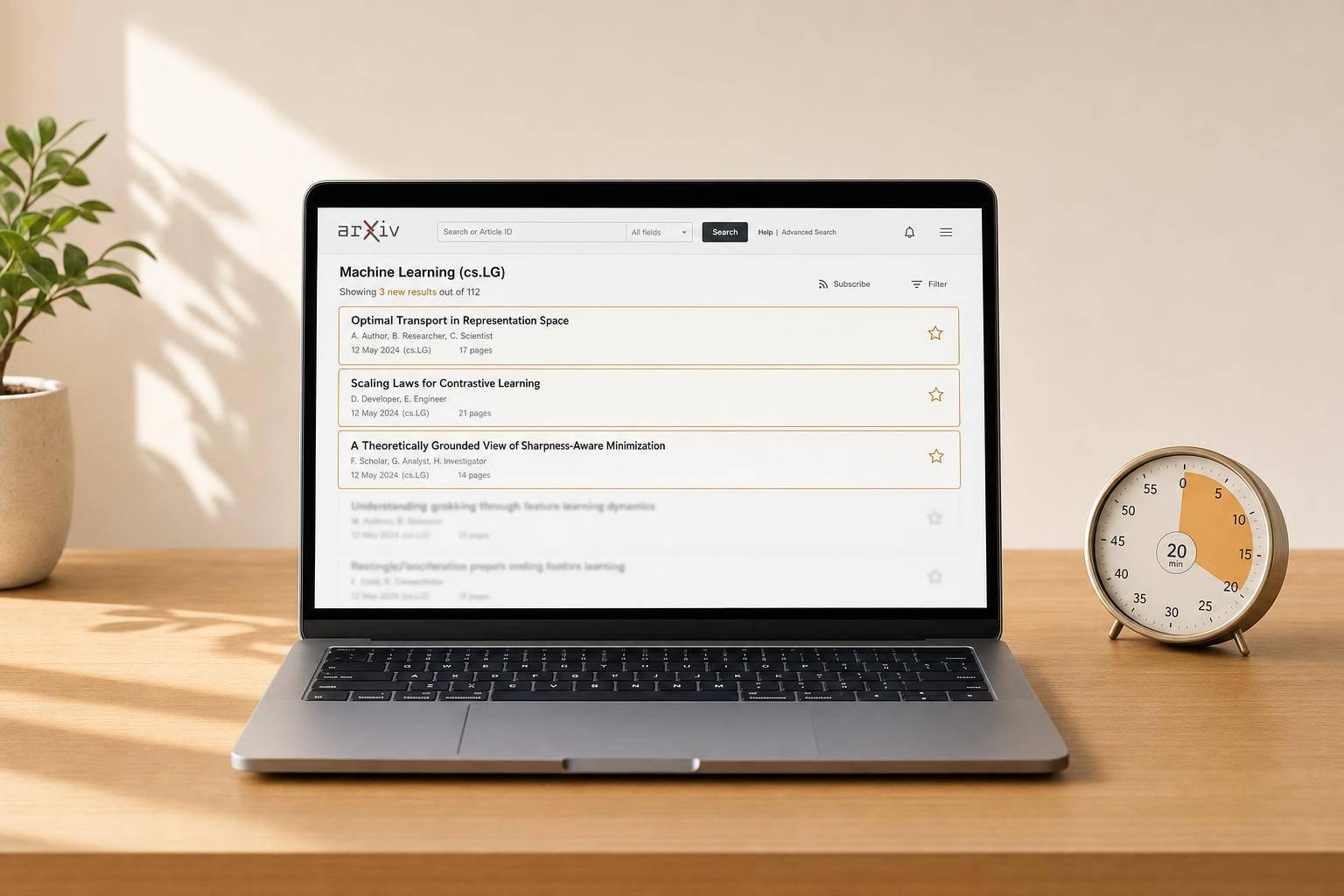
arXiv adds about 10,000 preprints a month, so reading everything is a bad plan. The workable setup is narrow scope, fixed filters, and a small triage loop that takes 15–30 minutes a day or a weekly block.
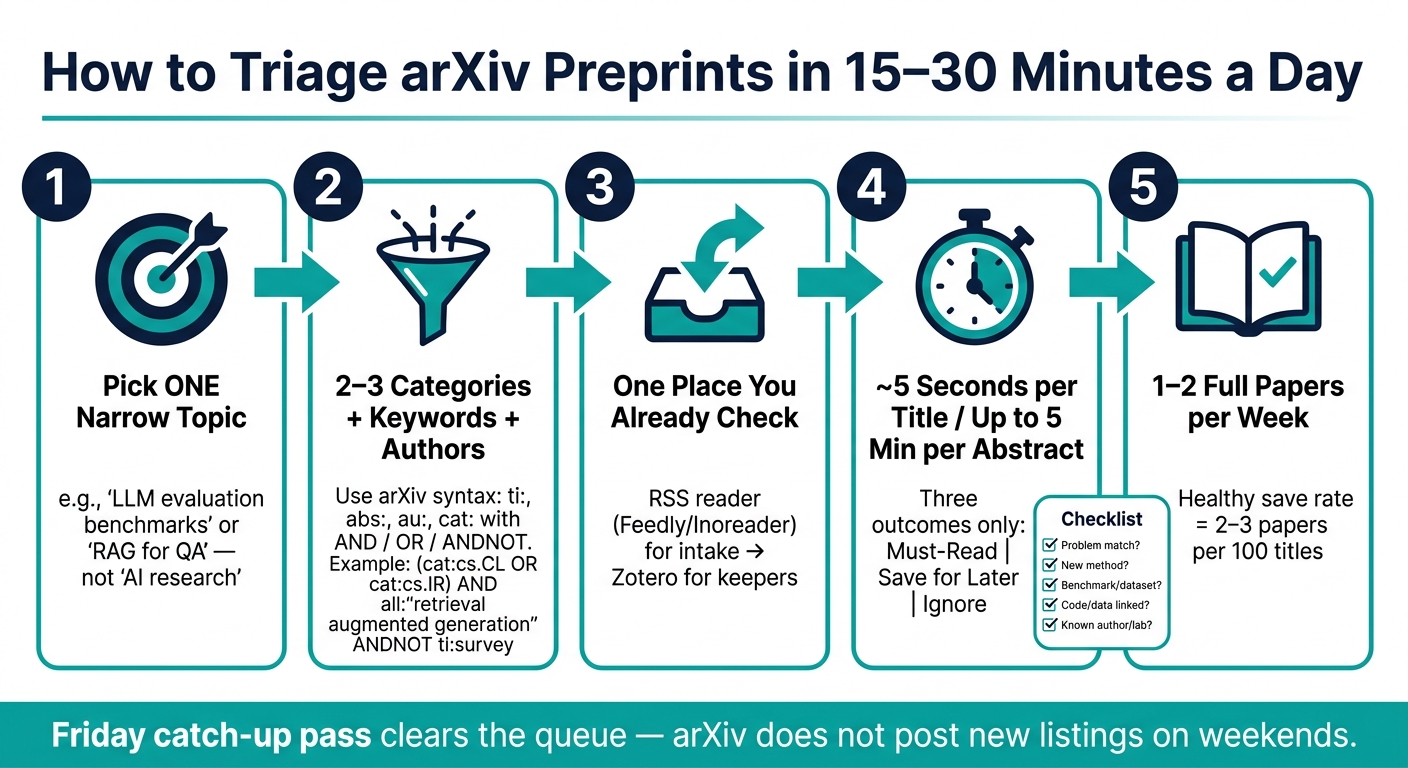
- Pick one topic, not a whole field.
- Track it with 2–3 arXiv categories, include/exclude keywords, and a short author list.
- Route results into one place you already check: RSS, email, or a paper library.
- Spend ~5 seconds per title, then up to 5 minutes per abstract only for papers that pass.
- Expect to save only 2–3 papers per 100 titles.
- Cap full reads at 1–2 papers a week or the queue turns into debt.
Most people fail at this because every paper feels urgent. It isn’t. The job is to sort, not to admire the stream.
A broad topic like “AI research” collapses on contact with reality. Six busy ML categories can mean about 200 new papers a day. A tight topic like LLM evaluation benchmarks or retrieval-augmented generation for QA can be watched without turning arXiv into a second shift.
Start by defining what counts as a hit. A usable topic usually has three parts: likely categories, signal terms, and a few authors or labs worth following. For LLM evaluation, that might mean cs.CL, cs.LG, and terms like benchmark, evaluation, judge, or leaderboard. For RAG, it might mean cs.IR, cs.CL, and terms like retrieval, grounding, dense retrieval, or vector database.
That mix matters because categories alone miss papers, and keywords alone miss papers too. Authors often frame the same work in different ways, and papers land in odd buckets. A retrieval paper can show up under cs.CL. An evaluation paper can lean toward cs.LG or stat.ML. If the filter has only one layer, holes show up fast.
The next step is to set a triage rule before alerts start landing. A plain three-way sort works:
- Read now: direct topic match and likely useful right away
- Skim later: close enough to track, but not urgent
- Ignore: outside scope, weak fit, or too incremental
The labels matter less than the action behind them. “Ignore” has to mean no debate, no tab, no guilt. If everything goes into one pile, the system fails in a week.
Use arXiv’s own feeds first. The daily feed update gives one review point instead of random checking all day. Start with the smallest category set that still covers the topic. For many AI paper watches, that means two or three categories, not six or seven.
Then add search syntax on top of the category feed. arXiv search supports fields like ti:, abs:, au:, cat:, and all: with AND, OR, and ANDNOT. That is enough for a clean first pass.
A plain query for RAG might look like:
(cat:cs.CL OR cat:cs.IR) AND (all:"retrieval augmented generation" OR all:grounding OR all:"dense retrieval") ANDNOT ti:survey
A plain query for LLM evaluation might look like:
(cat:cs.CL OR cat:cs.LG) AND (abs:evaluation OR abs:benchmark OR abs:judge OR abs:leaderboard) ANDNOT ti:survey
These are not magic strings. They are starting points. If the feed is thin, loosen the wording. If the feed is junk, add one more term or one exclusion. Small edits beat big rewrites because you can see what changed the output.
Author tracking works best as a backstop, not the base layer. Add au: for a few people or labs whose papers almost always matter to your work. Keep that list short. A long author list turns topic tracking into status tracking, and that is not the same thing.
One plain detail saves time later: store the base arXiv ID like 2401.12345, not 2401.12345v2. That avoids repeat alerts when a paper moves from v1 to v2.
The feed then needs one home. If it lands in a tool that never gets opened, it dies. An RSS reader such as Feedly or Inoreader works well for intake because it keeps scanning light. Zotero works better after triage, when a paper is worth saving with notes, PDF, and metadata. Email can work too if one daily digest is the only inbox that gets checked without fail.
A simple split looks like this:
| Tool | Best use | Weak point |
|---|---|---|
| Feedly / Inoreader | Daily intake and fast scanning | Easy to over-subscribe |
| Native arXiv email | One daily pass in the inbox | Long digests get messy |
| Zotero | Saved papers, notes, citations | Bad first stop for every paper |
| n8n or similar | Custom scheduled digest | More setup, same upstream filter limits |
No routing layer fixes a weak query. Bad input still produces bad output, just in a different app.
The daily review loop should stay blunt. Scan titles first. If a title is clearly outside the lane, skip it in about 5 seconds. Only open the abstract if the title hits the topic, method, or benchmark angle.
A fixed checklist keeps decisions steady:
- Is the problem inside the exact topic?
- Is the method new enough to care about?
- Is there a benchmark, dataset, or eval setup worth tracking?
- Is code or data linked in the abstract or comments?
- Does the author or lab belong on the follow list?
If a paper passes two or three of those, it can move forward. If it passes none, drop it.
A worked example makes this less fuzzy. Suppose the title is “A Benchmark for Retrieval-Augmented Generation in Domain-Specific QA.” That likely passes on title alone because it names the problem and the eval angle. The abstract then gets a short read: does it introduce a dataset worth citing, does it compare against real baselines, and is code or data available?
Now compare that with “Improving Language Model Performance with Better Prompts.” That may be good work, but unless the watch topic is prompting, it is too broad. No clear retrieval signal, no clear evaluation design signal, and no reason to spend another minute.
This process will miss some papers. That is not a bug; it is the price of keeping the queue under control. The failure cases are predictable: keyword drift, bland titles, weak abstracts, and papers that land in odd categories. A strict filter saves time but can miss sideways work that matters later.
That is why a catch-up pass helps more than constant checking. arXiv does not post new listings on weekends, so a Friday or Sunday review block can clear the queue. If a day gets missed, query the skipped range, filter by submittedDate, and scan titles plus abstracts. Treat that as bounded work, not debt.
A healthy system has a visible hit rate. If the filter saves 2–3 papers per 100 titles, it is probably close to right. If it saves 15, it is too loose. If it saves none for a week, it is too tight or the terms are stale.
When the feed starts missing papers that seem obvious in hindsight, keyword search alone is no longer enough. That is the point to add citation-neighborhood tools like Connected Papers around one anchor paper. KAEOA usually treats that as a check on the filter, not a full replacement. Citation maps can help find adjacent work, but they can also pull the search toward the same clusters and miss newer papers with thin citation links.
The weekly routine should be boring. That is a good sign. Check the daily update or do one weekly pass, save the few papers worth more time, clear leftovers on Friday, and edit one filter term at a time when the hit rate drifts. KAEOA fits best when the rules are already set and the job is routing the stream into one place on a schedule, not when the topic itself is still fuzzy.
If colleagues mention a paper and it already passed through the queue, the system is working. Not because every paper got read, but because the right few did.
How to Triage arXiv Preprints in 15–30 Minutes a Day
Start with arXiv's own feeds, then add keyword and author tracking
Subscribe to the category feeds that match your topic
You already know the hard part: your topic is broad enough to matter and narrow enough to watch. Now tie that scope to arXiv feeds. Start with two or three categories that fit the work you care about most, not every category that might contain a related paper. arXiv’s Atom feed endpoint updates daily at around 20:00 UTC (8:00 PM ET) [4], so you get a predictable review point instead of a drip of alerts all day.
| Topic | Start With These Categories | Add These If Needed |
|---|---|---|
| LLM Evaluation | cs.CL, cs.AI, cs.LG |
stat.ML, cs.CV |
| Retrieval-Augmented Generation | cs.CL, cs.IR, cs.AI |
cs.CV if the work is multimodal, stat.ML |
| General ML | cs.LG, stat.ML |
cs.NE |
That table gives you a sane starting set. If you watch too many categories from day one, the signal gets muddy fast. cs.CL plus cs.AI plus cs.LG is usually enough to surface most LLM evaluation work, while cs.IR matters more when retrieval is the point rather than a side detail.
Category feeds answer one question well: what is entering the stream? They do not answer the second question, which is what in that stream actually deserves your time. That’s why categories come first and keyword filters come right after.
Add include/exclude keywords and follow specific authors
Category feeds on their own miss two ways. First, they bring in a lot of near-matches that sound related but aren’t worth a close read. Second, some papers land in categories you would not have picked, especially when the authors frame the work from a different angle. The fix is simple: layer query filters on top of category coverage.
arXiv’s search syntax is plain and useful. Use prefixes like ti:, abs:, au:, cat:, and all:. Combine them with AND, OR, and ANDNOT. A baseline query such as cat:cs.CL AND all:"retrieval augmented generation" already cuts a lot of noise, and ANDNOT ti:survey trims out survey papers when you want new methods instead of overviews.
For LLM evaluation, a practical starter set is "LLM evaluation", "benchmarking", and "model grading". Those terms won’t catch everything, and that’s the point worth remembering: keywords narrow the firehose, but they can also hide papers that use different language. A paper about rubric-based scoring, pairwise preference judgment, or evaluator calibration may matter a lot even if it never says “LLM evaluation” in the title.
That trade-off is why author tracking still matters. Use au: for researchers whose work you do not want to miss, especially people who publish repeatedly in your lane. If a lab keeps shipping papers that shape your work, following those authors gives you a clean safety net.
Still, author tracking should stay narrow. If you follow too many names, you end up rebuilding a noisy social graph instead of tracking a topic. Good papers often come from groups you do not already know, so category-plus-keyword coverage does the broad search, while author tracking catches must-see output from a few specific researchers.
One detail saves a lot of annoyance later: track base arXiv IDs, not version suffixes. If you store 2401.12345 instead of 2401.12345v2, you avoid duplicate alerts when a paper moves from v1 to v2 or beyond. That sounds minor until your queue starts filling with what looks like “new” work that is just a revision.
A useful pattern is to keep your filters blunt at first, then tighten them after a week of seeing what gets through. If all:"retrieval augmented generation" is too narrow, switch to a broader mix like all:retrieval AND all:generation. If benchmarking pulls in unrelated evaluation setups, pair it with cat:cs.CL or abs:"large language model". You want filters that reduce waste without turning your watchlist into a blind spot.
Use catch-up pages as a backstop instead of monitoring constantly
Constant checking feels productive, but it usually just burns attention. A catch-up pass works better. arXiv does not update listings on weekends, so Friday’s entries roll through Sunday. That gives you a built-in review window instead of an endless backlog.
If you miss a day or two, query the API for the period you skipped, filter by submittedDate, and scan titles plus abstracts at about 5 seconds per paper [6]. That pace is fast, but it’s enough for triage. You’re not judging the whole paper yet. You’re deciding whether it deserves a slot in your reading queue.
This is where the feed format helps. Because the feed includes abstracts, you can usually make the first cut without opening the PDF. That matters more than it sounds. Opening every paper breaks rhythm, and once tabs pile up, the session turns into low-grade panic.
A simple catch-up workflow looks like this:
- Pull the missed date range from the API.
- Filter to your
cat:and keyword rules. - Scan title and abstract.
- Save only the papers that clear your bar for full reading.
Treat that session as bounded work. Ten minutes is ten minutes. Twenty minutes is twenty minutes. If a missed day yields 60 papers, you are not “behind” in some moral sense; you are just running a filter over a finite set.
There is one limit here. Five-second scans are good for triage, but they miss subtle papers with vague titles or sloppy abstracts. Some strong work hides behind generic wording like “a new framework” or “toward better evaluation.” That’s another reason not to rely on a single layer. Categories, keywords, and a short author list cover each other’s weak spots.
If you want to automate the catch-up step, keep the logic plain. Query by category and keyword, store the base arXiv ID, compare against what you saw before, and only surface new matches. KAEOA can sit on top of that process, but the value comes from the discipline of the system more than from any tool name. The feed gives you the raw stream; your rules decide what earns attention.
The result is a watchlist that stays tight enough to use. You stop grazing through arXiv all day, and you stop treating missed days like a pile of debt. You review what arrived, sort it fast, and move the few papers that matter into the next reading step.
sbb-itb-15d6cfa
How to Streamline Your Academic Search with Arxiv Pulse
Route arXiv updates into one inbox or dashboard you will actually check
Once your filters are set, send the stream to the place you already open every day. If papers land in a side tool you never check, the setup dies in a week.
Use Feedly, Inoreader, or Zotero to turn feeds into a review queue
Feedly and Inoreader both turn arXiv RSS or Atom feeds into one searchable queue. You can subscribe straight to category feeds like cs.CL or cs.LG, then tag, save, and search across what you collect [1][2]. That matters when one paper looks useful now, but the pattern across fifty papers matters more a month later.
This setup works well when you scan often and decide fast. Open the reader, skim titles, star what looks worth a read, and move on. It feels less like “keeping up with arXiv” and more like working a queue.
Zotero fits a different part of the job. Don’t use it as the first stop for every new paper unless you enjoy building a library full of stuff you never touch again. Use it after triage for papers you may cite, revisit, or annotate, especially if you want notes, PDFs, and metadata in one place.
A simple split usually works best: RSS reader for intake, Zotero for keepers. That keeps the front door light and the archive clean.
Use scheduled email summaries if you want one daily digest instead of a dashboard
If email is the only inbox you trust, use email. arXiv’s native category updates can cover the basic case, and an automation tool like n8n can build a scheduled digest around your own rules [5][7].
The upside is obvious: one daily pass, no extra tab, no new habit to train. For a lot of people, that’s the difference between a system that sticks and one that ends up abandoned next to a dozen “read later” apps.
The trade-off is speed and control. Email is slower for active scanning, and long digests get messy fast if your filter is still too broad. If your query pulls in 80 papers a day, dumping them into Gmail doesn’t fix the problem. It just moves the clutter.
With n8n or a similar tool, you can do more than forward a feed. You can schedule delivery, merge sources, and score or filter items before they hit your inbox [7]. That helps when you want one digest at 7:00 AM instead of a constant trickle.
Use a multi-source watch only if you need arXiv beside adjacent research signals
A broader monitor makes sense only when arXiv is one signal among several. Maybe you track papers, lab blogs, GitHub releases, forum threads, and product notes in the same area. In that case, one combined digest can save time because context sits next to the paper instead of in five open tabs.
Still, more sources usually mean more noise. A multi-source setup sounds neat on paper, but it can turn into a junk drawer if every source gets equal weight. The lighter option is often better: use the smallest system that gets papers into the place where you already review them.
The table below keeps the decision practical.
| Setup | Best When |
|---|---|
| arXiv native feeds + RSS reader | You only need arXiv, and you want to organize by tag or topic |
| arXiv native email updates | You want zero extra dashboards and one daily email is enough |
| Zotero | You need a long-term, searchable library of saved papers |
| n8n or similar automation | You want a custom-scored digest delivered on your schedule |
| Multi-source monitor | You need arXiv combined with news, communities, and custom RSS in one scheduled digest |
One honest limit: no routing tool fixes a weak filter. If the upstream query is sloppy, Feedly, Inoreader, email, Zotero, and n8n will all pass the same junk downstream. Clean input matters more than fancy delivery.
KAEOA is one option for scheduled digests that combine arXiv with news, blogs, and other sources.
Apply simple triage rules so only a few papers get real reading time
Papers pile up fast, even when they all land in one clean inbox. The fix is not reading harder. The fix is making the same call, the same way, on every paper so only a small set gets actual attention.
Scan titles and abstracts with a fixed decision checklist
Use one checklist every morning. On the first pass, skip the weeds and run the same five checks on every paper.
- Problem: Does the paper deal with a clear problem in your niche, such as RAG hallucinations or LLM bias, or is it broad to the point of being mushy?
- Method: Is the approach new in a way that matters, such as a new LLM-as-a-judge method, or is it mostly a standard setup on a different dataset?
- Benchmark: Does it use a known eval setup, or does it introduce a dataset you’d want to cite later?
- Code or data: Check the abstract or comments field for GitHub links or data access [3].
- Author or lab: Does it come from a team already on your follow list?
That routine matters more than any one question. When the same paper type shows up on Monday and Thursday, you want the same decision both days, not whatever mood the inbox puts you in.
From those five checks, three outcomes handle almost everything:
- Must-read: close to your work, new method, and code or data is available.
- Save for later: on-topic, but mostly incremental; send it to Zotero.
- Ignore: vague, off-topic, or not adding much on evaluation.
This sounds almost too plain, but plain is the point. If every title gets a custom debate, the queue wins.
A worked example for tracking LLM evaluation or retrieval-augmented generation
For an LLM evaluation or RAG feed, use include terms such as "LLM evaluation" OR benchmark OR judge OR "retrieval augmented generation" and combine them with AND, OR, and ANDNOT to keep the queue tight [1].
A simple example helps. Say a paper title is "A Benchmark for Retrieval-Augmented Generation in Domain-Specific QA". That likely passes the title screen because it hits the problem area, names an eval angle, and sounds scoped rather than fluffy. It goes to the abstract queue.
Now read the abstract for no more than 5 minutes. Check whether the benchmark is known or whether the new dataset looks cite-worthy. Check whether the method changes anything that matters or just repackages an old pipeline. Then scan for a GitHub link, released data, or a note in comments about availability [3].
If another paper shows up as "Improving Language Model Performance with Better Prompts", the title may look adjacent, but it probably fails unless your feed is about prompting. It’s broad, it doesn’t signal evaluation design, and it says nothing about retrieval. That one gets ignored in seconds, which is exactly what you want.
Keep a small allowlist of authors or labs you trust. When a paper comes from one of those groups, move it straight to the abstract stage even if the title is weak [8]. Good teams still publish bad titles, and this rule protects against missing useful work because of bland phrasing.
The daily cadence should stay tight. Spend about 5 seconds per title. If it passes, send it to a short abstract queue. Spend up to 5 minutes on each abstract with the same checklist. On most days, that leaves only a few papers worth opening at all.
Cap full reads at 1–2 papers a week. That cap forces selectivity. Without it, “save for later” quietly turns into “open twelve tabs and finish none.”
There’s a trade-off here. A strict filter keeps your time intact, but it also filters out some weird, early, sideways work that later turns out to matter. That’s fine if the goal is signal over volume. It’s not fine if your job depends on spotting fringe work before anyone else.
One practical way to keep the process stable is to separate triage from note-taking. Triage answers only one thing: Does this deserve more time? It does not answer whether the paper is correct, whether the results generalize, or whether the benchmarks are clean. Those are full-read questions, and mixing them into title review slows the whole system down.
If your queue still balloons, tighten the filter instead of adding more reading time. Remove broad terms. Add exclusions with ANDNOT. Trim topics that are “interesting” but not tied to your current work. KAEOA sees teams get into trouble here because they treat feed design like a one-time task when it’s more like inbox hygiene: miss a week, and the mess comes back.
Know what this workflow will miss and when to switch approaches
Even a tidy triage system misses papers. The usual failure mode is drift. Terms change, authors use different labels, and some good papers land in odd categories that your filter never touches.
Keyword drift is the obvious one. A paper may be about the thing you care about without using the phrase you track. Category mismatch is another. Good work on retrieval, evaluation, or bias may appear in a venue or bucket that doesn’t match your search pattern, especially when it crosses into adjacent fields.
When that starts happening, switch from term-based discovery alone to citation-based discovery too. If your feed misses papers that seem “obvious” in hindsight, that’s the signal. Don’t keep tightening keywords forever; that can make the blind spots worse.
Tools like Connected Papers help by showing how one paper connects to work you already know. That’s useful when a preprint never used your chosen terms but sits close to the papers you already trust. It’s less about searching the right phrase and more about following the neighborhood around a strong anchor paper.
That approach has limits too. Citation graphs can pull you toward the same clusters and the same author circles, which means you may miss newer work that hasn’t built citation links yet. Use it to patch holes, not as the only system.
A mixed setup tends to hold up better: keyword filters for daily intake, a short allowlist for known labs [8], and citation tools when the feed starts feeling stale or oddly thin. KAEOA usually treats that last step as a check on the filter, not a replacement for it.
Build a lightweight weekly routine that keeps you informed without reading everything
Once daily triage works, the weekly job gets pretty small: keep the filter honest. Scan titles first, then open abstracts only for papers that look like a fit. In most cases, 15 to 30 minutes a day or once a week is enough to stay current without turning arXiv into a second job [2][6].
Run the review after arXiv posts its daily update, and use Friday as the catch-up day. That schedule matters more than people expect. A fixed rhythm turns arXiv from a noisy stream into a check-in you can count on.
The title pass should stay fast. If a title clearly falls outside your topic, skip it without guilt. If it looks close but not obvious, read the abstract and decide whether it belongs in the queue.
A simple weekly loop works well:
- Check new titles after the daily update.
- Open abstracts only for likely matches.
- Save only the few papers worth reading or tracking.
- Use Friday to clear anything left in the queue.
- Adjust the filter if the hit rate starts drifting.
One good signal that the system is doing its job: colleagues mention a paper, and you’ve already seen it. That’s the sweet spot. You’re not reading everything, but you’re also not getting blindsided.
The save rate gives you a clean way to judge the filter. A healthy setup usually saves about 2 or 3 papers per 100 titles. If that number starts climbing, the filter is getting loose, and the queue will swell. Tighten it. If the save rate falls to zero, the filter is probably too narrow, so open it up a bit.
That adjustment does not need to be dramatic. Change one keyword, add one exclusion term, or widen one topic label, then watch the next week. Small edits beat a full rebuild because they make it clear what changed the output.
This approach has a limit, and it’s worth saying plainly. A tight filter can miss odd but useful papers, especially work that uses unfamiliar terms or sits between fields. That’s one reason the Friday pass matters: it gives you space to spot edge cases without letting the whole system sprawl.
If the routine works, the queue stays small and stable. More important, the filter gets better over time instead of noisier.
FAQs
How narrow should my arXiv topic be?
Keep the scope tight so your feed stays useful instead of turning into a firehose. Skip broad labels like artificial intelligence and center the feed on two or three themes that match your day-to-day work, such as large language models or robotics navigation.
Run a small test for a week or two. Group related keywords into bundles, watch what comes back, and keep only the sets that produce papers you’d actually read or act on. If you’re new to this, limit yourself to two or three arXiv categories at first. That keeps the volume sane and makes it much easier to spot what matters.
What should I do if my filter misses important papers?
Start by testing the query in the arXiv search box with the date range set to the last six months. That gives you a fast sanity check: if almost nothing shows up, the filter is probably too tight. If the results still look wrong, strip the query back to one or two core phrases so it doesn’t miss papers just because the field starts using different terms.
Language drift is one of the biggest reasons paper searches go stale. A query that worked three months ago can start dropping good results when authors switch from one label to another, or when a subfield starts using a new acronym. Shorter queries usually cast a better net, then the screening step does the cleanup.
You also get better coverage when you stop treating arXiv as the only feed. Pair keyword tracking with hand-picked sources, such as lab reading lists, conference watchlists, topic-specific X lists, or newsletters run by people who stay close to the field. arXiv is strong, but it won’t catch every paper in the same way a human-curated stream can.
A simple setup works well:
- arXiv query alerts for your main topics
- A few curated sources with high signal
- A lightweight review loop once or twice a week
When papers slip through or low-fit papers keep showing up, label them. Mark missed papers as false negatives and junk results as false positives, then use that feedback to tune the search terms or scoring model. That sounds basic, but it’s how the system gets less noisy over time instead of staying stuck with the same weak filter.
How often should I review my arXiv feed?
For most researchers, a daily review works better than binge-reading once in a while. Ten to 30 minutes each morning is usually enough to keep up without turning the process into a second job. Short sessions are easier to stick with, and that matters more than heroic catch-up blocks that keep slipping on the calendar.
If automated filtering is part of the setup, run it once a day and turn the output into a tight digest. That keeps the signal high and the noise low. Some teams prefer a twice-weekly rhythm instead, often on Monday and Thursday, especially when the volume is lower or the work does not change hour by hour.
What matters is not the exact cadence. What matters is a schedule that repeats and fits the way the week already runs. A perfect system that nobody follows is useless; a plain routine you can keep is what keeps the reading pile from getting out of hand.