Market Intelligence
A Competitive Monitoring Routine for One Person, 15 Minutes a Week

A Competitive Monitoring Routine for One Person, 15 Minutes a Week
Fifteen minutes is enough if the routine stays narrow: watch 3–5 rivals, track 5 signal types, use 3 source types, and log only the few changes that affect sales, pricing, or product work.
- Watch: pricing, product updates, hiring patterns, press/funding, customer reviews
- Use: Google Alerts or Talkwalker Alerts, RSS in Feedly or Inoreader, one saved Reddit or Hacker News search
- Run it in order: alerts for 5 minutes, RSS for 5 minutes, communities plus logging for 5 minutes
- Cut noise hard: if a signal does not change a decision, it does not go in the sheet
Most teams do not fail because they lack tools. They fail because the routine turns into tab-hoarding. The fix is boring on purpose: same competitors, same checks, same order, every week.
A short system works because it forces a choice. If a rival does not affect pricing pressure, product direction, or pipeline risk, that rival should not stay on the list. If a source does not surface one of those shifts, it should not stay in the stack.
The first move is to trim the watchlist. Start with CRM notes, closed-lost reasons, and call notes. If the same name keeps showing up when deals stall, discounting starts, or buyers ask for side-by-side comparisons, it belongs on the sheet. If it came up once three months ago, cut it.
That leaves a small set of companies worth checking every week. For each one, tie the work to five signal types only: pricing changes, product launches or changelogs, hiring patterns, press/funding news, and customer reviews. Those tend to move buying decisions more than blogs, podcasts, or social posting volume.
A plain one-line test helps keep the list honest: can the team explain in one sentence why this rival matters? “They undercut annual contracts in the same segment” is clear. “They’re sort of adjacent” is dead weight.
The source stack should stay just as tight. Alerts are for public mentions and named events. RSS is for first-party updates like release notes and newsroom posts. Community search is for rough customer chatter that polished channels miss. When each source has one job, triage stays simple and the weekly check stays under control.
Google Alerts and Talkwalker Alerts are the low-cost starting point. Use exact-match searches in quotes plus one signal term. A search like "Acme Corp" pricing or "Acme Corp" funding usually beats a broad name-only alert, which tends to pull in junk from job boards, scraped directories, and weak syndication. Set alerts to weekly, not as-they-happen, and route them into one label such as Competitive Intel.
Alerts work best for named events: funding rounds, executive hires, partnerships, and press releases. They do a poor job with quiet page edits, buyer complaints, and soft product shifts. That is a hard limit, not a setup mistake. If a pricing page changes without outside coverage, alerts may miss it.
RSS covers the gap on first-party updates. Add each competitor’s blog, changelog, and newsroom feed into Feedly or Inoreader. Feedly’s free tier supports up to 100 sources, which is more than enough for a small watchlist. In practice, a team usually needs only a few high-yield feeds per company.
Changelog feeds tend to be the strongest source here because they show what shipped. A blog post may dress up the story. A changelog often says, in plain terms, that SSO moved to a lower plan, a new integration launched, or limits changed. Those are the details that affect sales calls and product response.
If a site hides its RSS feed, check the page source for application/rss+xml or try paths like /feed, /rss, or /blog/rss. If nothing exists, stop digging and mark it for a manual page check once a week. The point is to keep the system usable, not perfect.
One saved community search rounds out the stack. For Hacker News, use hn.algolia.com and save a search URL for the company or product name. For Reddit, save a search inside the one subreddit where operators or buyers in that space already talk shop. One search per competitor or topic is usually enough. More than that turns five minutes into drift.
This source is messy, but it catches things the others miss: setup pain, pricing anger, migration trouble, praise for one feature, or repeated comparisons against another product. One loud post means little. A cluster of similar comments over two or three weeks means more.
The weekly routine works because the order does some of the filtering for you. Start with alerts, then RSS, then communities, then log. If a team starts with Reddit, it burns the whole slot arguing with threads in its head and never gets to the changelog.
| Check | Time | What to look for | What to skip |
|---|---|---|---|
| Alerts | 1–5 min | Funding, partnerships, executive moves, press | recycled coverage, weak newsletters, loose mentions |
| RSS | 6–10 min | changelog items, launches, pricing page shifts, message changes | thought leadership, low-value company posts |
| Community search | 11–13 min | repeated pain points, side-by-side comparisons, pricing friction | one-off rants, side arguments, hype threads |
| Log | 14–15 min | only items that change a decision | anything with no action tied to it |
The log itself should stay small. One spreadsheet is enough. Use six fields: Date, Competitor, Signal, Source, Significance, and Next Step. A line like 09/13/2026 | Acme Corp | Added SSO to lower tier | Changelog | 4 | Update battlecard; review enterprise wedge says more than ten saved tabs.
The score column matters because it stops every item from looking urgent later. A simple 1–5 scale works:
- 1 = interesting, no action
- 2 = watch it
- 3 = may affect one segment or sales motion
- 4 = changes active sales or pricing work
- 5 = team needs to respond now
That score should act like a gate. If a signal does not clear the bar, do not log it. Ten copies of the same press release are one event, not ten. A homepage copy tweak without a segment shift is often noise. A new integration, a pricing change, or 3+ hires in one function over 60–90 days is more likely to matter.
A hard health check helps here: if fewer than 30% of alerts change a decision or belief, the feed is too noisy. Tighten the query, remove a source, or drop the competitor from that signal. Many teams trust bad output simply because they have a lot of it. Volume is not proof.
There are limits to this routine, and they should stay visible. Free alerts can miss pages that are not indexed fast. RSS only shows what a company chooses to publish. Community searches are incomplete and easy to overread. Quiet sales plays, private beta work, and back-channel discounting often stay out of view.
That does not make the routine weak. It means the routine is built for visible motion, not full intelligence. A weekly 15-minute pass tells the team what moved in public and what may need a reply. It does not replace a monthly deeper review of pricing pages, demos, support docs, or win-loss notes.
The watchlist also needs maintenance. If a competitor has not produced a pricing, positioning, or sales signal in 90 days, it may not deserve a slot. Swap it out for the rival that keeps appearing in live deals. A small list with live risk beats a large list kept from habit.
KAEOA sees the same failure pattern over and over: the process dies when people collect more than they review. The fix is not another dashboard. The fix is a stricter filter and the same weekly slot on the calendar.
A team does not need more links. It needs a short record of market moves that change what sales says, what product builds, or how pricing gets framed. If a note cannot do one of those jobs, it should stay out of the sheet.
That is why this kind of routine lasts. It is narrow, plain, and a little dull. But 15 minutes a week is enough when the checks stay fixed, the log stays clean, and the team cuts anything that does not earn attention.
Tracking competitors: how frequently should you monitor competition?
sbb-itb-15d6cfa
Build the monitoring stack with free or simple tools
Start with the tools that cost $0 and take almost no setup. One person running a weekly competitor check does not need a full CI platform, a paid media monitor, or a giant dashboard that no one opens after week two.
Build the stack in the same order you review it each week: alerts first, then RSS, then one saved community search. That order matters. Alerts catch outside coverage, RSS covers what competitors publish on their own sites, and community search picks up the rough edges that formal channels miss.
Set up mention alerts for each competitor
Use Google Alerts or Talkwalker Alerts first. Create one alert per competitor and per signal, with quoted exact-match names plus a signal term to cut noise. Use searches like "Acme Corp" pricing, "Acme Corp" funding, "Acme Corp" launch, and "Acme Corp" vs [4][8].
Quoted searches matter more than most people think. Without quotes, alerts pull in loose matches, job pages, random directories, and posts that happen to use one of the same words. Add the signal term so you do not get every mention of the company under the sun.
Set each alert to a weekly digest, not real-time. A one-person review process falls apart when the inbox turns into a drip feed of low-grade noise. Route every alert into one email label, such as Competitive Intel, so the whole review sits in one place [3][8]. Then label each alert by competitor and signal. That sounds picky, but it saves time fast when the list grows from 4 alerts to 20.
"Google Alerts works well for named events - funding announcements, executive moves, press releases - and badly for everything else." [8]
That quote gets the job right. Alerts are good for public, named events with clean language around them. They are weak for subtle product shifts, user complaints, and quiet copy changes on landing pages. Treat alerts as a filter for outside news, not a full monitoring system.
There is also a plain limit here: Google Alerts can be spotty. Results may arrive late, or not at all, especially for smaller sites and forum chatter. Talkwalker Alerts sometimes helps, but neither tool gives full coverage. If a competitor matters a lot, alerts alone are not enough.
That is why RSS does the next job.
Subscribe to competitor blogs, changelogs, and newsroom pages via RSS
Find each competitor’s RSS feed and add the blog, changelog, and newsroom feeds to Feedly or Inoreader [2][4]. Stick to feeds that map back to your five signal types. If a feed does not help with pricing, launches, funding, hiring, partnerships, or other signals you track, skip it.
Feedly’s free tier covers up to 100 sources [2]. For a small competitor set, that is plenty. In practice, you do not need every feed on a company’s domain anyway. What helps is a short set of feeds that map cleanly to the updates you care about.
Changelog feeds are the best source in this group because they go straight to product changes. A newsroom post may tell a polished story. A changelog often tells you what shipped, when it shipped, and sometimes what broke along the way. If a competitor publishes both, keep both. If they only publish a blog with release notes mixed into marketing posts, you work with that.
RSS solves a basic problem: first-party updates scatter across sites, and most teams stop checking them after the first week. Put them in one reader and the work turns into a scan, not a scavenger hunt. That is the difference between a routine you keep and a routine you ditch.
A simple setup looks like this:
| Source type | What it catches | Tool |
|---|---|---|
| Blog feed | Product posts, positioning shifts, campaign pushes | Feedly or Inoreader |
| Changelog feed | New features, fixes, packaging changes | Feedly or Inoreader |
| Newsroom feed | Press releases, partnerships, executive news | Feedly or Inoreader |
Do not over-collect here. Ten thin feeds create more drag than three good ones. If a competitor posts to a newsroom once every six months and never says anything useful, remove it. The stack should help you review faster, not make you babysit dead sources.
If a site has no visible RSS link, check the page source for application/rss+xml or try common feed paths like /feed, /rss, or /blog/rss. Some SaaS sites hide feeds even though they still publish them. If nothing exists, that is a limit of the method, and you may need to fall back to manual checks for that source.
KAEOA often sees teams overdo this part by adding every company page they can find. That turns RSS into another inbox. The better move is a tighter source list that lines up with the signals you already decided matter.
Save one Reddit or Hacker News search for early chatter
Use one saved community search to catch what alerts and RSS miss. For Hacker News, go to hn.algolia.com, search the competitor name or product name, save the URL, and revisit it weekly. For Reddit, search the most relevant subreddit in your space and bookmark the results page [5].
Keep this to one saved search per competitor or topic. More than that gets messy fast. Community search works because it is narrow and repeatable, not because it is exhaustive.
This is where you tend to catch early complaints, feature requests, migration pain, pricing friction, and side-by-side product talk before formal press coverage lands [5][6]. A changelog may say a feature shipped. Reddit may tell you whether anyone likes it. A press release may announce new pricing. Hacker News may show whether buyers think the move is smart or desperate.
There is a trade-off, though. Community chatter is messy by nature. A loud post is not the market. One angry thread does not mean broad dissatisfaction, and one praise-heavy launch post does not mean adoption. Use these searches to spot patterns worth checking, not to declare winners and losers off a single comment chain.
A few search habits help:
- Search the product name as well as the company name if the brand is broader than the tool
- Use the industry subreddit that already has buying or operator discussion, not the biggest subreddit by member count
- Revisit the same saved page weekly instead of running a new search from scratch
That last point keeps the routine light. Open the bookmark, scan recent posts, and move on. If something looks important, then you click through and verify it against the competitor site, release notes, or outside coverage.
KAEOA uses this exact stack because it matches how one person actually works during a weekly review. Alerts catch named events. RSS catches first-party product motion. One community search surfaces the early grumbling, requests, and product talk that polished channels tend to hide.
Run the weekly check in a fixed 15-minute order
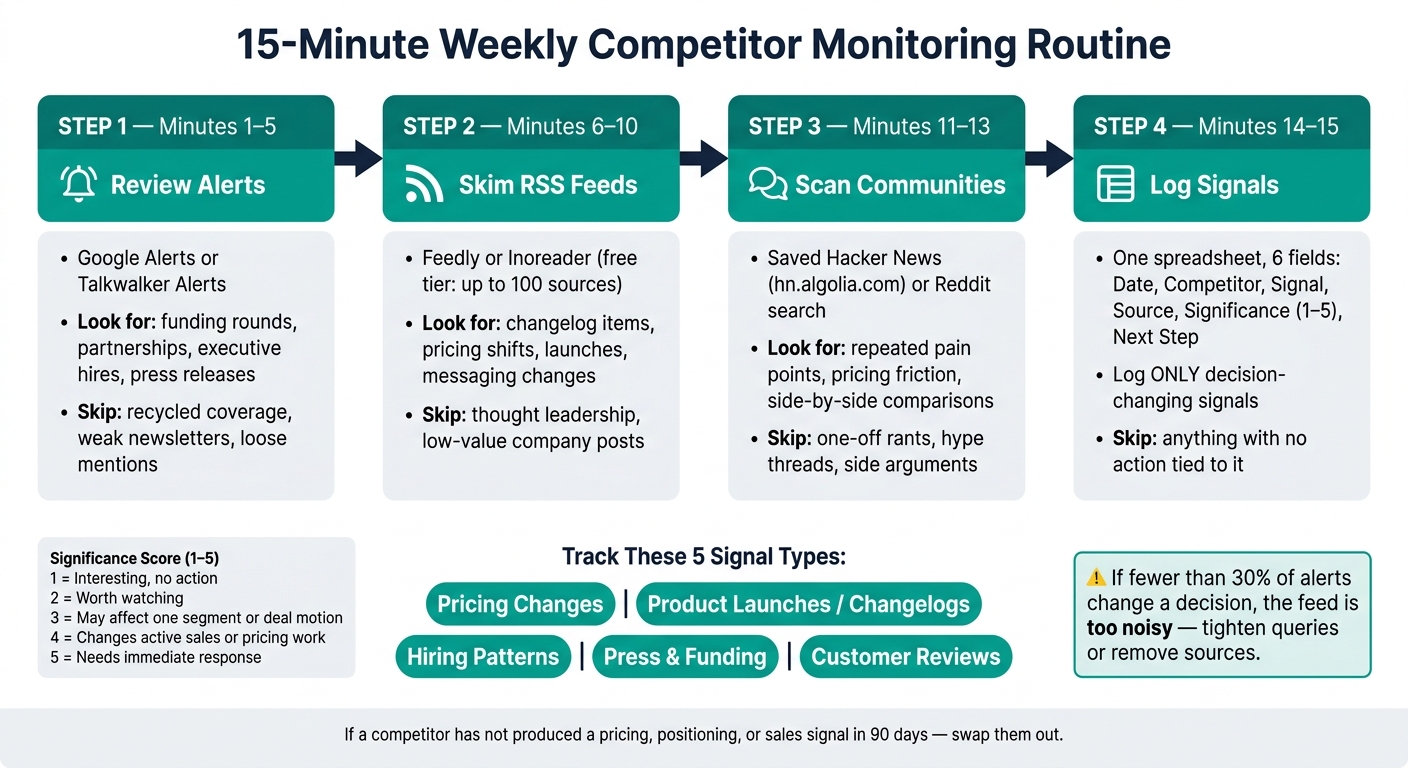
15-Minute Weekly Competitor Monitoring Routine
You don’t need a bigger research system. You need one slot on the calendar that happens every week, at the same time, and a tight order that keeps you from wandering off into tabs you didn’t plan to open.
Use one fixed 15-minute block each week. The cadence matters more than intensity. If the check moves around, it starts slipping; if it slips, the inputs pile up and the whole thing turns into a 45-minute catch-up session nobody wants to do.
| Time Block | Activity | What to Focus On |
|---|---|---|
| Minutes 1–5 | Review alerts | Named events: funding, partnerships, executive moves |
| Minutes 6–10 | Skim RSS feeds | Shipped changes, pricing updates, messaging shifts |
| Minutes 11–15 | Scan communities, then log | Customer chatter, decision-changing signals |
The order matters too. Start with alerts, move to RSS, then check communities, and only then write anything down. That sequence keeps the pass grounded in concrete events first, product movement second, and market chatter last. If you reverse it, community noise tends to eat the whole session.
Minutes 1–5: Review alerts first
Start with the alert digest and skim subject lines only. Don’t open every item. That’s the trap. The point in this first block is triage, not reading.
Look for named events that usually matter at a go-to-market or product level: a funding round, a partnership announcement, or a new executive hire. Those are the kinds of changes that often signal budget, channel movement, or a shift in direction. An executive move can hint at a new sales motion. A partnership can point to distribution. A funding round can mean a team is about to speed up hiring or spend harder on demand.
Skip the obvious junk. Press mentions with no clear action behind them, recycled summaries, low-signal newsletters, and generic “industry trend” headlines don’t earn a click. If an item looks material, mark it for the last block and move on. Don’t stop to take notes yet.
Most weeks, this alert pass is quiet. That’s normal. Quiet doesn’t mean the system failed; it means nothing named and public happened that week. That’s useful in itself because it keeps the log from filling with filler.
Minutes 6–10: Skim RSS feeds second
Next, switch to the RSS reader and scan unread items by title. Again, the goal isn’t to read everything. You’re trying to catch shipped changes and direct market signals, not consume content.
Check changelogs first. They’re usually the cleanest source for what actually shipped. Marketing pages talk about intent; changelogs show what made it out the door. If a company ships a new integration, changes usage limits, adds admin controls, or adjusts packaging, the changelog often says it faster and more plainly than the blog does.
After changelogs, skim blog and newsroom items only if the title points to one of three things: a product launch, a pricing update, or a shift in messaging. Those three tend to affect sales calls, battlecards, packaging, and roadmap bets. A generic thought-leadership post usually does not.
Treat RSS like a shipping radar, not a content feed. That distinction matters. If you use it like a reading list, the five minutes disappear fast. If you use it as a filter, you come away with a short set of concrete changes that might alter positioning or response plans.
There’s also a limit here worth being honest about: RSS only shows what a company decides to publish. A lot of meaningful movement never lands in a feed. Silent pricing tests, sales-script changes, and packaging experiments often show up elsewhere first. That’s one reason the community scan stays in the routine.
Minutes 11–15: Scan communities, then log
Open the saved Hacker News or Reddit search and scan last week’s titles. Keep it narrow. You’re not there to “see what people are saying” in a vague sense. You’re looking for chatter that points to something that changes a buying decision, a product comparison, or a pain point showing up often enough to matter.
If a thread looks relevant, read only enough comments to confirm the signal. That usually means checking whether more than one person reports the same issue, reaction, or use case. A single loud comment can mislead. A cluster of similar comments is worth noting.
This is where discipline matters most. Communities are useful, but they’re also where a 15-minute process goes to die. One spicy thread, one side argument, one product teardown, and suddenly the slot is gone. Read just enough to answer one question: is there a signal here, or just noise with engagement?
Then switch from scanning to logging. That handoff should be sharp. Don’t keep reading while half-writing notes. Open the one-sheet log and capture only items that would change how you sell, price, or build. That filter cuts out most of the junk.
A simple test helps:
- Would this change a sales objection handle?
- Would this affect packaging or pricing talk?
- Would this push product work up or down the queue?
- Would this change positioning against a rival?
If the answer is no, skip it. If it won’t change how you sell, price, or build, it doesn’t belong in the log.
Use the last minute to capture only decision-changing signals. Keep each entry short and concrete: what happened, where it came from, and why it matters. Something like “Competitor added SSO to lower tier - changelog - weakens enterprise upsell wedge” is enough. That style forces clarity and makes the log usable later when someone asks, “Why did this go on the watchlist?”
KAEOA works best here when the process stays small and repeatable. The win isn’t volume. The win is that each week produces a few items a team can act on, instead of a pile of links nobody reads.
One more trade-off is worth naming. This routine is built for signal detection, not deep analysis. It tells you what moved and what might matter. It does not replace a monthly deeper pass on pricing pages, product demos, win-loss notes, or support docs. If the weekly check starts carrying that load, it gets bloated and stops happening.
That’s why the fixed order matters so much. Alerts catch named public events. RSS catches shipped changes. Communities catch rough edges and buyer reaction. Logging turns all of that into a small decision record instead of a memory test. KAEOA can sit on top of that process, but the process itself has to stay tight or it won’t last.
Log only decision-changing signals and skip the rest
Use a one-sheet template with six fields
After the 15-minute scan, log only the items that change a sales, pricing, or product call. Everything else is noise. Keep it in one spreadsheet with six columns: Date (MM/DD/YYYY), Competitor, Signal, Source, Significance, and Next Step.
That setup stays simple on purpose. You don’t need a custom database to spot movement. A single row can do the job: 09/13/2026 | Acme Corp | New Team pricing tier | Pricing page | 4 - affects mid-market deals | Update battlecard; review packaging. In one line, you see what changed, where it showed up, why it matters, and what action follows.
The Significance column matters more than it looks. Score each item from 1 to 5 so you can track patterns over time without building a heavier system [4][7]. A score of 1 might be a weak clue with no action yet. A 5 should mean the signal forces a response now, not later.
A simple scoring frame keeps people honest:
- 1 - interesting, but no action
- 2 - worth watching
- 3 - may affect one segment or deal motion
- 4 - changes active sales or pricing work
- 5 - needs a direct response across product, pricing, or GTM
That’s enough structure for a lean team. It also makes review easier a month later, when memory gets fuzzy and every update starts to look more important than it was.
Filter out duplicates, syndication, and low-signal mentions
Use the score as a gate, not decoration. If a signal doesn’t change a decision, it does not get a row. That rule sounds strict, but it saves a lot of wasted time.
Skip repeated press release pickups from aggregators. Skip generic listicles that repackage old facts. Skip broad blog posts with no new move behind them, tiny homepage copy tweaks, and raw mention volume with no business meaning attached. A competitor getting talked about more often is not the same as a competitor changing the market.
What does deserve a row is the kind of move that changes how you sell, package, or position. Good examples include a pricing or packaging shift, a homepage headline swap that points to a new target segment, 3+ hires in one function over 60–90 days [2][1], or a new integration added to a changelog. Those aren’t vanity signals. They point to resource moves, segment bets, or product direction.
Think about it like this: syndication is an echo, not a new event. If ten sites copy the same release, you still have one signal, not ten. Logging all ten makes the tracker look busy while making the team less sharp.
There’s a clean way to test whether the system works. If fewer than 30% of alerts change a decision or belief, the feed is too noisy [7]. That number gives you a hard line. It stops the common trap where teams keep adding sources, alerts, and dashboards, then wonder why nobody trusts the output.
A small log with high signal beats a giant sheet nobody uses. That’s where KAEOA-style discipline tends to help most: not by adding more monitoring, but by cutting what doesn’t earn attention.
Know when this routine is not enough
This kind of routine has limits, and it helps to say them out loud. Free alert tools can miss pages that don’t get indexed fast. RSS only shows what a company chooses to publish. Saved searches in communities and social platforms are incomplete by design. You’re looking through keyholes, not standing in the whole room.
That doesn’t make the process weak. It just sets the ceiling. A free, manual setup gives you decent coverage for visible moves, but it will miss quiet pricing tests, private sales plays, and internal GTM shifts that never hit a public page.
That trade-off is fine when the watchlist is small and the team needs a light habit that fits into 15 minutes. It becomes a problem when one competitor keeps showing up in lost deals, when battlecards start turning messy because facts live in too many places, or when the sheet stops being easy to scan. At that point, the issue isn’t discipline. The issue is scale.
Until then, consistency matters more than extra tooling. Run the routine on schedule, log only what changes decisions, and cut any competitor that has not triggered a pricing, positioning, or sales change in 90 days [7]. If a company hasn’t produced a decision-changing signal in three months, it’s probably taking up space that a higher-risk player should get.
One more caveat: this method can underweight slow shifts. A single copy edit may not matter, but five related edits across a pricing page, homepage, and docs center over six weeks can point to a deeper move. That’s where the Source and Significance columns earn their keep. You’re not building a giant system, but you are building enough memory to notice a pattern before it turns into a lost quarter.
Conclusion: A small weekly habit beats scattered checking
This only sticks if the routine stays small enough to do every single week. The win does not come from more effort. It comes from doing the same tight process on a steady schedule.
Keep the watchlist narrow. Review the same sources in the same order each week. Log only the changes that could shift a sales call, shape a product call, or force a pricing move. If a note does not change what the team says or does, it probably does not belong in the log.
That discipline matters more than volume. A messy tracker fills up fast and then stops being useful. A clean one gives the team a short record of what changed, when it changed, and why it mattered.
For most teams, 15 minutes a week is enough when the routine stays strict and the log stays clean.
FAQs
How do I choose which rivals to track?
Sales teams lose time when a competitor list turns into a wall of logos. Most of those names never show up in live deals, so they don’t help reps win. Keep the list tight and tied to what buyers actually bring up.
Focus on the three competitors that appear most often in real sales conversations. Skip famous brands and edge-case rivals that almost never come up. Name only the companies that change deal flow, pricing pressure, or buyer objections.
A simple test keeps the list honest: if a team can’t explain in one sentence why a rival matters, that rival doesn’t belong on the list. That rule cuts out noise fast. It also forces sharper thinking, which is what reps need when a prospect says, “We’re also looking at them.”
Use tiers so the team knows where to pay close attention and where to spend only light review time.
- Tier 1: direct deal competitors. These are the companies that show up in active evaluations and head-to-head sales cycles.
- Tier 2: emerging threats. These don’t appear in every deal yet, but they show signs of moving closer to your core market.
- Tier 3: adjacent companies you review quarterly. They matter enough to watch, but not enough to shape day-to-day sales work.
This setup does two useful things. First, it keeps battlecards and enablement focused on what reps need right now. Second, it gives product, marketing, and leadership a simple way to track movement without treating every company like an emergency.
Tier movement should stay simple too. If a prospect mentions a new company in a live deal, move it to Tier 1. Don’t wait for a quarterly review or a long internal debate. If buyers are bringing it into the room, it already matters.
That said, this approach has a limit. A competitor can stay quiet for months and then show up fast after a pricing shift, funding round, or channel push. So while the list should stay short, someone still needs to check win/loss notes, call recordings, and CRM fields often enough to catch changes before they pile up.
KAEOA should treat this as a working sales tool, not a market map. The point isn’t to prove market knowledge. The point is to help teams respond well in actual deals.
What if a company has no RSS feed?
When a competitor does not publish an RSS feed, watch the pages that tend to change first: the changelog, pricing page, press or newsroom page, product update log, and feature docs. A page-monitoring tool such as Visualping or ChangeTower checks those URLs for you and sends an alert when the page changes, which saves you from opening the same tabs every week.
Set this up with a little care, or the alerts turn noisy fast. Watch the exact URL, narrow the check to the part of the page that matters if the tool allows it, and set a check interval that matches the page. A pricing page might deserve daily checks. A newsroom page may only need a few checks per week.
Both tools handle the basic job well, but they are not magic. If a site changes layout often, loads text with JavaScript, or rotates banners and timestamps, you can get false alarms. That means you still need a quick human review before treating every alert as a meaningful move.
For pages that barely move but still matter, the Wayback Machine fills a different role. It helps you compare older versions of a page over time, which is useful for seeing when pricing copy changed, when a feature disappeared, or when a company rewrote its positioning. Use it as a periodic backstop, not a live alert system.
A simple rhythm works well: use Visualping or ChangeTower for current-page alerts, then check the Wayback Machine once a month or once a quarter for slow-moving pages. KAEOA often treats this as a low-effort layer in competitor tracking because it catches quiet changes that never make the blog, press release, or social feed.
When should this 15-minute routine stop being enough?
Monitoring stops paying off when it creates more noise than signal. Reassess the setup when upkeep takes more time than the insight is worth, most alerts are junk, unread notifications stack up, or manual triage starts to feel like a part-time job.
Revisit the process when your needs shift, too. If more than 30% of deals go to competitors, new sales hires need structured battlecards, or a fundraise is coming up, the old setup usually won’t cut it.
That’s the point where a lighter process, a tighter filter, or a more formal system starts to make sense. KAEOA fits some teams here, but the bigger issue is simpler: if the work to manage monitoring keeps growing while the output stays flat, the setup needs to change.
There’s a trade-off, though. Cutting alerts too hard can hide useful signals, especially around pricing moves, product launches, or hiring patterns. The goal isn’t fewer alerts at any cost. The goal is fewer bad alerts and faster action on the ones that matter.